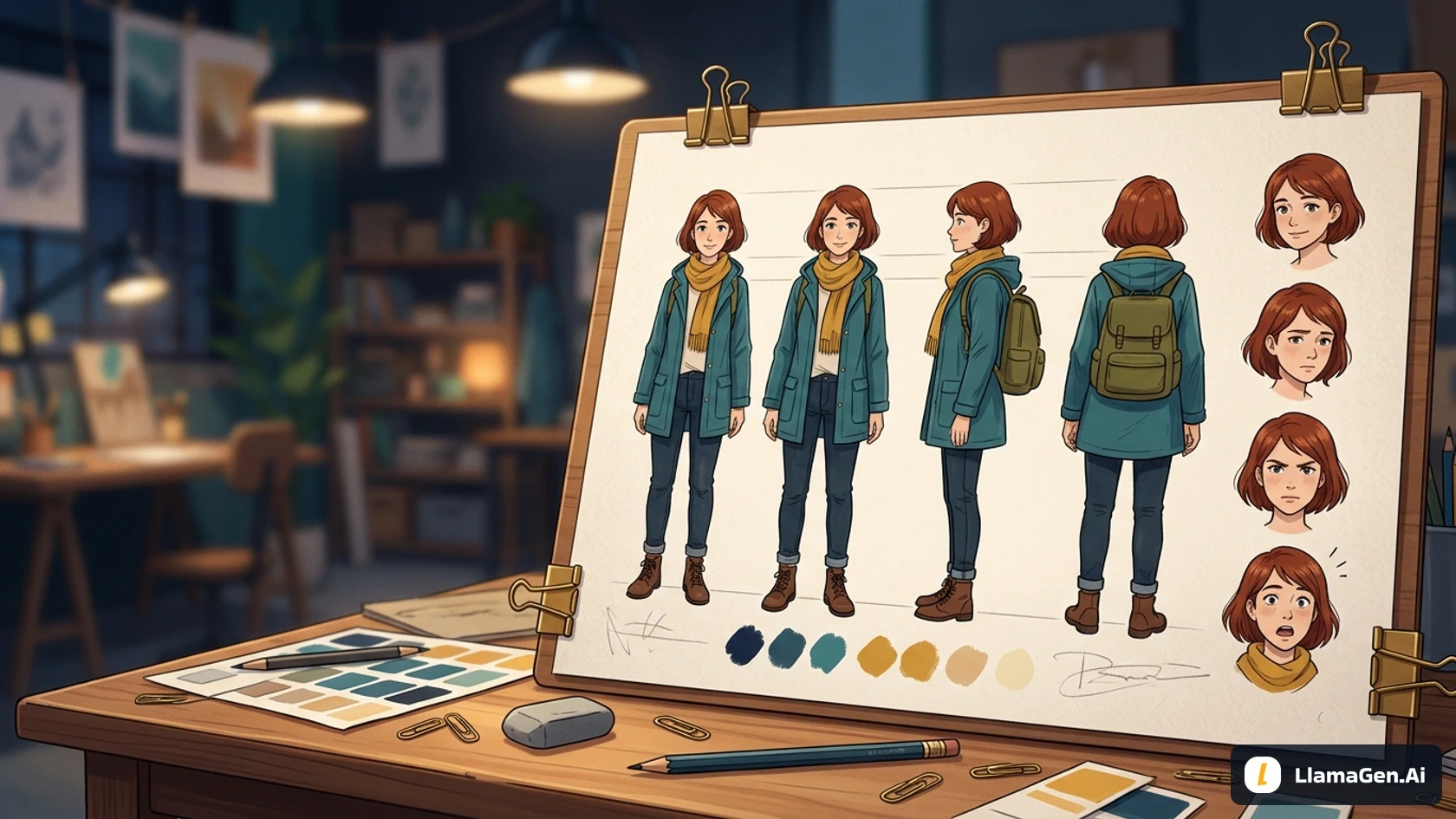
A useful OC reference sheet answers the questions a portrait leaves open: what the character looks like from the side, how the jacket closes, which colors belong to the design, and what can change in the next scene.
Build the sheet before generating a long sequence of comic panels. You will have a stable design to compare against when camera angle, expression, or lighting changes.
This guide turns an approved character into a practical reference package: three main views, four expressions, a palette, important costume and prop details, and a short handoff record. If you are still choosing a design, begin with a short story role and a few visible anchors. To create or refine the artwork, open OC Maker.
Example scope — updated November 5, 2026: Maya's plates below are generated instructional illustrations, not screenshots or a verified one-click reference-sheet export. The suggested process is to create or collect the needed images, arrange them in your preferred layout tool, and review them together. The current product page does not establish that all these views and expressions can be exported as a complete sheet in one action.
What belongs on a character reference sheet?
A useful sheet contains enough information to recognize and redraw the character in the scenes you actually need. For a recurring clothed human character, start here:
Section
What it should clarify
Approved main image
The version the other views must match
Front, side, and back
Proportions, silhouette, costume construction, and hidden details
Expressions
How the face changes while remaining recognizable
Palette
Base colors under neutral lighting
Costume and prop details
更新日誌
點燃年輕人的夢想 讓數百萬個故事活靈活現
彙整最新的 LlamaGen 功能發布、產品強化、設計更新與重要錯誤修正。
✦
✧
✦
✧
全新的媒介,為了 故事創作
用靈感在幾秒內創作無限的故事、漫畫、動畫、遊戲等內容,打動現代觀眾
Closures, straps, markings, and recurring objects
Written rules
Fixed identity, allowed changes, unresolved details, and version
The sheet does not need to be decorative. Large, readable images and clear notes are more useful than a polished poster with details too small to inspect.
If a planned comic only shows the character's upper body, prioritize the head, hands, and jacket. If the character runs, turns, or carries an object, include the views and construction details those actions reveal.
1. Begin with a character brief tied to the story
Character creation for comics starts with a role and a visible design. Maya is an adult traveler trying to return a lost notebook before its owner leaves the station. She is observant but hesitant to approach strangers.
Her design brief is:
Adult woman, short auburn bob, teal rain jacket, mustard scarf,
dark jeans, brown boots, compact olive backpack.
Attentive expression, practical clothing, cautious posture.
The red notebook belongs to this scene. It is not a permanent costume feature. That distinction prevents a future character image from adding the notebook when the story no longer calls for it.
If you are continuing the earlier story-seed exercise, apply the same method to Leo: keep the apprentice's role, copper hair clip, utility jacket, and recurring repair tool identifiable. The process transfers to a different character; the design details should not.
Write down the anchors before generating additional views. Otherwise, a pleasing new result can quietly replace the design you already approved.
2. Choose one approved image as the authority
Pick the image that most clearly establishes the design. Check the face, hair shape, apparent age, body proportions, costume, and visible accessories.
Do not average several contradictory pictures into an imaginary character. If one has a long coat and another has a short jacket, choose one or record them as separate approved outfits.
Your main reference should show the features that matter. A dramatic shadow across the face may look appealing, but a neutral view is usually easier to compare with later drawings. Keep the dramatic image as a mood reference, with a separate role.
Save the full file and mark its version. A suitable name is maya-reference-v01-main.png; use whatever naming pattern your project can follow consistently.
3. Establish front, side, and back views
On the current OC Maker page, describe the character or add an optional reference, choose an available image shape, and review the displayed credit cost. Sign in before generating. The current generator is on the page; do not assume a separate image-studio handoff or a complete-sheet export. Use the approved image and a stable identity description where the selected model supports reference input. Ask for a neutral view with even lighting and enough space around the body.
Using the approved character reference, create a neutral full-body
side-profile view of Maya, an adult woman. Preserve the short auburn bob,
teal rain jacket, mustard scarf, dark jeans, brown boots, and compact
olive backpack. Both feet visible, natural standing pose, plain light
background, even lighting. Show one character only, no lettering.
Generate or draw the front and back with corresponding view instructions. Separate views are often easier to inspect than a single crowded sheet, although your tool's actual behavior may differ.
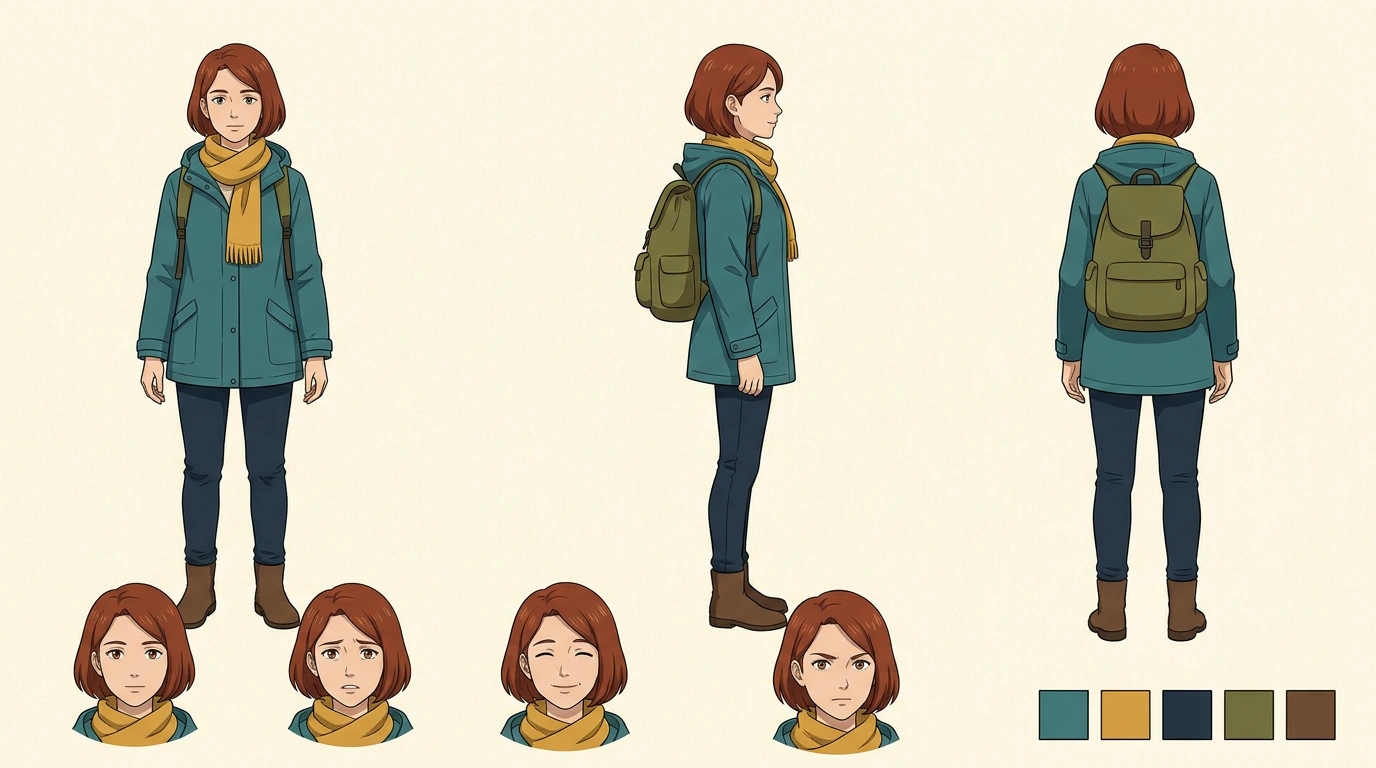
Concept sheet: front, side, and back views should describe one approved design. This illustration demonstrates one arrangement; every detail still needs review before production use.
Keep the figures at comparable scale when arranging them. Align the head, shoulders, waist, knees, and feet well enough to reveal proportion changes. A tiny back view beside a large portrait makes mismatches harder to spot.
Watch for accidental mirrored details. If a design has a mark on its left cheek, "left" means the character's left, not always the left side of the displayed picture. Add an explicit note where orientation matters.
4. Audit the views before making the sheet final
Compare one attribute across every view rather than judging each picture independently.
Attribute
What to compare
Hair
Length, volume, part, and silhouette from behind
Face and age
Recognizable structure and intended adult appearance
Jacket
Length, collar, closure, cuffs, and pocket placement
Scarf
Color, knot direction, and visible ends
Backpack
Size, shape, straps, closure, and how it rests on the body
Body proportions
Head size, torso length, limb length, and footwear
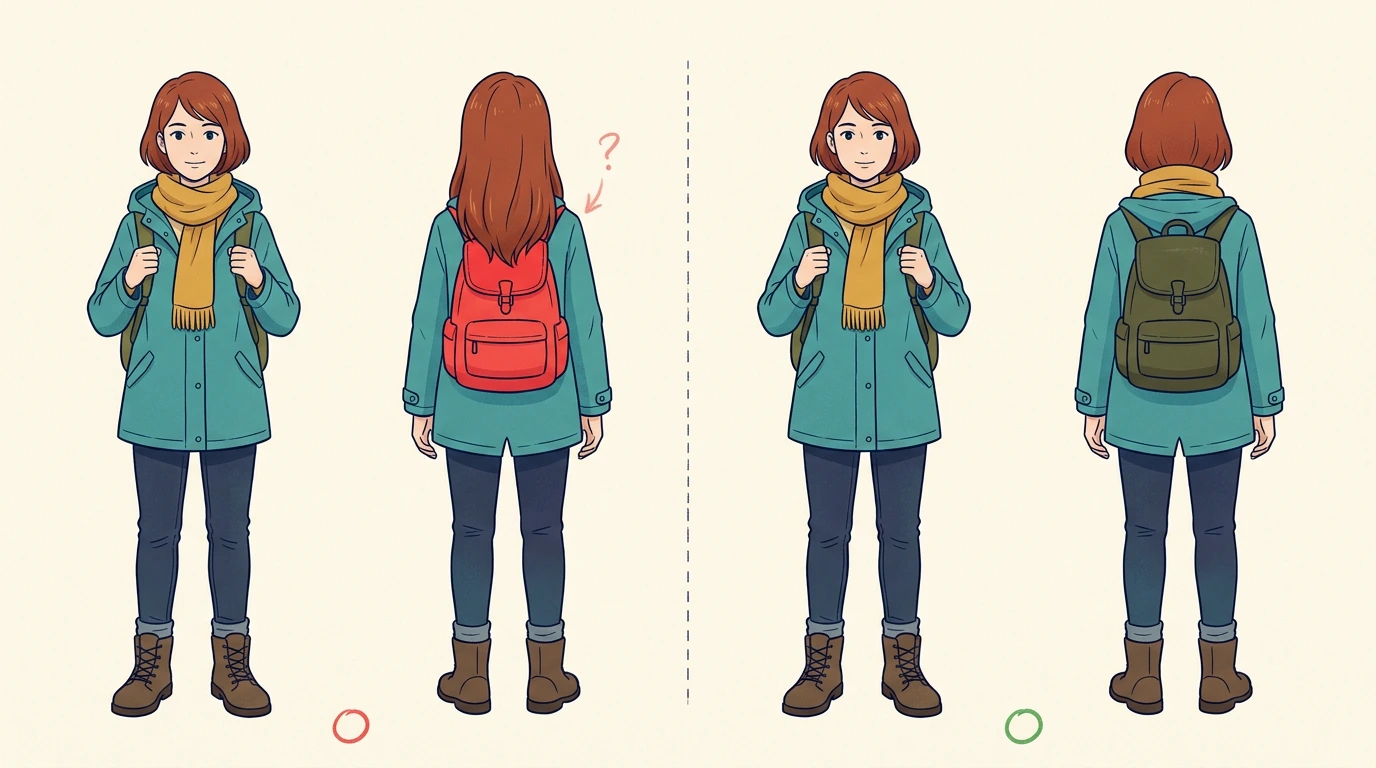
Teaching example: the mismatched pair changes the hair and backpack in the back view. The corrected version restores the written brief. This is a constructed audit example, not a recorded product repair.
If one view fails, revise that view against the approved design. Ask for a specific correction and then inspect the rest of the revised image. A request to fix the bag can also change the hair or jacket.
Keep unresolved details visible in the notes. If the main image never shows a backpack closure, choose and approve that construction before treating it as fixed. A reference sheet is where you settle those decisions.
5. Add four expressions that belong to the character
Start with expressions the planned story uses. For Maya's station scene, calm, concerned, pleased, and determined are enough to begin.
Use similar framing and lighting so you can compare the underlying face. Check the hairline, eyes, nose, jaw, and apparent age. The mouth and eyebrows should move; the whole facial structure should not become a different person.
Create a close-up expression study of the approved adult character Maya.
Preserve her face structure, short auburn bob, teal jacket collar,
and mustard scarf. Expression: concerned but attentive.
Neutral background, even lighting, one head-and-shoulders portrait.
No lettering or extra faces.
Repeat with a different expression rather than adding several new costume and style instructions each time. Record an expression as approved only after comparing it with the main image.
For a stylized comic, you may deliberately exaggerate surprise or anger. State the permitted exaggeration in the notes so another artist understands where flexibility belongs.
6. Define base colors under neutral lighting
Place a few plain swatches beside the artwork and label them in your layout tool. Generated labels can be inaccurate, so add exact text after image creation.
Here is a proposed palette for Maya's design. These are editorial target colors, not automatically extracted measurements or values guaranteed by a generator:
Element
Proposed base color
Rain jacket
Teal #287C80
Scarf
Mustard #C69B36
Hair
Auburn #884C36
Backpack
Olive #68704B
Boots
Brown #70503A
Approve the palette alongside the selected artwork. If the image and swatches disagree, decide which needs revision. Do not leave two competing color authorities.
Lighting can shift these colors in a scene. A warm station lamp can make teal look warmer without changing the base costume. Compare the underlying design and context rather than expecting identical pixel values in every image.
7. Show the details another creator would ask about
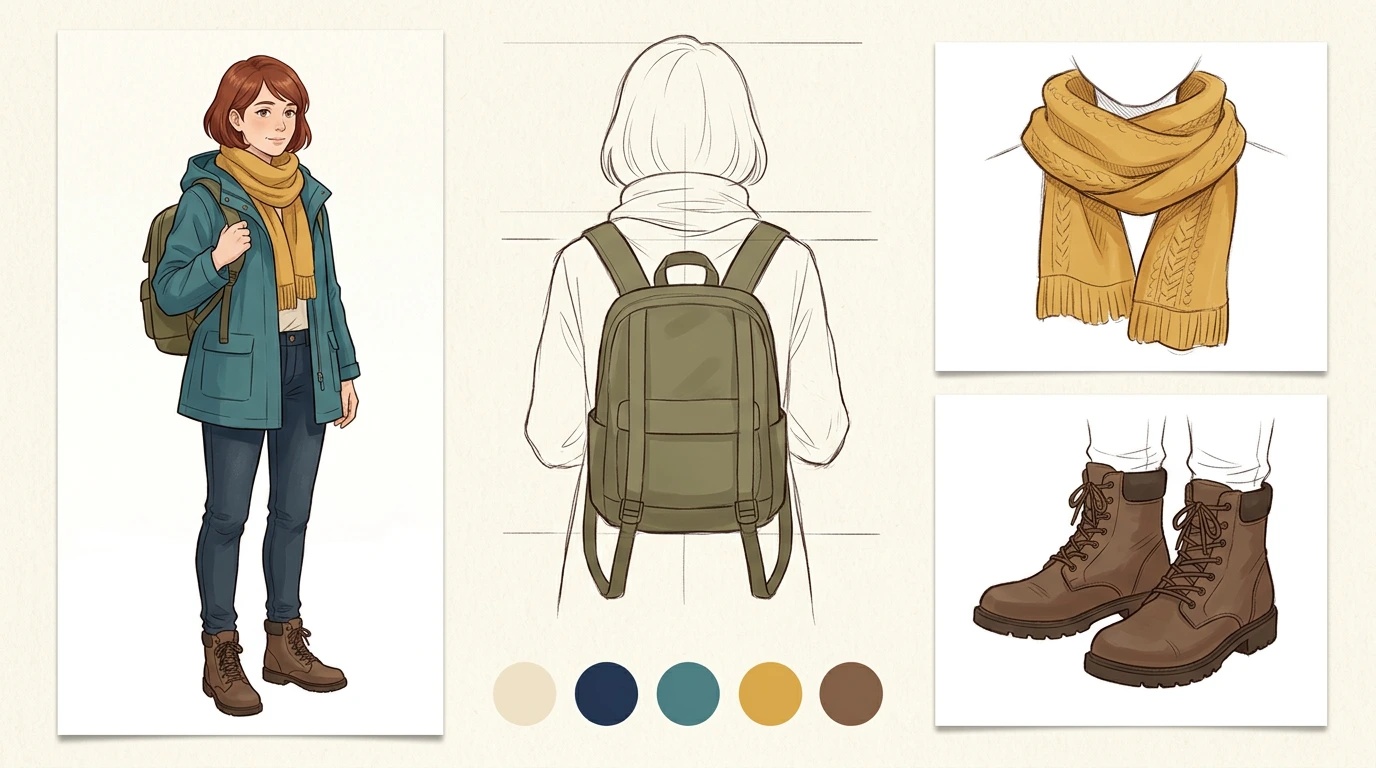
Add close-ups for features that are important but small in the full-body views. Maya needs a readable backpack construction, scarf arrangement, and boot shape. A different character may need a mechanical hand, a patterned sleeve, or a distinctive tool.
Teaching board: give important construction details enough space to be inspected. An attractive overview cannot replace a useful close-up.
Keep costume details separate from scene props. For the notebook, record its red cover, approximate size, and which scene introduces it. If it has text that must be readable, add or check that text separately.
Avoid loading the sheet with objects that never appear in the story. Include what helps a collaborator or a later image preserve the design.
8. Add a short character handoff record
The artwork and notes should tell the same story. Use this copyable template:
Character and version:
Story role and current goal:
Approved main image:
Fixed identity anchors:
Approved outfit:
Allowed pose, expression, and lighting changes:
Front / side / back view files:
Expression files:
Base palette:
Recurring costume details:
Scene props:
Unresolved details:
Approval date and reviewer:
Changes from the previous version:
For Maya, fixed anchors include the adult appearance, short auburn bob, teal rain jacket, and mustard scarf. Pose, expression, camera angle, and scene lighting can change. The compact olive backpack is part of the selected traveling outfit; a later outfit change should be approved deliberately.
Keep the actual references with the record. A filename pointing to a missing image is not a usable handoff. Export a readable overview and preserve the original images so details remain available.
9. Test the sheet in one new comic scene
Before generating many panels, use one modest scene to find gaps in the reference. For example, ask for Maya turning toward a station attendant while holding the notebook.
Review the result against the sheet: does the turn preserve her hair shape? Does the backpack sit correctly? Are her hands and the notebook readable? Does the expression fit the action?
This is a validation task to perform with your actual output, not a promise of automatic consistency. Record what changes and update the reference only when you intentionally approve a design revision.
A quick review checklist helps:
Check
Question
Identity
Does this still read as the same approved character?
Outfit
Are major costume pieces unchanged unless intentionally revised?
Props
Are scene props present only when the scene calls for them?
Color
Do the base colors still read correctly under the scene lighting?
Construction
Do details such as straps, closures, and boot shapes remain usable?
Start with front, side, and back when your story shows those angles. Add detail views where the costume or action requires them. The purpose is to answer production questions, not fill a fixed number of boxes.
Can I create the complete sheet in one AI generation?
You can try a supported multi-view request, but inspect every figure for contradictions. This guide does not establish a one-click complete-sheet export in OC Maker. Separate images and a manually assembled layout are a valid approach.
Does a reference sheet guarantee character consistency?
No. It gives you a clear standard for review. The selected model, reference handling, prompt, pose, and later edits can still introduce changes.
Should I include personality and backstory?
Include the parts that affect expression, posture, costume, or behavior. Keep a longer biography in a linked character document so the visual sheet stays readable.
What should I send an artist?
Send the approved sheet, readable original images, fixed and flexible design notes, the scene brief, and any unresolved questions. Clearly identify generated exploratory images so the artist knows what has and has not been settled.
Build or refine your OC in LlamaGen.AI, then approve the views and notes together. A reference sheet becomes useful when it helps you recognize and correct the next image.