

कॉमिक बनाने की बुनियादी बातें
Black-and-white AI manga: ink, tones, और readability को control करें
Monochrome manga page, saturation हटाई हुई color image नहीं होती। इसमें intentional black shapes, साफ़ line hierarchy, restrained screentones, readable faces, और ऐसी spacing चाहिए जो export और print में भी बनी रहे।
प्रकाशित किया गया LlamaGen Editorial Teamअपडेट किया गया
त्वरित उत्तर
Page को पहले values के आधार पर plan करें: तय करें क्या paper white रहेगा, क्या solid black बनेगा, और depth कहाँ tones से आएगी। Line art और lettering को readable रखें, gradients में moiré check करें, और export किए गए page को screen और delivery size पर compare करने के बाद ही रखें।
ये references इस craft की बुनियादी समझ बताते हैं। नीचे दिए गए मूल exercises LlamaGen के examples हैं; लेखक LlamaGen का समर्थन नहीं करते।
Hierarchy के बिना tone जोड़ी गई
हर जगह एक जैसा gray
Face के पीछे busy tone
Scaling के बाद fine pattern खो गया
पठनीय मोनोक्रोम सिस्टम
Paper white सुरक्षित रखें
Solid black से anchor करें
एक controlled tone family इस्तेमाल करें
काल्पनिक characters के साथ मूल instructional illustration; यह न customer comic है, न product screenshot।
Page को black, white, और controlled gray के रूप में design करें
Monochrome clarity hierarchy से आती है, हर surface को texture से भरने से नहीं।
- सबसे गहरा anchor चुनें
- पेज को स्थिर रखने के लिए हर जगह समान काला विवरण फैलाने के बजाय एक प्रमुख ब्लैक मास, सिलोएट, या फ़ोरग्राउंड शेप का उपयोग करें।
- Faces और actions की रक्षा करें
- महत्वपूर्ण eyes, hands, props, और motion edges को background tones से अलग रखें। जहाँ texture story beat से टकराए, उसे कम करें।
- Tones का उद्देश्य तय करें
- Tones को depth, material, time, या mood के लिए इस्तेमाल करें। सिर्फ page खाली लगने पर random gray न जोड़ें।
- Effect lines को contours से अलग रखें
- Speed lines को direction और force support करनी चाहिए, बिना character silhouette या panel border में मिलाए।
सिर्फ canvas नहीं, exported page भी proof करें
Resampling से lines और dot patterns बदल सकते हैं। File को उन्हीं conditions में review करें जिनमें readers उसे देखेंगे।
- Target size पर check करें
- Intended phone या page size पर zoom out करें। 200 percent पर elegant लगने वाली fine hatching, कम करने पर noise बन सकती है।
- Tone geometry inspect करें
- Interference patterns, broken gradients, और scaling के बाद flat gray में मिल जाने वाले tones देखें।
- Editable master रखें
- Layers और high-resolution source data को flattened delivery export से अलग सुरक्षित रखें।
- Publisher की specification follow करें
- Trim, bleed, resolution, file type, और monochrome settings destination पर निर्भर करते हैं। Universal preset की बजाय उसका current template इस्तेमाल करें।
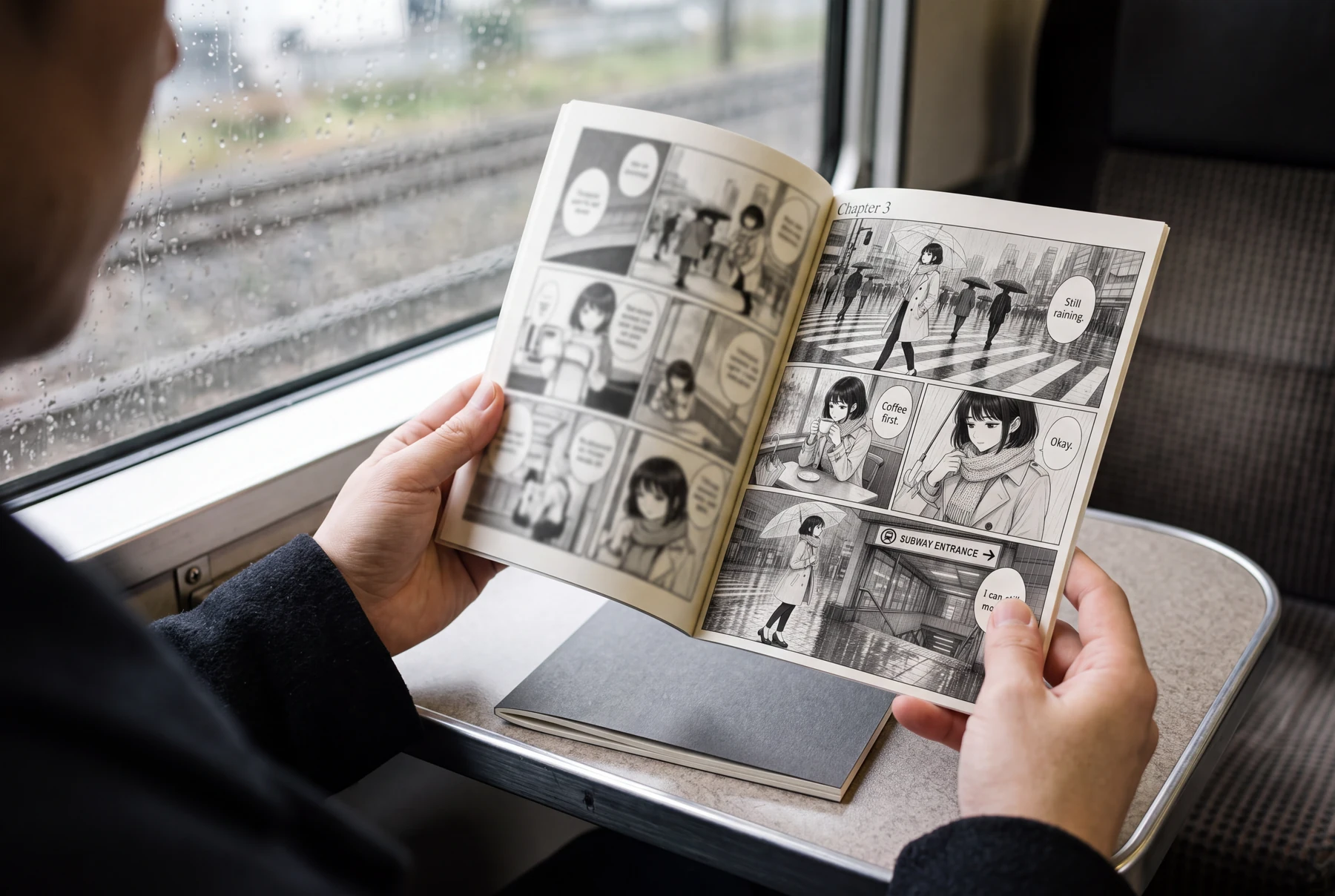
Worked example: एक बरसाती station page
एक commuter reflective street पार करता है, cafe में रुकता है, और subway entrance तक पहुँचता है।
Panel 1
बारिश और सड़क की reflections को middle gray में रखें, जबकि commuter silhouette साफ़ बनी रहे।
Panel 2
Cafe में हल्के tones इस्तेमाल करें ताकि cup और hands readable रहें।
Panel 3
Solid black को hair, coat की गहरी folds, और चुनी हुई architecture के लिए रखें।
Panel 4
Station sign और आख़िरी movement के आसपास background detail कम करें।
Page में weather, character, और location के लिए अलग-अलग value roles हैं। ज़्यादा tone अपने-आप scene को बेहतर नहीं बनाती।
रोज़मर्रा के इस्तेमाल में कॉमिक पेज
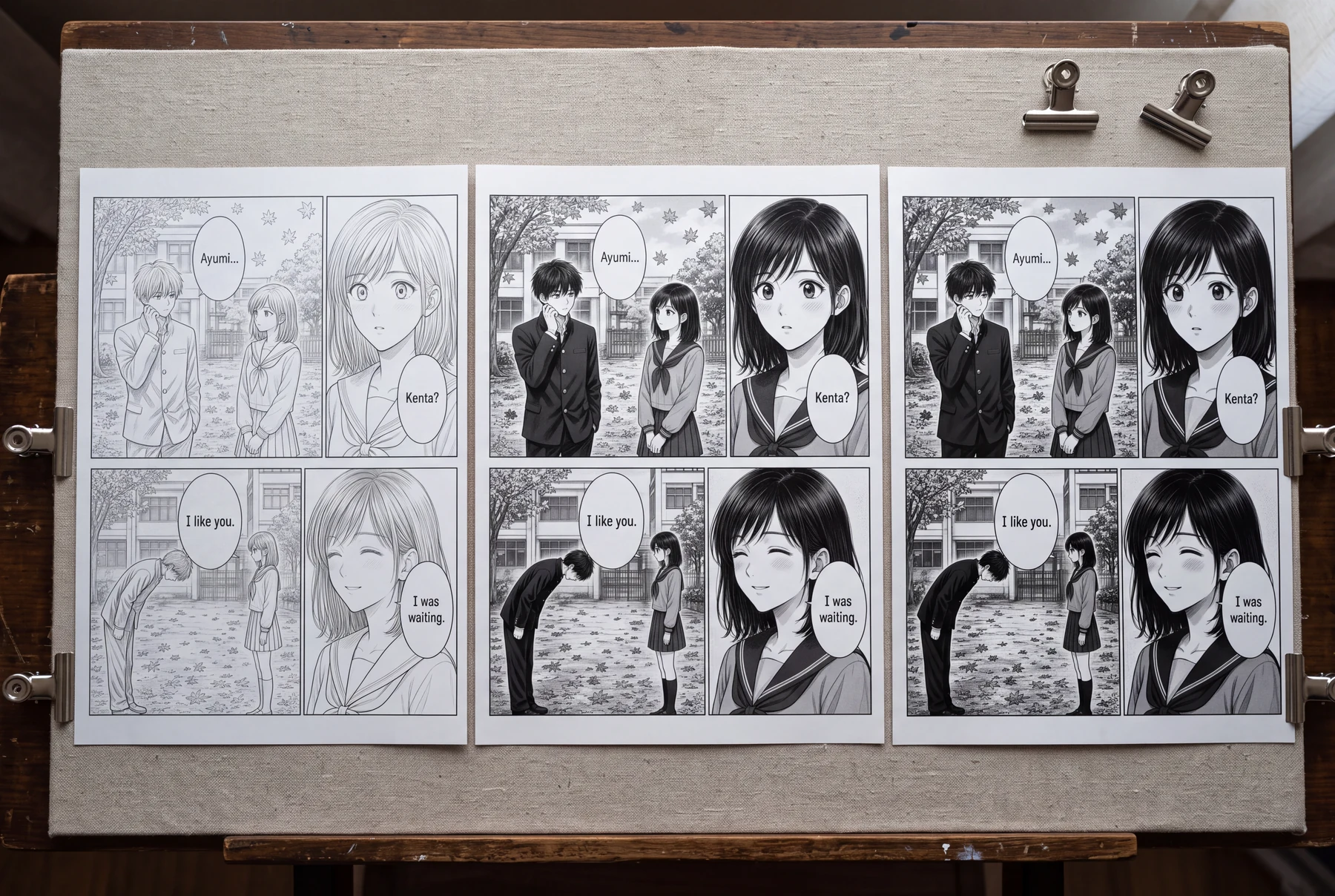
Reading size पर तीन tonal treatments की तुलना करें
वही school scene और panel composition रखें; सिर्फ black-and-gray strategy बदलें।
Hierarchy के बिना tone जोड़ी गई
- हर background surface में लगभग एक जैसा gray है।
- Hair, uniform, trees, और school wall बराबरी से compete करते हैं।
- Fine tones सिर्फ बड़े करके देखने पर clean लगते हैं।
पठनीय मोनोक्रोम सिस्टम
- Paper white faces और dialogue space को अलग करता है।
- Solid black hair और चुने हुए clothing shapes को anchor करता है।
- एक restrained tone family background depth को दर्शाती है।
तुलना कैसे करें
- Clean-line, balanced-tone, और dark versions को same dimensions में export करें।
- हर version को phone size और intended page size पर देखें।
- Lost eyes, merged hands, और noisy gradients को mark करें।
- वही सबसे सरल version रखें जो intended mood बनाए रखे।
क्या देखें
सबसे मज़बूत version को story beat बनाए रखना चाहिए, बिना हर object पर texture थोपे।
यह exercise क्या साबित नहीं कर सकती
Screen comparison, printer proof या publisher की current technical requirements की जगह नहीं ले सकती।
पब्लिश करने से पहले: पेज की समीक्षा करें
- Solid blacks की भूमिका साफ़ है।
- Faces, hands, और story props readable रहते हैं।
- Delivery size पर tones से दिखने वाला moiré नहीं बनता।
- Lettering, busy textures से अलग रहती है।
- Editable master और delivery export, दोनों सुरक्षित रहते हैं।
अक्सर पूछे जाने वाले सवाल
क्या मैं color manga page को black and white में बदल सकता हूँ?
आप color से शुरू कर सकते हैं, लेकिन अच्छे monochrome result के लिए आम तौर पर simple desaturation की बजाय manual value, line, और tone decisions चाहिए होते हैं।
क्या manga के लिए screentones ज़रूरी हैं?
नहीं। Clean line art, solid blacks, hatching, wash, या restrained tones—सब काम कर सकते हैं। ऐसा system चुनें जो story और final output के लिए सही हो।
Export के बाद tones में moiré क्यों दिखता है?
Dot patterns resampling या reproduction में interference पैदा कर सकते हैं। Actual export size पर test करें और destination की monochrome guidance follow करें।
स्रोत और आगे पढ़ने के लिए
- Clip Studio Paint — मोनोक्रोम मंगा गाइड: बैकग्राउंड इनकिंग ↗
Official tutorial material perspective rulers और monochrome manga background की inking को कवर करता है।
- KDP — Paperback और Hardcover formatting issues ठीक करें ↗
Primary publishing guidance में moiré के लिए manga-specific cautions शामिल हैं। Requirements platform-specific हैं और बदल सकती हैं।
अपने कॉमिक workflow में अगला कदम उठाएँ
एक स्पष्ट story beat plan करें, संबंधित tool आज़माएँ, और result खुद review करें। ये guides आपकी कॉमिक को automatically analyze या repair करने का वादा नहीं करतीं।