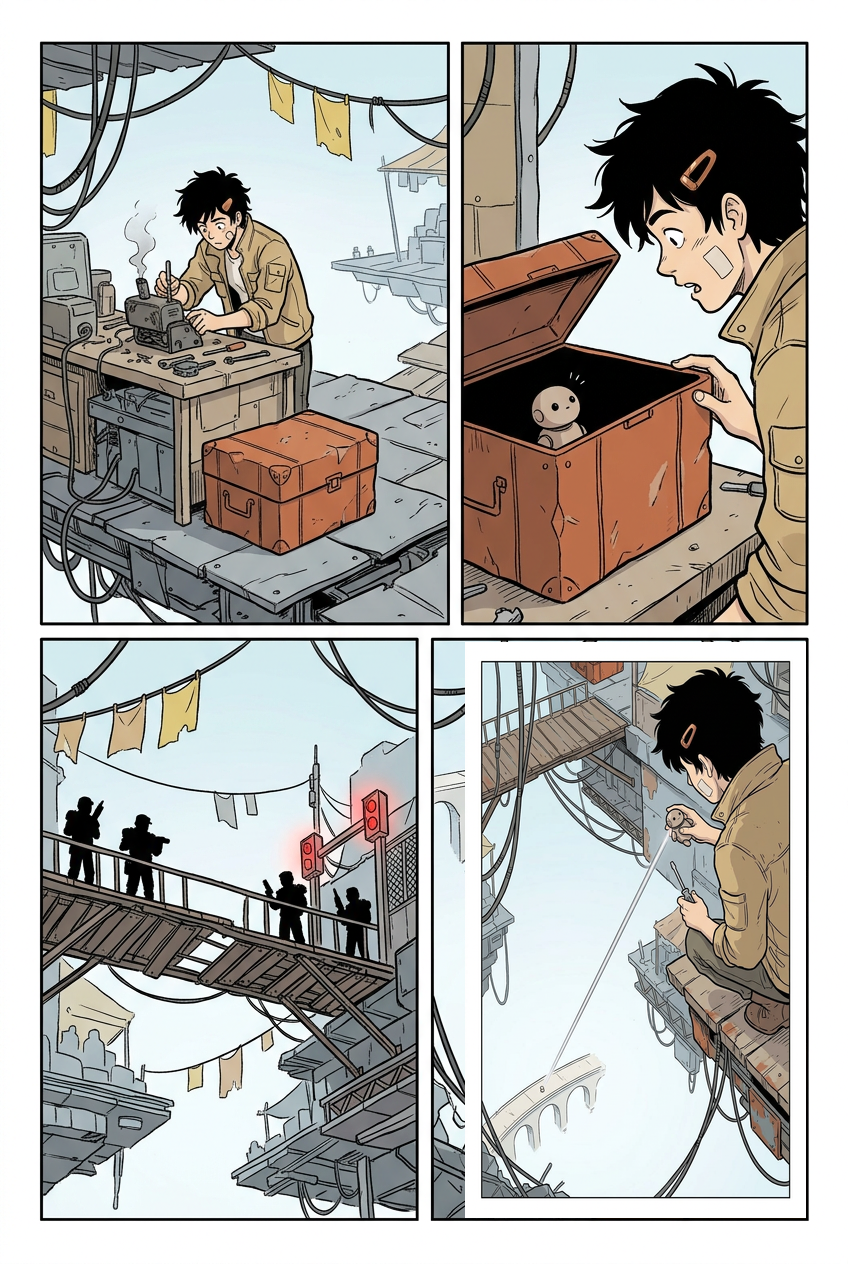

一个漫画脚本模板可以帮助你定义每个分镜中会出现什么:可见的动作、说话者,以及准确的台词。先从一页开始,选择四格或六格,然后将已确认的脚本带到 LlamaGen.AI Script to Comic。在你检查完画面之前,请将最终字稿单独保留。
更新于 2026 年 11 月 16 日。本次更新保留了原始的 Leo / 漂浮废品市场示例课程,并新增了可下载的文本模板、两个实际页面输出,以及两个修复后的结尾分镜。新图像使用了成年版 Leo 的演绎设定。图像通过 LlamaGen.AI 的 image playground 与 Vertex Nano Banana 2.1 生成;替换分镜在本地完成拼装。它并不是已登录状态下 Script-to-Comic 或 Studio 导出的演示示例。
复制一个实用的漫画脚本格式
并不存在唯一通用的漫画脚本格式。有些合作方偏好电影剧本风格,有些偏好按页与分镜组织的文档,还有些直接依据分镜草图工作。关键在于清晰:动作、准确台词和连续性备注应当容易区分。
这个模板是用于短篇漫画页面的纯文本工作格式。它适合起草和生成流程,但并不是作为出版社要求的投稿格式来呈现的。
PAGE: 1
READING_DIRECTION: LEFT_TO_RIGHT
PANEL_COUNT: 4 or 6
PAGE_GOAL: [what changes by the ending]
CHARACTER_LOCK: [approved identities and props]
LOCATION_LOCK: [stable visual anchors]

PANEL: 1
SHOT: [camera distance and angle]
ACTION: [one visible moment]
SPEAKER: [name, or NONE]
DIALOGUE: [exact words, or NONE]
CAPTION: [exact words, or NONE]
SFX: [exact sound, or NONE]
CONTINUITY: [details that must survive]
LETTERING_SPACE: [reserved region]
GENERATION_NOTE: [art-only instruction]
为每个分镜重复一次 PANEL 区块。空白下载版包含六个区块;如果是四格页面,请删除第 5 和第 6 个区块。用 NONE 表示静默,这样协作者就能区分这是有意的无对白停顿,还是遗漏了台词。
这些都是为本课程准备的原创 UTF-8 文本文件。若需要可打印的练习页,请使用现有的 Comic Script Template page,其中提供 A4 和 US Letter 两种 PDF 版本。上面的文本下载是独立的工作文档,并非来自那个 PDF 组件的下载内容。
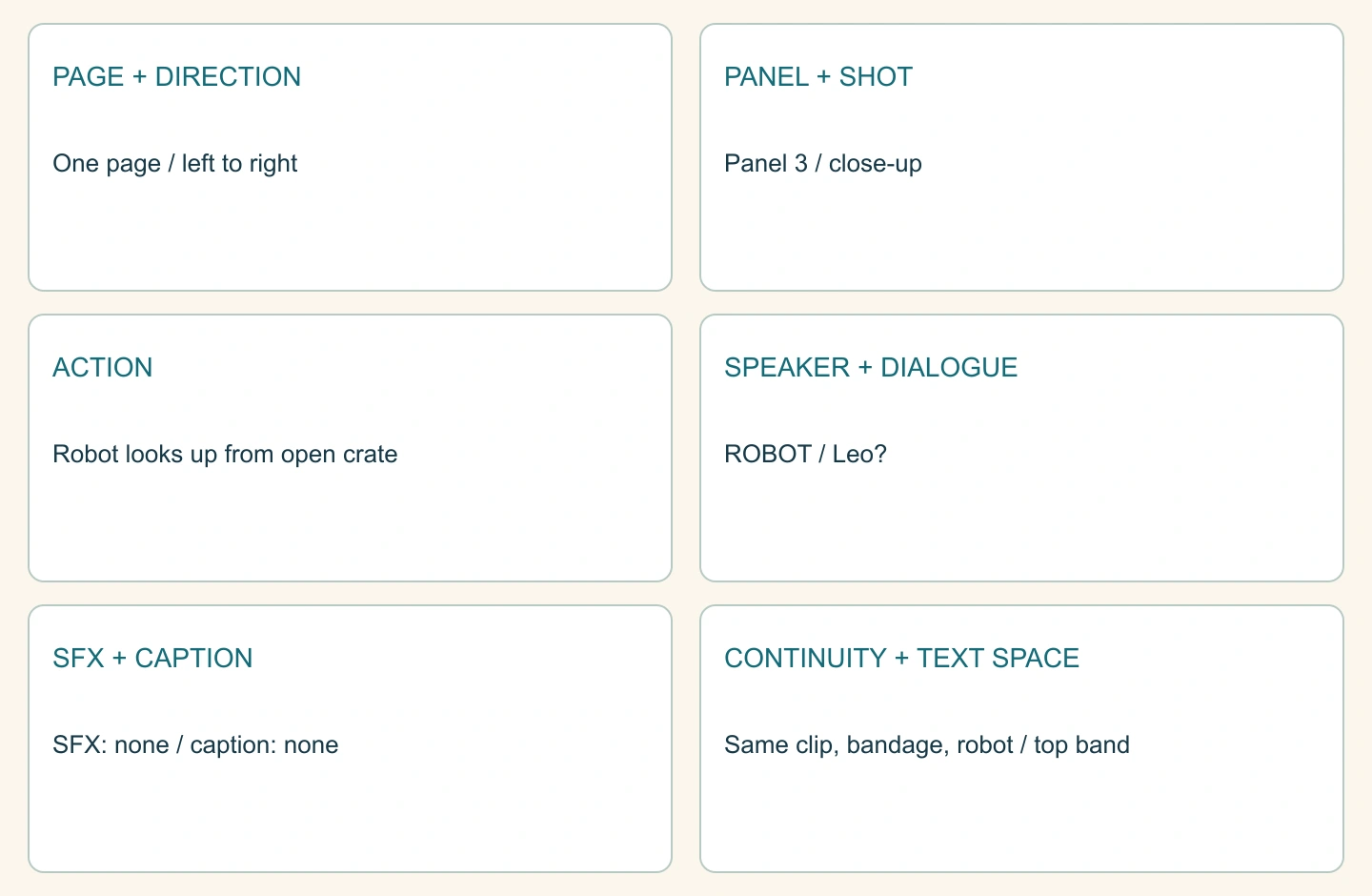
这些标签是在本地编排的。例如,“Robot looks up” 应放在 ACTION 中;“Leo?” 应放在 DIALOGUE 中,并将 ROBOT 设为 SPEAKER。像 “click” 这样的声音应放在 SFX 中。不要把背景说明写进说出口的台词里。
阅读方向与对白留白空间
在页面层级上注明阅读方向。本课程中的页面从左到右、从上到下阅读。右到左的漫画页面需要从一开始就按这种顺序设计第一个节拍、视线方向和气泡顺序;仅靠黑白画面本身并不能确立阅读顺序。
在生成前预留字稿空间,并在生成后检查结果。像“在机器人上方留出空间”这样的备注只是请求,并不是保证。在小分镜中,先从一条简短对白或静默开始。要检查实际气泡大小,而不是只依赖字数估算。panel-layout lesson 解释了构图几何、阅读顺序和节奏是如何协同工作的。
原始的 Leo 分步课程
漫画脚本不是把小说段落拆成若干行。
它是一个制作计划。每个分镜都需要一个明确任务、一个可见瞬间,以及足够的说明,让读者、画师或 AI 系统明白页面上应该出现什么。如果你跳过这一步,生成过程就会变成猜测:一个分镜里动作过多、镜头角度不一致、对白不清楚,以及背景无法支撑故事。
本指南延续了以下系列内容:
- 第 1 天:如何开始一个漫画故事
- 第 2 天:角色创作
- 第 3 天:漫画世界构建
今天你将创建一个实用成果:
A 4-6 panel comic page script with visual direction, dialogue, and generation notes.
这个脚本将成为下一篇关于生成漫画页面的文章输入内容。
你将创建什么
对于第一页,结构应尽量简单:
Panel 1: Establish the location.
Panel 2: Show the character's normal pressure.
Panel 3: Introduce the trigger.
Panel 4: Make the conflict visible.
Panel 5: Force a choice.
Panel 6: End with a hook.
每个分镜应包括:
- 分镜目的
- 镜头类型
- 地点
- 角色
- 动作
- 情绪
- 背景锚点
- 对白或旁白
- 连续性备注
- 图像生成提示词
以下是工作模板:
Panel number:
Purpose:
Shot type:
Location:
Characters:
Action:
Emotion:
Background anchors:
Dialogue/caption:
Continuity notes:
Generation prompt:
这种结构通常足以指导一个页面,而不会让每个分镜都信息过载。
为什么分镜规划要先于生成
故事种子可以描述发生了什么。角色设定表可以定义谁会出现。世界观文档可以定义事件发生在哪里。
而漫画脚本决定的是读者将如何体验这一切。
如果没有分镜规划,像下面这样的提示会过于模糊:
Leo finds a robot in the floating junk market and runs from guards.
它可能会变成一张拥挤的图片、一次随机追逐,或一个没有清晰阅读顺序的场景。分镜脚本会把同样的想法转化为可控的视觉节拍:
| 节拍 | 读者看到什么 |
|---|---|
| 铺垫 | 开阔天空之上的漂浮废品市场 |
| 角色压力 | Leo 在众人面前修理失败 |
| 触发点 | 一个箱子自行打开 |
| 发现 | 小机器人重复了他妹妹的声音 |
| 危险 | 守卫灯变成红色 |
| 钩子 | 机器人向一个不可能存在的平台投射出地图 |
这样页面才有了节奏。
第 1 步:确定页面任务
每一页都应该只有一个主要任务。
对于第一页,常见且有用的任务包括:
- 介绍主角
- 建立世界
- 揭示一个奇怪的物体
- 制造一个选择
- 以一个问题结束
对于 Leo 的故事,这一页的任务是:
Introduce Leo, show the floating junk market, reveal the robot, and end with the map hook.
这句话可以帮助页面避免试图做得太多。
第 2 步:选择 4–6 格结构
一个实用的首页结构是:
1 wide panel
3 medium panels
1 close-up
1 hook panel
对于日漫或 webtoon,你可以调整结构:
| 格式 | 合适结构 |
|---|---|
| 单页漫画 | 4–6 个分镜,并有明确的结尾节拍 |
| Webtoon 开篇 | 5–7 个纵向节拍,并留出更多间距 |
| 漫画页 | 5–6 个分镜,黑白对比更强 |
| 漫画条漫 | 3–4 个分镜,并有一个干净利落的笑点或揭示 |
不要一开始就做 12 格。分镜越多,连续性风险越高,而且通常会降低开篇页面的清晰度。
第 3 步:给每个分镜分配一个目的
一个分镜不应同时承担五项任务。
较弱的分镜目的:
Leo is at the market, fixing a machine, feeling nervous, hearing his sister, seeing the robot, and guards arrive.
更强的顺序安排:
Panel 1: Establish the floating market.
Panel 2: Show Leo failing a repair.
Panel 3: Show the crate opening.
Panel 4: Show Leo hearing his sister's voice.
Panel 5: Show guard lights turning red.
Panel 6: Show the robot map hook.
每个分镜只保留一个核心视觉想法。
第 4 步:用镜头类型控制读者注意力
镜头类型告诉读者该看哪里。
使用这组简单分类:
- 远景:展示地点。
- 中景:展示角色动作。
- 特写:展示情绪或重要物件。
- 过肩镜头:展示角色与物件之间的关系。
- 仰角:让危险显得更大。
- 细节镜头:聚焦一个线索。
对于 Leo 这一页:
| 分镜 | 镜头类型 | 原因 |
|---|---|---|
| 1 | 远景 | 建立漂浮市场 |
| 2 | 中景 | 展示 Leo 在压力下工作 |
| 3 | 细节镜头 | 让箱子显得重要 |
| 4 | 特写 | 展示 Leo 的情绪反应 |
| 5 | 仰角 | 让守卫灯显得危险 |
| 6 | 过肩镜头 | 同时展示 Leo 与那张不可能存在的地图 |
镜头类型会让生成提示更容易撰写,也会让页面更容易阅读。
第 5 步:写出 4–6 格脚本
以下是一个完整的首页脚本,使用了前几篇指南中的故事、角色表和世界设定说明。
Page job:
Introduce Leo, show the floating junk market, reveal the robot, and end with the map hook.

Panel 1:
Purpose: establish the world
Shot type: wide establishing shot
Location: Floating Junk Market
Characters: Leo as a small figure near a repair stall
Action: stacked salvage platforms hang above open sky while people move across narrow bridges
Emotion: adventurous, busy, slightly unstable
Background anchors: hanging cables, warning flags, pulley crates, open sky
Dialogue/caption: Caption: "The market floated high enough that broken things sometimes fell for minutes."
Continuity notes: keep the market above open sky; use dusty gray, faded yellow, rust orange
Generation prompt: wide cinematic manga panel of a floating junk market above open sky, stacked salvage platforms, hanging cables, warning flags, pulley crates, small repair stall, busy but readable background, no readable text

Panel 2:
Purpose: show Leo's normal pressure
Shot type: medium shot
Location: Floating Junk Market repair stall
Characters: Leo
Action: Leo tightens a screw on a wheezing machine as smoke puffs from the wrong side
Emotion: anxious focus, embarrassed determination
Background anchors: tool bench, patched metal, canvas awning, warning flags in distance
Dialogue/caption: Leo: "Almost fixed. Probably."
Continuity notes: Leo has messy black hair, copper clip, tan utility jacket, cheek bandage, dented screwdriver
Generation prompt: medium manga panel of Leo, nervous apprentice repair kid, tightening a screw on a damaged machine at a floating market repair stall, smoke puff, anxious focus, preserve copper hair clip, cheek bandage, tan utility jacket, dented screwdriver

Panel 3:
Purpose: introduce the trigger
Shot type: detail shot
Location: repair stall floor
Characters: Leo's hand only
Action: a dented delivery crate clicks open by itself beside Leo's boot
Emotion: quiet surprise
Background anchors: scratched metal floor, crate latch, loose bolts
Dialogue/caption: SFX: click
Continuity notes: keep crate dented and old; avoid extra characters
Generation prompt: close detail manga panel of a dented delivery crate on scratched metal floor beside a worn boot, latch opening by itself, loose bolts, tense quiet moment, no readable text

Panel 4:
Purpose: make the discovery emotional
Shot type: close-up
Location: repair stall
Characters: Leo, tiny robot
Action: the tiny robot looks up from the crate and repeats a voice Leo recognizes
Emotion: shock, hope, fear
Background anchors: crate edge, tool shadows, soft sky light
Dialogue/caption: Robot: "Leo?"
Continuity notes: Leo's face should show recognition; keep robot small and simple
Generation prompt: close-up cinematic manga panel of Leo staring at a tiny robot inside a dented crate, shocked expression, hopeful fear, soft daylight, tool shadows, preserve Leo's face details and outfit anchors

Panel 5:
Purpose: add danger
Shot type: low angle
Location: Guard Checkpoint Bridge near the market
Characters: guard silhouettes, Leo at the foreground edge
Action: red signal lights switch on across the bridge while guards turn toward the repair stall
Emotion: danger, exposure, urgency
Background anchors: steel gate ribs, red warning lights, narrow bridge
Dialogue/caption: Guard: "Seal the bridge."
Continuity notes: checkpoint uses red warning lights; keep guards as silhouettes
Generation prompt: low angle manga panel of a narrow guard checkpoint bridge, steel gate ribs, red warning lights turning on, guard silhouettes looking toward market repair stall, tense atmosphere, no readable signs

Panel 6:
Purpose: end with a hook
Shot type: over-the-shoulder
Location: repair stall looking toward open sky
Characters: Leo, tiny robot
Action: the robot projects a map line toward an unlisted platform below the market
Emotion: mystery, impossible choice
Background anchors: open sky, hanging cables, faint silver route line, distant pale arches
Dialogue/caption: Caption: "The map pointed down, to a place the market said did not exist."
Continuity notes: show Leo holding the dented screwdriver; make the map visual but avoid readable words
Generation prompt: over-the-shoulder manga panel of Leo holding a tiny robot as it projects a glowing map line toward an impossible hidden platform below a floating market, open sky, hanging cables, distant pale arches, mysterious silver light, no readable text
这是一个可用的 6 格首页脚本。
第 6 步:将脚本转换为 LlamaGen.AI 输入
当脚本被当作结构化的视觉简报,而不是松散的故事段落时,LlamaGen.AI 的效果最好。清晰的分镜拆分更容易控制节奏、镜头、角色和连续性。
你可以使用 LlamaGen.AI 来创建:
- 完整漫画条或整页
- 按分镜生成的草稿
- 镜头角度变体
- 对白与旁白位置安排
- 单个分镜的重绘
- 跨角色和地点锚点的一致性检查
先粘贴以下内容:
Story seed:
[paste Day 1 story seed]

Character sheet:
[paste Day 2 character sheet]

World bible:
[paste Day 3 locations and style rules]

Panel script:
[paste the 4-6 panel script]
然后请求生成第一版视觉草稿。不要一开始就要求最终润色。首先,检查叙事顺序是否清晰、角色是否保持设定一致,以及地点是否在各分镜之间保持一致。
在第一版草稿之后做一次简单审查,有助于发现常见问题:
- 第 1 格是否能清楚读成场景设定?
- Leo 是否在每个分镜中都符合角色锚点?
- 箱子、螺丝刀和机器人等道具是否保持一致?
- 这一页是否让视线从铺垫顺畅地移动到钩子?
- 是否有某些对白更适合改成旁白,或者干脆删掉?
你可以直接复制的提示示例
使用以下提示,把笔记转成干净的分镜脚本。
提示 1:把故事笔记转成 6 格脚本
Turn this comic story seed, character sheet, and world bible into a 6-panel first page script:
[paste story seed]
[paste character sheet]
[paste world bible]

For each panel include:
- purpose
- shot type
- location
- characters
- action
- emotion
- background anchors
- dialogue or caption
- continuity notes
- image-generation prompt
Keep each panel focused on one visual beat.
提示 2:优化分镜节奏
Review this comic panel script for pacing:
[paste panel script]

Find:
- panels doing too many jobs
- missing establishing shots
- unclear transitions
- weak final hook
- dialogue that could be more visual
Return a revised 4-6 panel version.
提示 3:把段落转换成分镜节拍
Convert this story paragraph into comic panel beats:
[paste paragraph]

Output:
Panel number | Beat purpose | Visible action | Shot type | Emotion | Hook value
Limit it to 4-6 panels.
提示 4:创建适合 AI 的分镜提示
Convert this comic script into AI-ready panel prompts:
[paste panel script]

Rules:
- preserve character anchors
- preserve location anchors
- keep prompts concise
- include shot type and emotion
- avoid readable text unless it is handled separately as dialogue
提示 5:在生成前检查连续性
Check this panel script for continuity risks before generation:
[paste panel script]

Review:
- character appearance consistency
- location consistency
- prop continuity
- camera flow
- dialogue clarity
- final hook strength
Return a short fix list and a revised script.
漫画脚本检查清单
在你生成图像之前,请检查脚本:
- 页面只有一个主要任务。
- 页面使用 4–6 个分镜。
- 每个分镜都有一个清晰目的。
- 第 1 格建立地点。
- 角色以一致的视觉锚点出现。
- 世界设定锚点是可见的。
- 页面上的镜头类型有所变化。
- 对白足够简短,能装得下。
- 动作可以被看见,而不只是被解释。
- 最后一格制造了钩子。
- 每个分镜都有连续性备注。
- 每个分镜都有适合 AI 的生成提示。
需要避免的常见错误
注意这些问题:
- 在一个分镜里写完整个场景
- 在读者还不知道身处何地时就以特写开场
- 每个分镜都使用同样的镜头角度
- 在画面尚未存在前加入过多对白
- 在分镜之间忘记道具
- 在读者还没理解第一个地点前就切换场景
- 页面结尾没有问题或视觉惊喜
如果脚本形式已经让页面显得混乱,那么生成之后通常只会更混乱。
同一个场景,用四格还是六格?
新的下载示例改编自上文课程中的同一个原始前提:Leo 在漂浮废品市场修理设备,发现一个小机器人,看见守卫警报,并跟随机器人的线索前往下方一个隐藏平台。图像改编将 Leo 设定为成年学徒。机器人所使用的那道被认出的声音仍保留在单独的对白脚本中;一张未加字的图像无法证明它用了谁的声音。
新的六格版本把场景设定和修理动作合并进开场分镜,然后让 Leo 手持机器人的画面拥有独立节拍,之后才揭示最终路线。这是对先前六格示例的编辑性重排,并不意味着两份脚本完全相同。
| 故事任务 | 四格下载版 | 六格下载版 |
|---|---|---|
| 建立场景与压力 | 1:在漂浮摊位修理 | 1:在漂浮摊位修理 |
| 发现 | 2:机器人出现在一个已经打开的箱子里 | 2:锁扣打开;3:机器人抬头 |
| 警告 | 3:守卫红色信号 | 4:守卫红色信号 |
| 明确抉择方向 | 被压缩进转场中 | 5:Leo 在边缘处抱着机器人 |
| 钩子 | 4:路线指向市场下方 | 6:路线指向市场下方 |
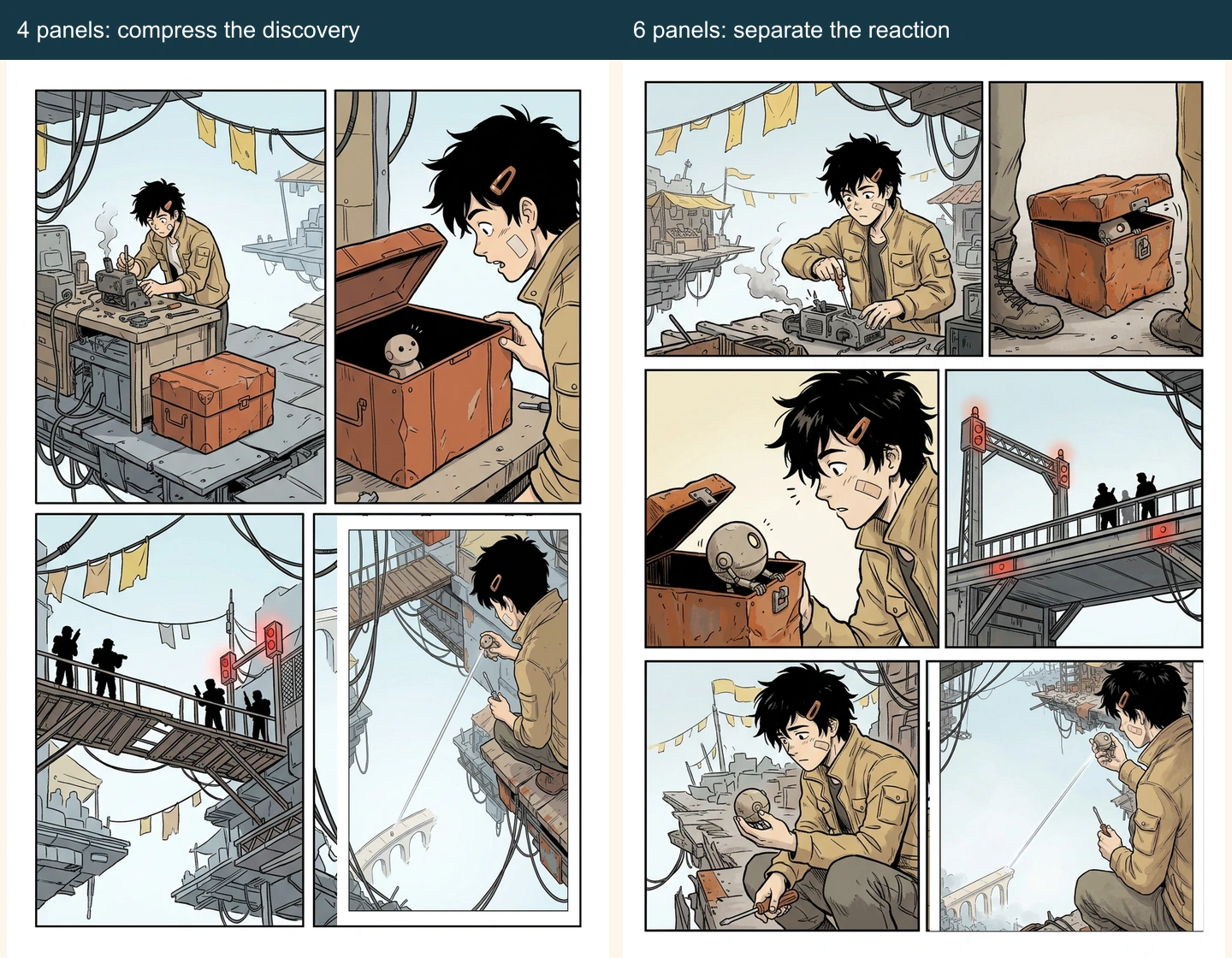
两者都是真实的 image playground 输出,并在本地替换了最后分镜。它们是基于相同书面角色与场景锁定的独立请求。它们不是用固定 seed 或共享锁定参考生成的,因此 Leo 的比例和机器人的具体设计在两个版本间会有所不同。请将每一页分别与其各自确认过的脚本对照;不要把这当作一个仅比较分镜数量的受控基准。
四格版本省略了单独的锁扣节拍和方向确认节拍。六格版本更容易检查这些变化,但会占用更多页面空间。两种选择都不天然更好。对于更长的原始段落,请使用 Novel Chapter to Comic Beats 来决定哪些内容必须保留,再选择分镜数量。
一次真实的脚本到图像修正
两版初始输出都把拱形目标平台放在了 Leo 上方,尽管确认过的结尾明确写的是市场下方的平台。这改变了线索的方向。第一版四格图中还在远处拱门附近放了一个类似小机器人的身影,使原本意图中的单机器人场景不够清晰。
我们保留了这些初始输出,并为每个版本重新生成了一个新的最终分镜。修正说明指定了一个从高处向下看的镜头,Leo 和他手中的机器人位于右上角,一条银色路线向左下方的浅色拱门下降,并且目标平台上不出现第二个机器人。
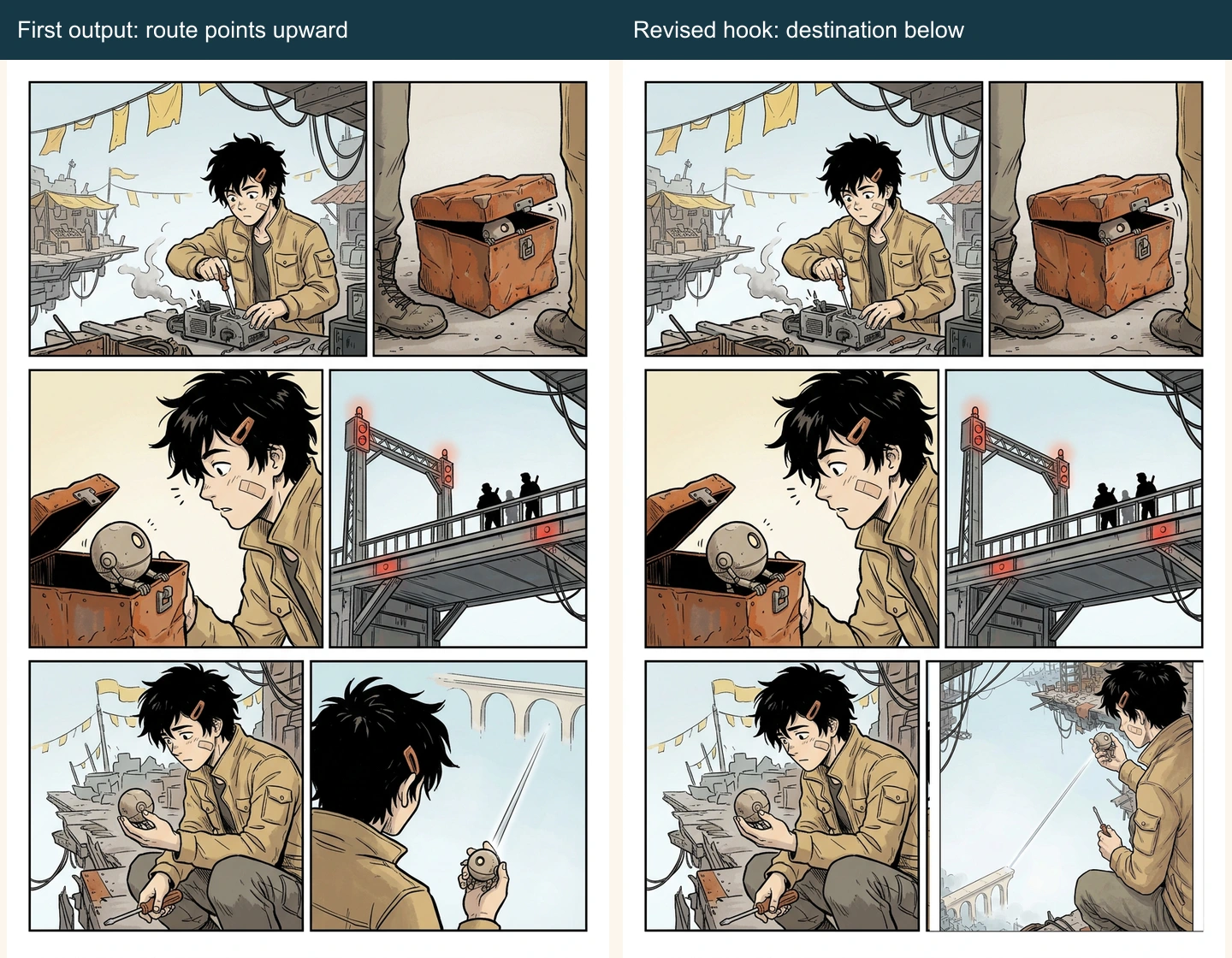
在本地合成过程中,只替换了最后分镜的矩形区域。像素对比确认,每页在该矩形之外没有任何像素发生变化。这是本地拼装流程的特性,并不是 Studio 原生分镜锁定功能的声明。替换内容改变了所选区域内的姿势、镜头、平台以及较小的服装细节。
现在,下行线索已经可见。在六格替换版中,露出的机器人仍然能辨认为圆形,但它的外壳与前面分镜不同。四格替换版在平台边缘也有一个很小的标记。在将任一页面视为最终发布母版之前,请以原始尺寸检查这些细节。本课程展示的是一次经过审查的脚本到图像迭代,而不是完美连续性或最终印刷就绪状态。
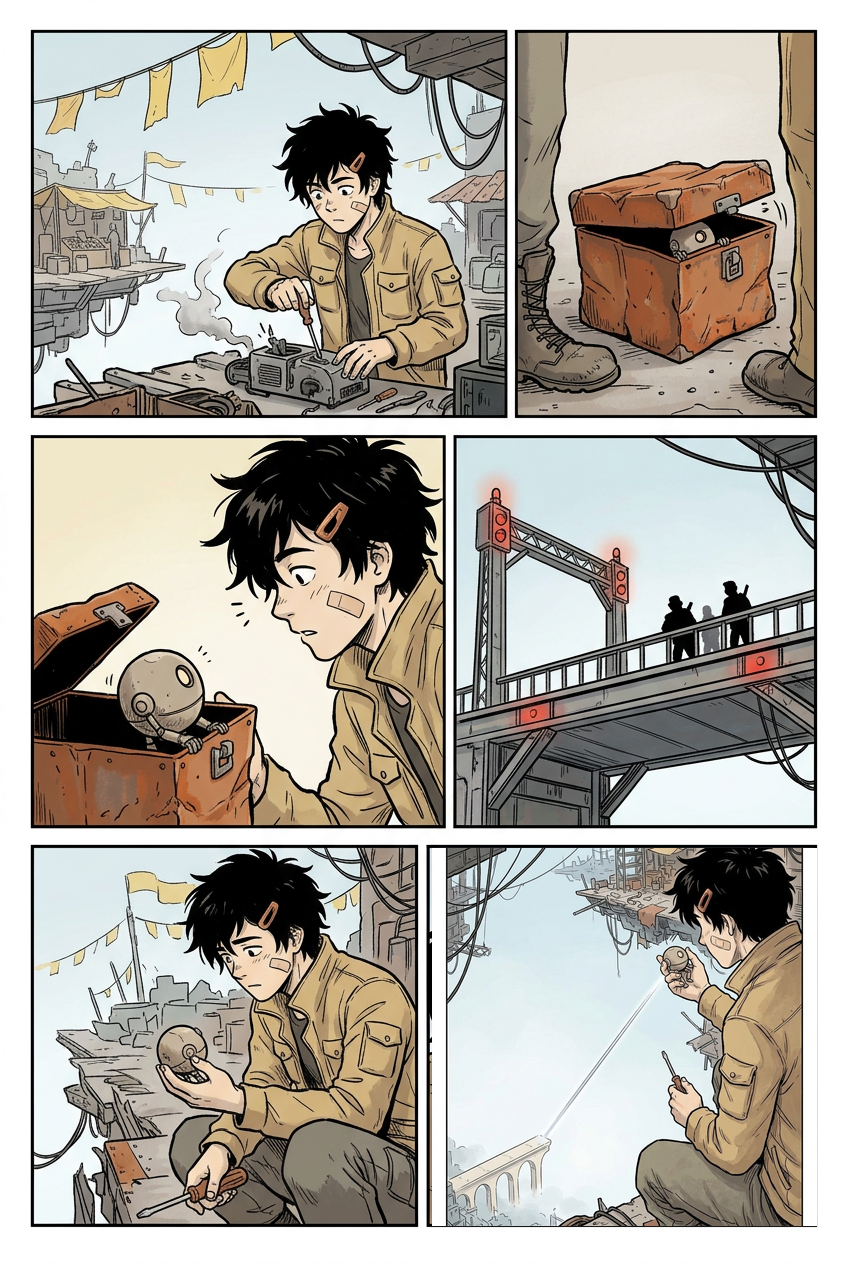
图像包含六个主要分镜。修理、锁扣、机器人、守卫信号、方向确认和下行路线按预期顺序出现。“Leo?” 和守卫的话仍保留在文本文件中;画面中并未生成任何准确对白。打开完整六格 PNG 或 打开四格 PNG,并与填写完成的下载脚本进行对照。
当你在 Script to Comic 中使用这个模板时,请粘贴已确认的分镜区块,在有标准参考图时附上该参考,并根据动作和连续性字段审核返回的草稿。声音文件、配音表现或准确气泡内容,都不应从纯图像请求中被推断出来。
下一步:生成漫画页面
本系列的下一篇文章是 Generate a Comic Page。那篇指南会把这个分镜脚本转化为完整的视觉漫画页面。
上一步:漫画世界构建
从第 1 天开始:如何开始一个漫画故事
当你准备生成第一版视觉草稿时,从这里开始:
Related hot tags
日漫
漫画脚本
教程
故事创作
热门创作工具
将灵感变成下一个故事
使用 LlamaGen 创作漫画、分镜和风格化照片。

点燃年轻人的梦想
让千万故事鲜活起来
了解 LlamaGen 最新功能发布、产品增强、设计更新和重要错误修复。