A manga script template helps you define what appears in each panel: the visible action, the speaker, and the exact words. Start with one page, choose four or six panels, then take the approved script to LlamaGen.AI Script to Comic. Keep final lettering separate until you have checked the artwork.
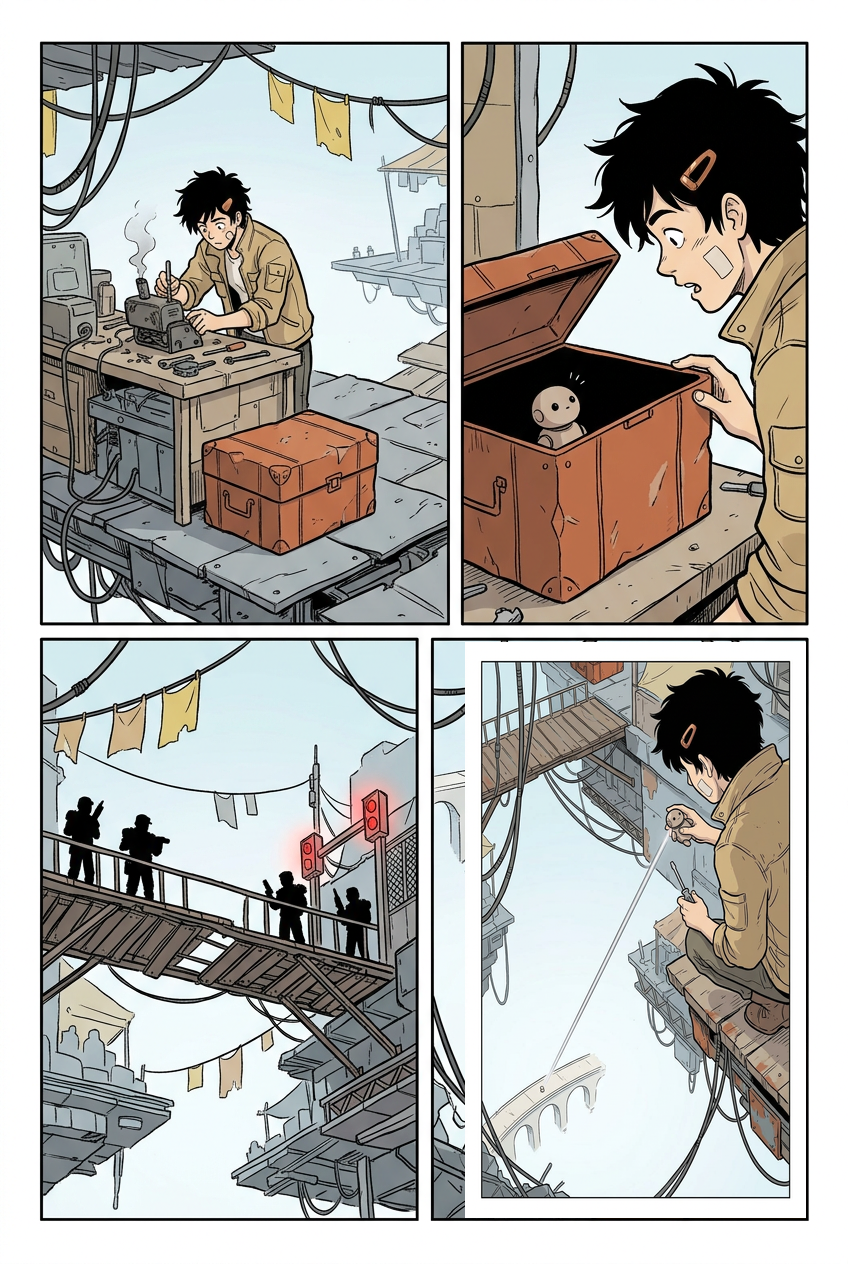
Updated November 16, 2026. This refresh keeps the original Leo / floating-junk-market lesson and adds downloadable text templates, two actual page outputs, and two repaired ending panels. The new art uses an adult interpretation of Leo. It was generated through LlamaGen.AI's image playground with Vertex Nano Banana 2.1; replacement panels were assembled locally. It is not a signed-in Script-to-Comic or Studio export demonstration.
Copy a practical manga script format
There is no single universal manga script format. Some collaborators prefer screenplay style, some prefer page-and-panel documents, and some work from thumbnails. What matters is clarity: action, exact words, and continuity notes should be easy to distinguish.
This template is a plain-text working format for a short comic page. It is useful for drafting and generation workflows, but it is not presented as a publisher's required submission format.
PAGE: 1
READING_DIRECTION: LEFT_TO_RIGHT
PANEL_COUNT: 4 or 6
PAGE_GOAL: [what changes by the ending]
CHARACTER_LOCK: [approved identities and props]
LOCATION_LOCK: [stable visual anchors]

PANEL: 1
SHOT: [camera distance and angle]
ACTION: [one visible moment]
SPEAKER: [name, or NONE]
DIALOGUE: [exact words, or NONE]
CAPTION: [exact words, or NONE]
SFX: [exact sound, or NONE]
CONTINUITY: [details that must survive]
LETTERING_SPACE: [reserved region]
GENERATION_NOTE: [art-only instruction]
Repeat the PANEL block for each panel. The blank download includes six blocks; delete blocks 5 and 6 for a four-panel page. Use NONE for silence so a collaborator can tell the difference between an intentional silent beat and missing dialogue.
These are original UTF-8 text files prepared for this lesson. For a printable worksheet, use the existing , which offers A4 and US Letter PDF versions. The text downloads above are separate working documents, not downloads from that PDF widget.
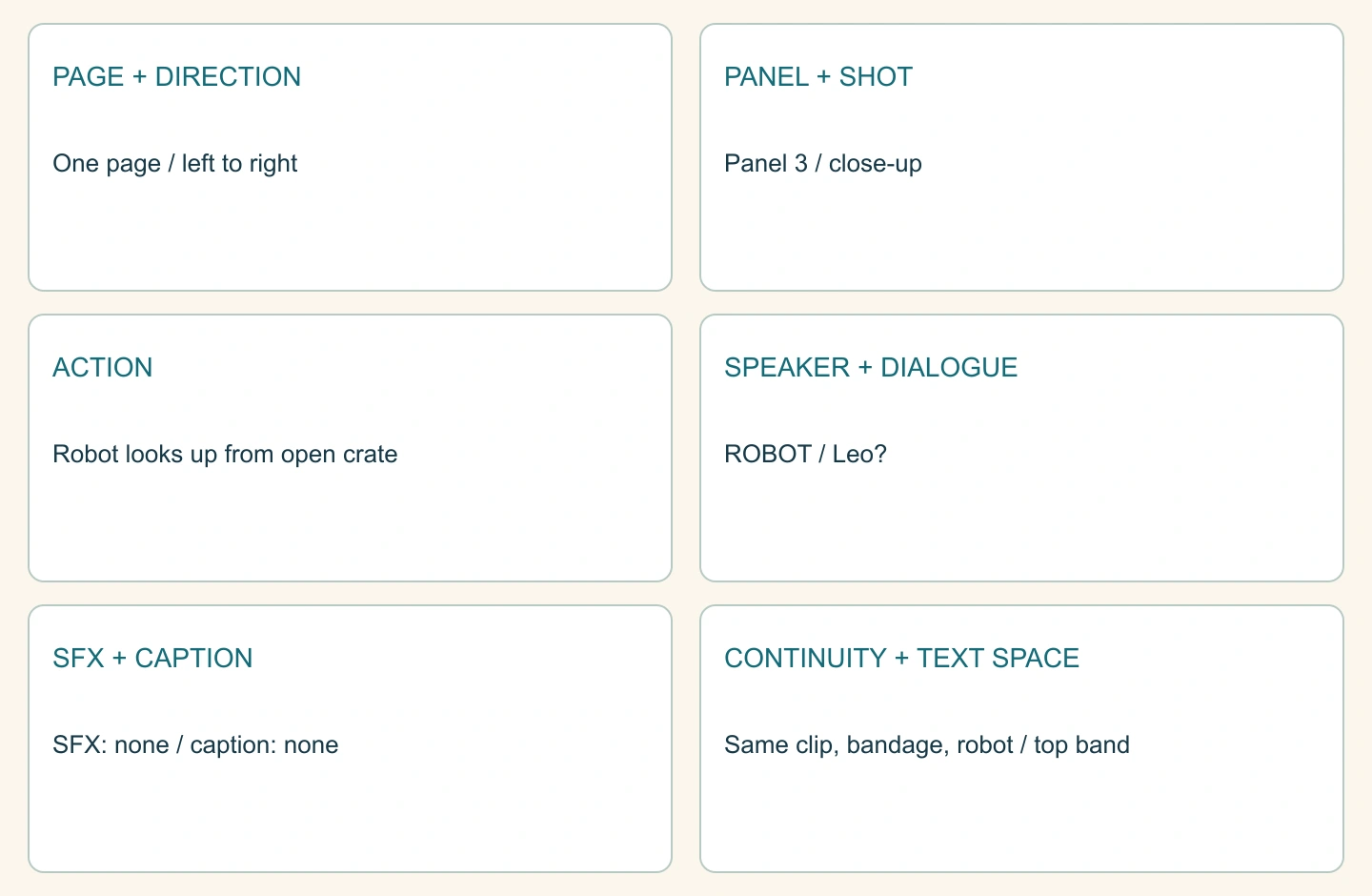
The labels were composed locally. For example, “Robot looks up” belongs in ACTION; “Leo?” belongs in DIALOGUE with ROBOT as SPEAKER. A sound such as “click” goes in SFX. Keep background direction out of the spoken line.
Reading direction and dialogue space
State the reading direction at page level. The pages in this lesson read left to right and top to bottom. A right-to-left manga page needs the first beat, gaze direction, and balloon order designed that way from the start; monochrome art alone does not establish reading order.
Reserve lettering space before generation and inspect the result afterwards. A note such as “leave room above the robot” is a request, not a guarantee. In small panels, start with one short line or silence. Review the actual balloon size instead of relying only on word count. The panel-layout lesson explains how geometry, reading order, and pacing work together.
The original step-by-step Leo lesson
A comic script is not a novel paragraph broken into lines.
It is a production plan. Each panel needs one clear job, one visible moment, and enough direction for a reader, artist, or AI system to understand what should appear on the page. If you skip this step, generation becomes guesswork: too much action in one panel, inconsistent camera angles, unclear dialogue, and backgrounds that do not support the story.
A 4-6 panel comic page script with visual direction, dialogue, and generation notes.
That script becomes the input for the next article on generating the comic page.
What You Will Create
For a first page, keep the structure simple:
Panel 1: Establish the location.
Panel 2: Show the character's normal pressure.
Panel 3: Introduce the trigger.
Panel 4: Make the conflict visible.
Panel 5: Force a choice.
Panel 6: End with a hook.
This structure is usually enough to guide a page without overloading every panel.
Why panel planning comes before generation
A story seed can describe what happens. A character sheet can define who appears. A world bible can define where it happens.
The comic script decides how the reader experiences it.
Without panel planning, a prompt like this is too vague:
Leo finds a robot in the floating junk market and runs from guards.
That could turn into one crowded image, a random chase, or a scene with no readable sequence. A panel script turns the same idea into controlled visual beats:
Beat
Reader sees
Setup
Floating junk market above open sky
Character pressure
Leo failing a repair in public
Trigger
A crate opens by itself
Discovery
Tiny robot repeats his sister's voice
Danger
Guard lights turn red
Hook
Robot projects a map to an impossible platform
Now the page has rhythm.
Step 1: Choose the page job
Every page should have one main job.
For a first page, useful jobs include:
Introduce the main character
Establish the world
Reveal a strange object
Create a choice
End with a question
For the Leo story, the page job is:
Introduce Leo, show the floating junk market, reveal the robot, and end with the map hook.
That sentence helps keep the page from trying to do too much.
Do not start with 12 panels. More panels increase continuity risk and usually reduce clarity on an opening page.
Step 3: Assign one purpose per panel
A panel should not do five jobs at once.
Weak panel purpose:
Leo is at the market, fixing a machine, feeling nervous, hearing his sister, seeing the robot, and guards arrive.
Stronger sequence:
Panel 1: Establish the floating market.
Panel 2: Show Leo failing a repair.
Panel 3: Show the crate opening.
Panel 4: Show Leo hearing his sister's voice.
Panel 5: Show guard lights turning red.
Panel 6: Show the robot map hook.
Each panel gets one core visual idea.
Step 4: Use shot types to control reader attention
Shot type tells the reader where to look.
Use this simple set:
Wide shot: show the place.
Medium shot: show character action.
Close-up: show emotion or an important object.
Over-the-shoulder: show the relationship between character and object.
Low angle: make danger feel larger.
Detail shot: focus on a clue.
For the Leo page:
Panel
Shot type
Reason
1
Wide shot
Establish the floating market
2
Medium shot
Show Leo working under pressure
3
Detail shot
Make the crate important
4
Close-up
Show Leo's emotional reaction
5
Low angle
Make the guard lights feel dangerous
6
Over-the-shoulder
Show Leo and the impossible map together
Shot types make generation prompts easier to write and pages easier to read.
Step 5: Write the 4-6 panel script
Here is a complete first-page script using the story, character sheet, and world notes from the previous guides.
Page job:
Introduce Leo, show the floating junk market, reveal the robot, and end with the map hook.

Panel 1:
Purpose: establish the world
Shot type: wide establishing shot
Location: Floating Junk Market
Characters: Leo as a small figure near a repair stall
Action: stacked salvage platforms hang above open sky while people move across narrow bridges
Emotion: adventurous, busy, slightly unstable
Background anchors: hanging cables, warning flags, pulley crates, open sky
Dialogue/caption: Caption: "The market floated high enough that broken things sometimes fell for minutes."
Continuity notes: keep the market above open sky; use dusty gray, faded yellow, rust orange
Generation prompt: wide cinematic manga panel of a floating junk market above open sky, stacked salvage platforms, hanging cables, warning flags, pulley crates, small repair stall, busy but readable background, no readable text

Panel 2:
Purpose: show Leo's normal pressure
Shot type: medium shot
Location: Floating Junk Market repair stall
Characters: Leo
Action: Leo tightens a screw on a wheezing machine as smoke puffs from the wrong side
Emotion: anxious focus, embarrassed determination
Background anchors: tool bench, patched metal, canvas awning, warning flags in distance
Dialogue/caption: Leo: "Almost fixed. Probably."
Continuity notes: Leo has messy black hair, copper clip, tan utility jacket, cheek bandage, dented screwdriver
Generation prompt: medium manga panel of Leo, nervous apprentice repair kid, tightening a screw on a damaged machine at a floating market repair stall, smoke puff, anxious focus, preserve copper hair clip, cheek bandage, tan utility jacket, dented screwdriver

Panel 3:
Purpose: introduce the trigger
Shot type: detail shot
Location: repair stall floor
Characters: Leo's hand only
Action: a dented delivery crate clicks open by itself beside Leo's boot
Emotion: quiet surprise
Background anchors: scratched metal floor, crate latch, loose bolts
Dialogue/caption: SFX: click
Continuity notes: keep crate dented and old; avoid extra characters
Generation prompt: close detail manga panel of a dented delivery crate on scratched metal floor beside a worn boot, latch opening by itself, loose bolts, tense quiet moment, no readable text

Panel 4:
Purpose: make the discovery emotional
Shot type: close-up
Location: repair stall
Characters: Leo, tiny robot
Action: the tiny robot looks up from the crate and repeats a voice Leo recognizes
Emotion: shock, hope, fear
Background anchors: crate edge, tool shadows, soft sky light
Dialogue/caption: Robot: "Leo?"
Continuity notes: Leo's face should show recognition; keep robot small and simple
Generation prompt: close-up cinematic manga panel of Leo staring at a tiny robot inside a dented crate, shocked expression, hopeful fear, soft daylight, tool shadows, preserve Leo's face details and outfit anchors

Panel 5:
Purpose: add danger
Shot type: low angle
Location: Guard Checkpoint Bridge near the market
Characters: guard silhouettes, Leo at the foreground edge
Action: red signal lights switch on across the bridge while guards turn toward the repair stall
Emotion: danger, exposure, urgency
Background anchors: steel gate ribs, red warning lights, narrow bridge
Dialogue/caption: Guard: "Seal the bridge."
Continuity notes: checkpoint uses red warning lights; keep guards as silhouettes
Generation prompt: low angle manga panel of a narrow guard checkpoint bridge, steel gate ribs, red warning lights turning on, guard silhouettes looking toward market repair stall, tense atmosphere, no readable signs

Panel 6:
Purpose: end with a hook
Shot type: over-the-shoulder
Location: repair stall looking toward open sky
Characters: Leo, tiny robot
Action: the robot projects a map line toward an unlisted platform below the market
Emotion: mystery, impossible choice
Background anchors: open sky, hanging cables, faint silver route line, distant pale arches
Dialogue/caption: Caption: "The map pointed down, to a place the market said did not exist."
Continuity notes: show Leo holding the dented screwdriver; make the map visual but avoid readable words
Generation prompt: over-the-shoulder manga panel of Leo holding a tiny robot as it projects a glowing map line toward an impossible hidden platform below a floating market, open sky, hanging cables, distant pale arches, mysterious silver light, no readable text
That is a usable 6-panel first page.
Step 6: Convert the script into LlamaGen.AI inputs
LlamaGen.AI works best when the script is treated as a structured visual brief instead of a loose story paragraph. Clear panel separation makes it easier to control flow, camera, characters, and continuity.
Use LlamaGen.AI to create:
A full comic strip or page
Panel-by-panel drafts
Camera-angle variations
Dialogue and caption placement
Redraws for individual panels
Consistency checks across character and location anchors
Start by pasting:
Story seed:
[paste Day 1 story seed]

Character sheet:
[paste Day 2 character sheet]

World bible:
[paste Day 3 locations and style rules]

Panel script:
[paste the 4-6 panel script]
Then ask for a first visual draft. Do not ask for final polish immediately. First, check whether the sequence is readable, whether the character stays on-model, and whether locations remain consistent from panel to panel.
A simple review pass after the first draft helps catch common issues:
Is Panel 1 clearly readable as the setting?
Does Leo still match the character anchors in every panel?
Do props such as the crate, screwdriver, and robot stay consistent?
Does the page move the eye cleanly from setup to hook?
Is any dialogue better moved into a caption or removed entirely?
Prompt examples you can copy
Use these prompts to move from notes to a clean panel script.
Prompt 1: Turn story notes into a 6-panel script
Turn this comic story seed, character sheet, and world bible into a 6-panel first page script:
[paste story seed]
[paste character sheet]
[paste world bible]

For each panel include:
- purpose
- shot type
- location
- characters
- action
- emotion
- background anchors
- dialogue or caption
- continuity notes
- image-generation prompt
Keep each panel focused on one visual beat.
Prompt 2: Improve panel pacing
Review this comic panel script for pacing:
[paste panel script]

Find:
- panels doing too many jobs
- missing establishing shots
- unclear transitions
- weak final hook
- dialogue that could be more visual
Return a revised 4-6 panel version.
Prompt 3: Convert a paragraph into panel beats
Convert this story paragraph into comic panel beats:
[paste paragraph]

Output:
Panel number | Beat purpose | Visible action | Shot type | Emotion | Hook value
Limit it to 4-6 panels.
Prompt 4: Create AI-ready panel prompts
Convert this comic script into AI-ready panel prompts:
[paste panel script]

Rules:
- preserve character anchors
- preserve location anchors
- keep prompts concise
- include shot type and emotion
- avoid readable text unless it is handled separately as dialogue
Prompt 5: Check continuity before generation
Check this panel script for continuity risks before generation:
[paste panel script]

Review:
- character appearance consistency
- location consistency
- prop continuity
- camera flow
- dialogue clarity
- final hook strength
Return a short fix list and a revised script.
Comic script checklist
Before you generate art, check your script:
The page has one main job.
The page uses 4-6 panels.
Each panel has one clear purpose.
Panel 1 establishes the location.
The character appears with consistent visual anchors.
The world-building anchors are visible.
Shot types vary across the page.
Dialogue is short enough to fit.
The action can be seen, not only explained.
The final panel creates a hook.
Each panel has continuity notes.
Each panel has an AI-ready generation prompt.
Common mistakes to avoid
Watch for these problems:
Writing a full scene inside one panel
Starting with a close-up before the reader knows where they are
Giving every panel the same camera angle
Adding too much dialogue before the art exists
Forgetting props between panels
Changing the location before the reader understands the first one
Ending the page without a question or visual surprise
If the page feels confusing in script form, it will usually be more confusing after generation.
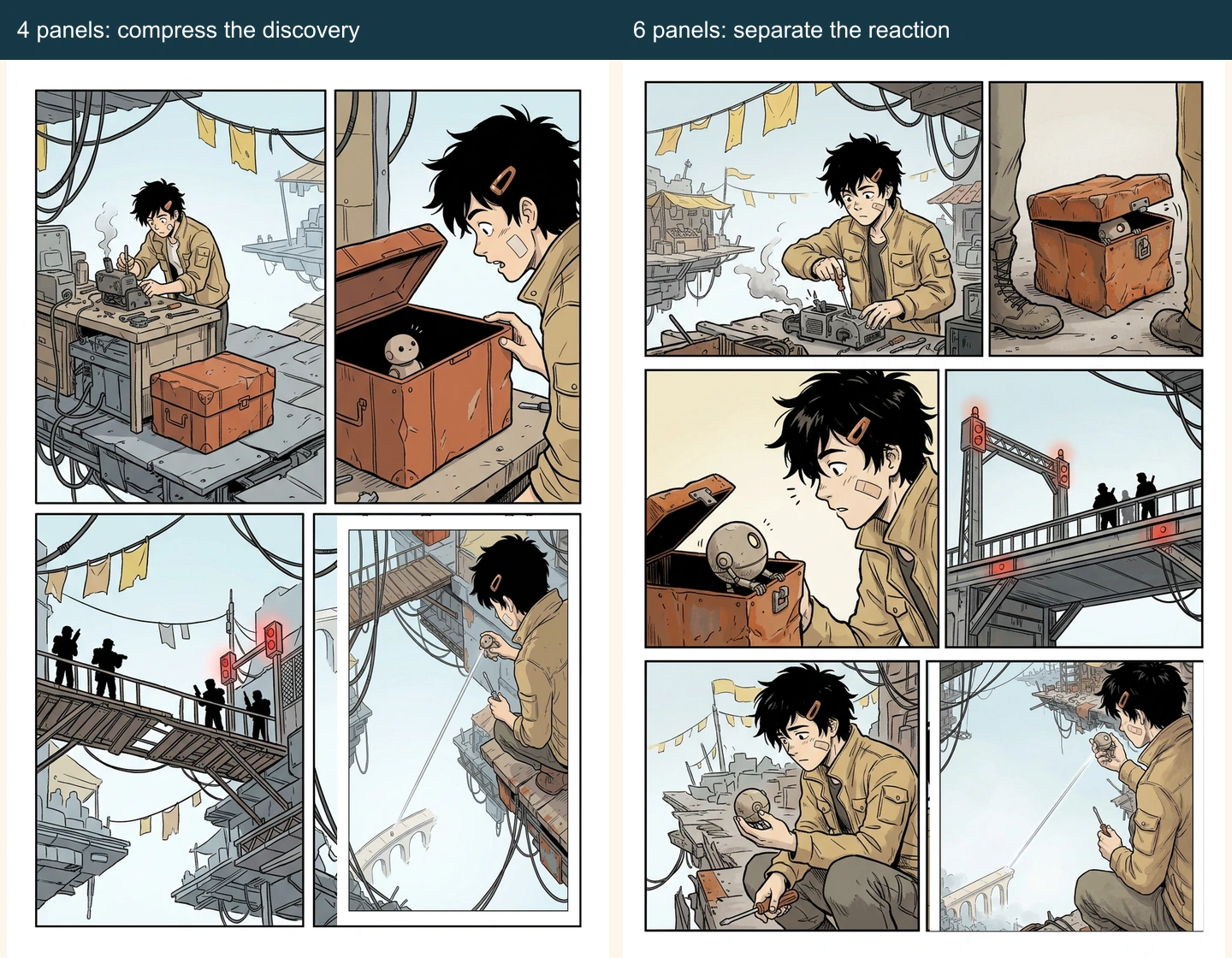
One scene, four panels or six?
The new downloads adapt the same original premise as the lesson above: Leo repairs equipment in a floating junk market, discovers a tiny robot, sees the guard warning, and follows the robot's clue toward a hidden platform below. The illustrated adaptation treats Leo as an adult apprentice. The robot's recognized voice remains in the separate dialogue script; an unlettered image cannot prove whose voice it uses.
The new six-panel version combines the setting and repair into its opening panel, then gives Leo holding the robot its own beat before the final route reveal. This is an editorial rearrangement of the earlier six-panel example, not a claim that the two scripts are identical.
Story job
Four-panel download
Six-panel download
Establish place and pressure
1: repair at the floating stall
1: repair at the floating stall
Discovery
2: robot visible in an already-open crate
2: latch opens; 3: robot looks up
Warning
3: red guard signals
4: red guard signals
Orient the decision
Compressed into the transition
5: Leo holds the robot at the edge
Hook
4: route points below the market
6: route points below the market
Both are real image-playground outputs with locally replaced final panels. They were independent requests using the same written character and setting lock. They were not generated with a fixed seed or a shared locked reference, so Leo's proportions and the robot's exact design vary between versions. Compare each page with its own approved script; do not treat this as a controlled panel-count-only benchmark.
Four panels omit the separate latch and orientation beats. Six make those changes easier to inspect but use more page space. Neither option is automatically better. For a longer source passage, use Novel Chapter to Comic Beats to decide what must survive before choosing the panel count.
A real script-to-image correction
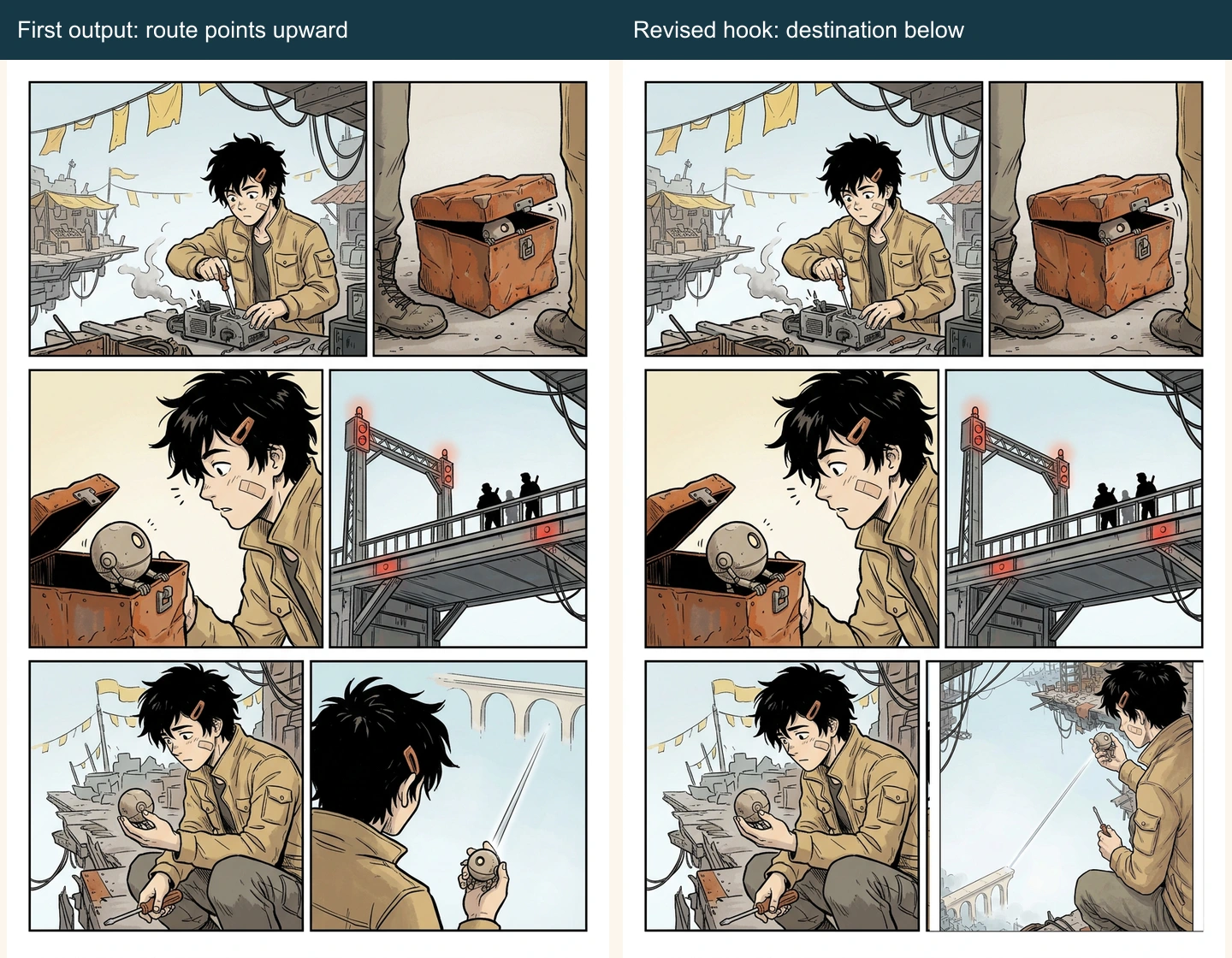
Both first outputs placed the arched destination above Leo, even though the approved ending specified a platform below the market. That changed the direction of the clue. The first four-panel image also placed a small robot-like figure near the distant arches, which made the intended single-robot scene less clear.
We kept those first outputs and generated one new final panel for each version. The correction specified a high camera looking down, Leo and the held robot at upper right, a silver route descending to pale arches at lower left, and no second robot on the target platform.
Only the final-panel rectangle was replaced during local composition. Pixel comparison confirmed zero changed pixels outside that rectangle in each page. That is a property of the local assembly process, not a native Studio panel-lock claim. The replacement changes the pose, camera, platform, and smaller clothing details inside the selected region.
The downward clue is now visible. In the six-panel replacement, the exposed robot remains recognizably round, but its casing differs from the earlier panels. The four-panel replacement also has a tiny mark at the platform edge. Review small details like these at full size before treating either page as a final publication master. This lesson demonstrates an inspected script-to-art iteration, not perfect continuity or final print readiness.
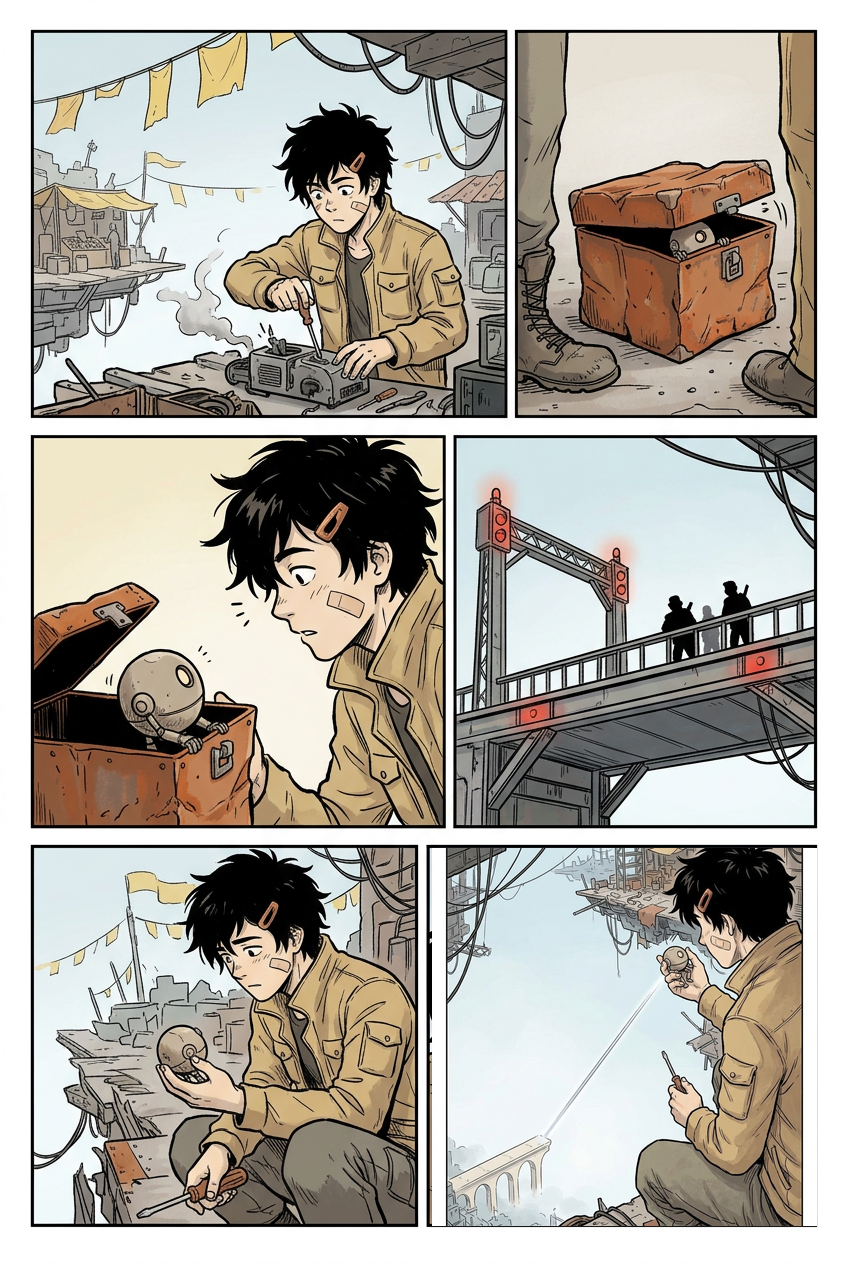
The image contains six principal panels. The repair, latch, robot, guard signals, orientation, and downward route appear in the intended order. “Leo?” and the guard's words remain in the text document; no exact dialogue was generated into the artwork. Open the full six-panel PNG or open the four-panel PNG to compare with the filled downloads.
When you use the template in Script to Comic, paste the approved panel blocks, attach the canonical reference if available, and review the returned draft against the action and continuity fields. A sound file, voice performance, or exact balloon should not be inferred from an art-only request.
Next step: Generate the comic page
The next article in this series is Generate a Comic Page. That guide turns this panel script into a full visual comic page.