LlamaGen लोगोLlamaGen ब्रांड
लॉग इन करेंअभी सदस्यता लें20% की छूट
  1. होम
Batch Comic Production Workflow: Draft, Approve, Repair, and Export 40 Pages
सभी पोस्ट

Batch Comic Production Workflow: Draft, Approve, Repair, and Export 40 Pages

Jay
Jay
३० अक्टूबर, 2026
लिंक कॉपी करें
  • Why a long comic needs a production ledger
  • Step 1: Lock the brief and divide the book
  • Step 2: Make the pilot representative
  • Step 3: Use documented requests and retain job IDs
  • Step 4: Separate technical success from editorial approval
  • Step 5: Repair only the affected panel
  • Step 6: Audit the 40-page ledger before export
  • What time and credits should you track?
  • Release checklist
  • FAQ
  • Can I request all forty pages at once?
  • Does a completed API job mean a page is approved?
  • Should a failed panel trigger a full batch rerun?
elevate-your-comics.png
LlamaGen के साथ अपनी कॉमिक्स को ऊँचाई दें

To produce a 40-page comic reliably, approve a small pilot, generate in reviewable batches, repair failed panels, and assemble exports from approved versions. A successful generation request is only one stage of production.

Begin with the LlamaGen.AI Comic API when you need a repeatable integration. This guide provides a worked planning example for forty four-panel pages. It does not claim that forty finished pages were generated or benchmarked for this article.

Why a long comic needs a production ledger

The hard question is usually not whether one page changed, but which other pages depend on that change. A creator discussion about a 40-page comic describes how updating a character can leave teams unsure about affected pages and downstream assets.

Give each page a stable ID and connect it to the approved script, reference version, generation job, review decision, and export. That record makes corrections traceable and helps protect already approved work.

Our example follows Mira through a railway-station mystery. Her copper bob, teal coat, and brass compass remain fixed. The book contains forty pages with four planned panels per page: 160 planned panel slots. Covers and promotional crops are separate deliverables.

Step 1: Lock the brief and divide the book

Write a short production brief before submitting work:

Project: Station Compass
Length: 40 story pages, 4 panels per page
Character: Mira, copper bob, teal coat, brass compass
Location: rainy station, blue train, warm lamps
Reading direction: left to right
Dialogue: maintained separately for final lettering
Approval owner: named editor

Then choose a batch schedule that leaves room for review:

StagePagesPurpose
Pilot1–3Verify identity, pacing, panel count, and lettering space
Batch A
Related hot tags

Comic Production

कॉमिक एपीआई

चरित्र स्थिरता

लोकप्रिय क्रिएटर टूल

प्रेरणा को अपनी अगली कहानी में बदलें

LlamaGen के साथ कॉमिक, स्टोरीबोर्ड और स्टाइलिश फोटो बनाएं।

01

एआई कॉमिक जनरेटर

बस कुछ ही मिनटों में, अपने विचार को सुंदर कॉमिक स्ट्रिप में बदलें।

कॉमिक बनाएं
02

एआई मंगा जनरेटर

जानदार मंगा कला और बहुउपयोगी कहानियाँ बनाएं।

एआई के साथ मंगा बनाएं
03

AI स्टोरीबोर्ड जनरेटर

निर्माण से पहले हर दृश्य का कल्पनात्मक रूप से अवलोकन करें।

एआई के साथ स्टोरीबोर्ड बनाएं
04

फोटो को कॉमिक में बदलें

किसी भी फोटो को कॉमिक-शैली के चित्र में बदलें।

चित्रों से कॉमिक बनाएं
05

एआई कॉमिक स्ट्रिप्स मेकर

निरंतर करैक्टर के साथ साझा करने योग्य स्ट्रिप्स बनाएं।

एआई के साथ कॉमिक स्ट्रिप्स बनाएं

LlamaGen community

checkmark

Get hands-on help with your comics

checkmark

Showcase your comics to fellow LlamaGen creators

checkmark

Participate in special events to win gifts

परिवर्तन लॉग

युवाओं के सपनों को जगाएं
जहाँ लाखों कहानियाँ जीवंत हो उठती हैं

LlamaGen की नवीनतम फीचर रिलीज़, प्रोडक्ट सुधार, डिज़ाइन अपडेट और महत्वपूर्ण बग फिक्स का सारांश।
✦
✧
✦
✧

के लिए एक नया माध्यम कहानी कहने

असीमित कहानियाँ, कॉमिक्स, एनीमेशन, गेम्स और बहुत कुछ—सेकंडों में बनाएं, जो आधुनिक दर्शकों से जुड़ें

Batch Comic Production Workflow: Draft, Approve, Repair, and Export 40 Pages - LlamaGen.AI Blog
4–11
Establish a repeatable production rhythm
Batch B12–19Check the first major scene transition
Batch C20–27Review the central reveal and recurring props
Batch D28–35Protect continuity during the climax
Final batch36–40Resolve the story and check the complete sequence

These are editorial batches, not a promise about the maximum pages accepted by an API request. Check current account limits before choosing request sizes.

Step 2: Make the pilot representative

Include a wide establishing shot, a face close-up, a prop interaction, a two-character exchange, and a page turn somewhere in the first three pages. Three nearly identical portrait pages will not reveal the book's hardest problems.

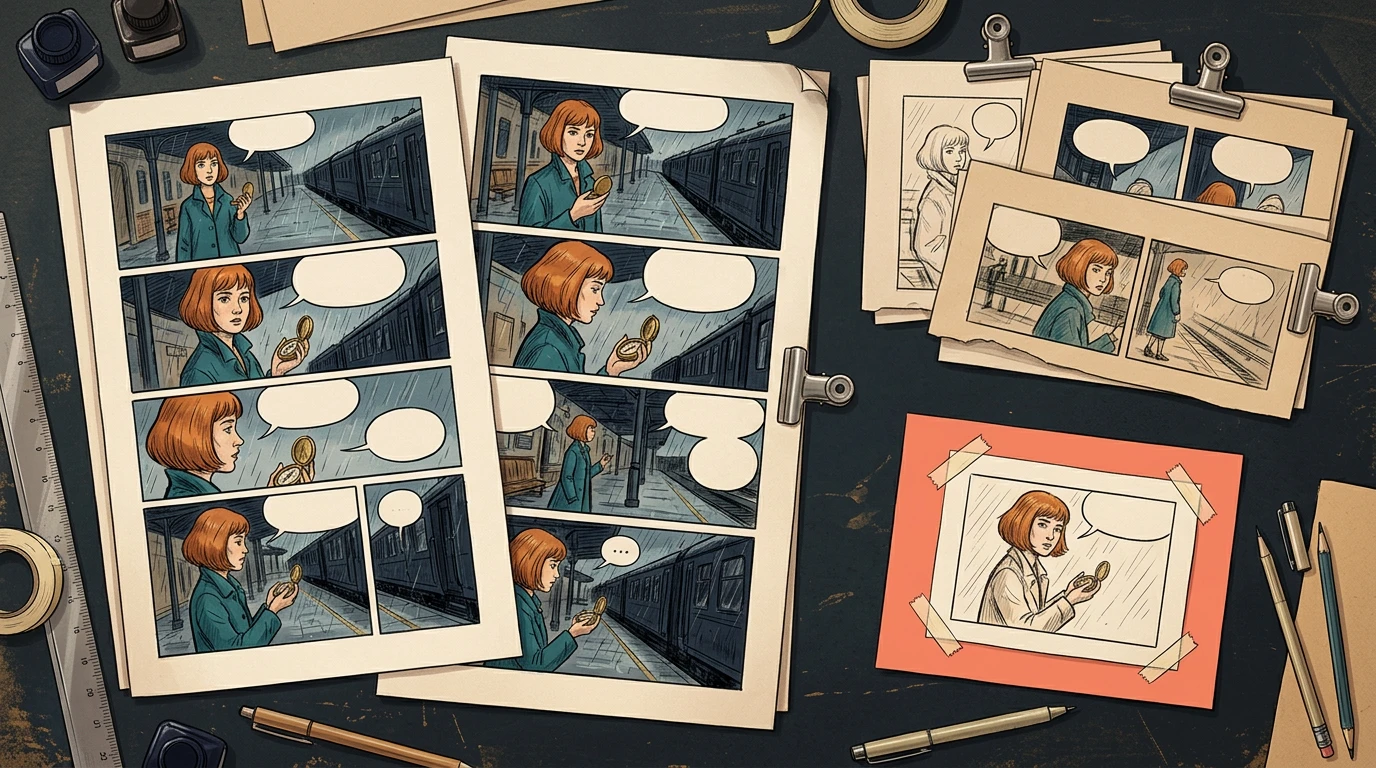
A conceptual production board with pilot pages, review gates and later batches

The illustration shows the approval structure. It is not a screenshot of forty generated pages.

Review the pilot for story clarity as well as image quality. Check that the compass stays recognizable, the character does not drift between camera distances, and dialogue can fit without covering a hand or face. Save the approved references and script versions before expanding production.

If the pilot fails, record the cause and update the shared brief. Correcting a shared instruction during the pilot limits how many later pages can inherit the same problem.

Step 3: Use documented requests and retain job IDs

The current Comic API documentation supports multi-page input through a nested pagination object. The following is a request-shape example, not a request executed by this article:

{
  "prompt": "Create the first three pages of Station Compass from the approved panel script.",
  "preset": "japanese_manga",
  "pagination": {
    "totalPages": 3,
    "panelsPerPage": 4
  }
}

Do not combine this pagination mode with fixPanelNum. Keep API tokens private. Store the returned generation ID, then retrieve status and assets using the documented status endpoint. Record returned usage rather than estimating a universal price per page.

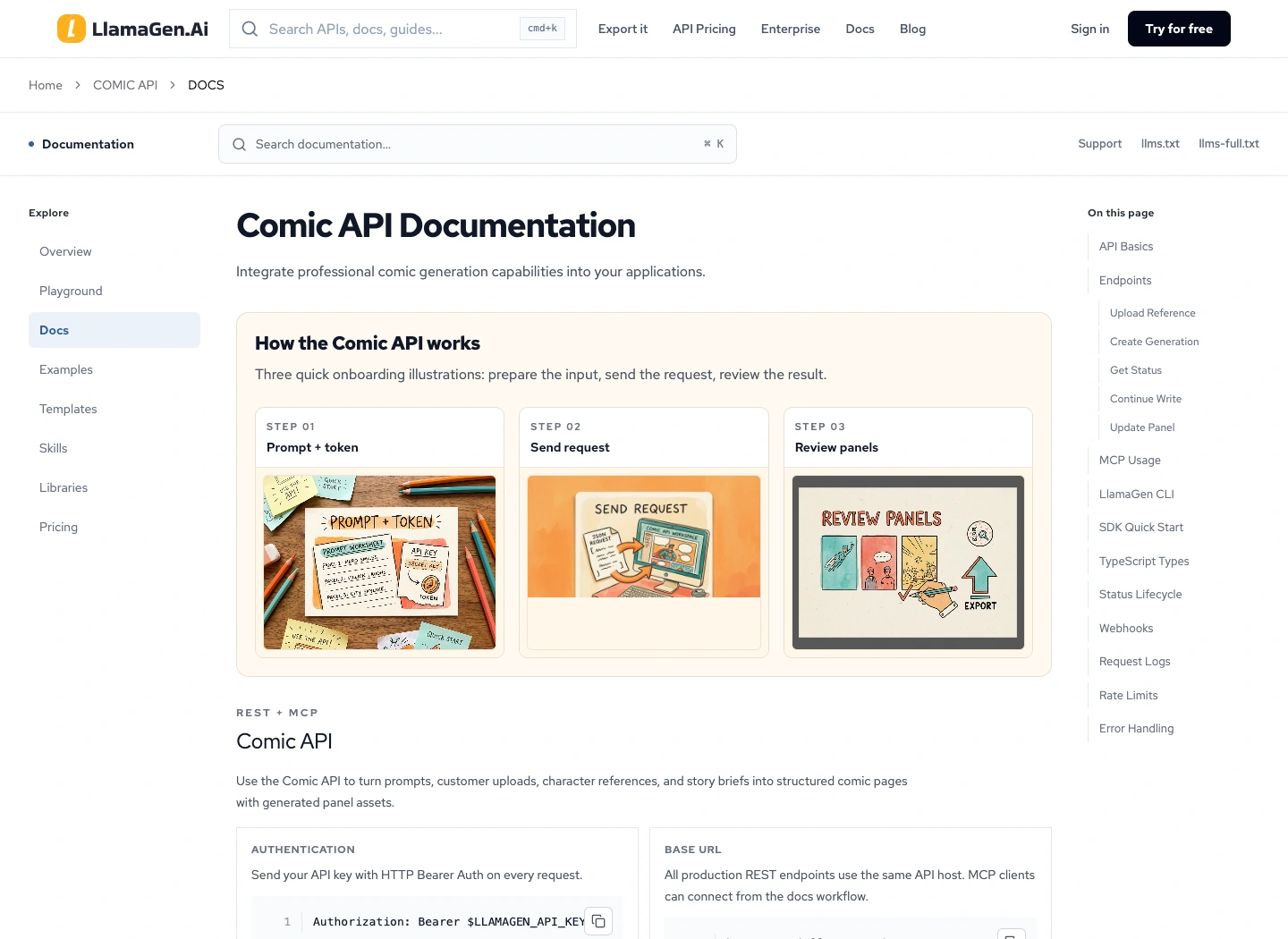
The public Comic API documentation page captured during preparation

For each submitted job, preserve the input and the response together. When a response is delayed, inspect the existing job before submitting another request. Follow the documented idempotency behavior; changing a retry key can create a separate job and additional cost.

Step 4: Separate technical success from editorial approval

A job can complete while a page still has a missing beat, an incorrect coat, or unreadable balloon space. Keep generation state and editorial state in separate fields.

page_id,batch,script_version,reference_version,job_id,review_state,export_version
P001,pilot,v03,mira-v02,record-returned-id,approved,v01
P002,pilot,v03,mira-v02,record-returned-id,repair-required,
P003,pilot,v03,mira-v02,record-returned-id,awaiting-review,

Use explicit decisions such as awaiting-review, repair-required, and approved. Assign an owner and a reason to every rejection. Keep earlier approved files until the replacement has passed review.

At the end of each batch, inspect the transition into the next one. A correct last panel and a correct first panel can still disagree about where a character is standing or which hand holds the prop.

Step 5: Repair only the affected panel

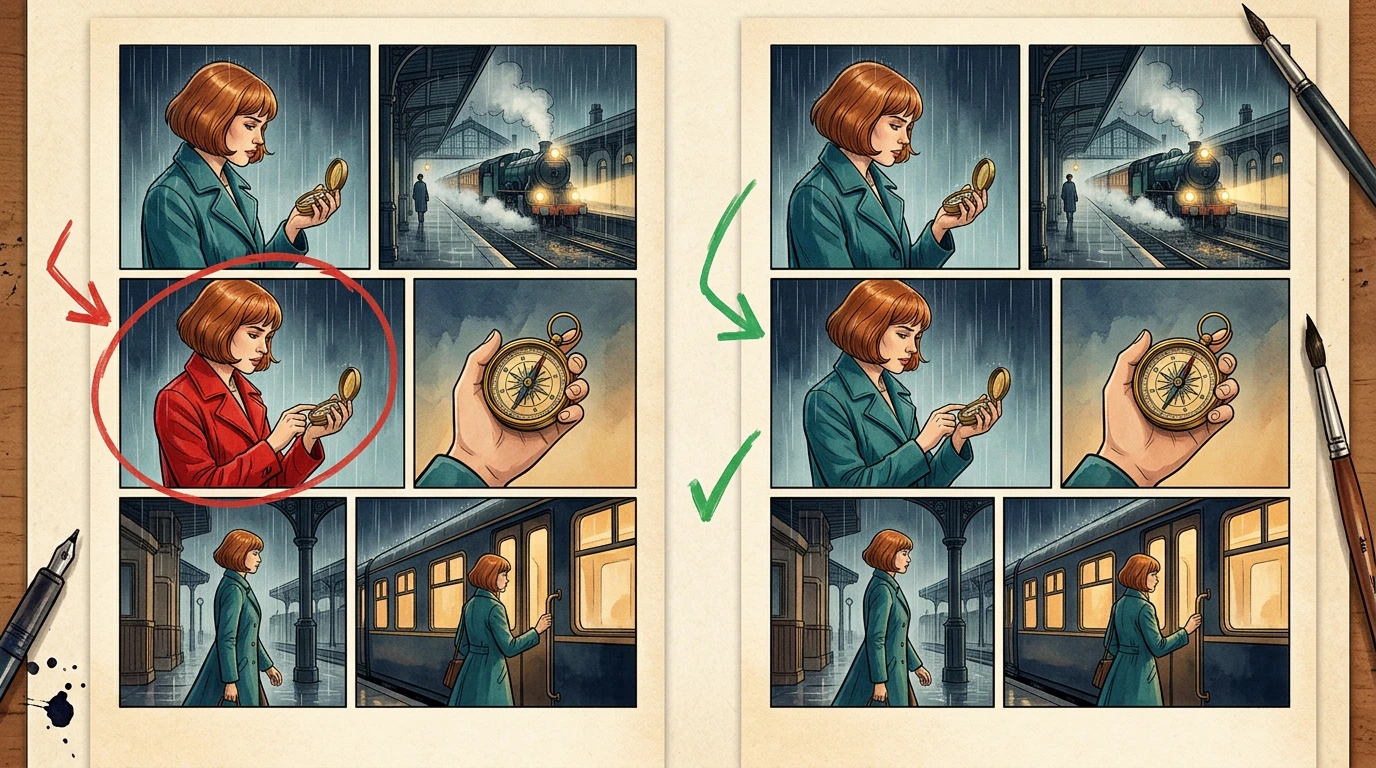
Suppose P017 has one panel where Mira wears a red coat. Record that single defect rather than rejecting every image in the batch.

A conceptual before-and-after comic page illustrating a single coat-color correction

The API documents a panel-update request on an existing generation. Page and panel indexes are zero-based. Map those indexes from the actual job result; P017 in your book is not automatically page index 16 inside every batch.

Use a repair brief such as:

Restore Mira's teal coat and copper bob in this panel.
Preserve the camera, station, compass, pose and other characters.
Do not revise the surrounding panels.

After repair, review the adjacent panels and refresh only the exports that use the changed page. The reference-change audit guide covers broader dependency changes.

Step 6: Audit the 40-page ledger before export

Check uniqueness, complete page coverage, approval, and current export versions. A simple local planning check can catch missing records before anyone assembles the book:

expected = {f"P{i:03d}" for i in range(1, 41)}
actual = [row["page_id"] for row in pages]
assert len(actual) == len(set(actual)), "Duplicate page ID"
assert set(actual) == expected, "Missing or unexpected page"
assert all(row["review_state"] == "approved" for row in pages)
assert all(row["export_version"] for row in pages)

In the accompanying local planning exercise, one deliberately unapproved page blocks export until its review record is corrected. This tests the ledger rule, not the visual quality of forty comic pages. An editor still needs to read the full book.

What time and credits should you track?

Track generation, review, repair, lettering, assembly, and final reading separately. Save actual returned usage for each job and measure human review time with the same boundaries for each batch.

Use this budget structure:

Total production cost = pilot + accepted batches + repairs + export work
Total elapsed time = generation waits + review + repair + assembly

Do not extrapolate a whole book from one attractive panel. A useful pilot estimate includes rejected results and cleanup.

Release checklist

  • Forty unique story-page IDs are present in the intended order.
  • Every page has an editorial approval and current export version.
  • Character, location, and prop references are traceable.
  • Dialogue and credits have been proofread.
  • Page boundaries and scene transitions read continuously.
  • Files reopen on another device without missing assets.
  • Cover, thumbnails, and promotional crops use approved versions.

Start with a three-page brief in Comic API. Expand only after you can explain why those pages pass. For team production requirements, the enterprise route can help scope the integration.

FAQ

Can I request all forty pages at once?

Use the current API and account limits to determine what is accepted. Editorial batch size should also reflect how much your team can inspect before continuing.

Does a completed API job mean a page is approved?

No. Completion is a technical state. Approval requires review of the result against the brief.

Should a failed panel trigger a full batch rerun?

First identify the cause. A local defect can often be repaired individually; a shared reference or script problem may affect several pages and should trigger an impact audit.

Product documentation reviewed November 2, 2026. Figures and the planning ledger are instructional examples; no forty-page speed or cost benchmark is claimed.

LlamaGen लोगो
  • United States
  • Español
  • Français (France)
  • 日本語
  • 한국어
  • Deutsch
  • 繁體中文 (台灣)
  • 繁體中文 (香港)
  • 简体中文
  • Português
  • Italiano
  • Español (México)
  • العربية
  • Русский
  • Português (Brasil)
  • Tiếng Việt
  • हिन्दी

AI कॉमिक जनरेशन के भविष्य में नेतृत्व कर रहे हैं

  • 24×7 समर्थन
  • साप्ताहिक अपडेट
  • सुरक्षित और नियम-संगत
  • 99.9% अपटाइम

LlamaGen मुफ़्त में डाउनलोड करें

iOSडेस्कटॉप

LlamaGen के बारे में AI से पूछें

उत्पाद

  • नवीनतम लॉन्च
  • विशेषताएँ
  • कॉमिक स्ट्रिप मेकर
  • मंगा स्टूडियोनया
  • चित्र को कॉमिक में बदलें
  • कॉमिक से वीडियो
  • एआई कॉमिक फैक्ट्री
  • कॉमिक एजेंट
  • iOS और Android
  • Mac और Windows
  • डाउनलोड करें
  • कॉमिक जैपनया
  • एआई कॉमिक जनरेटर
  • एआई कार्टून जेनरेटर
  • एआई वेबटून जनरेटर
  • कॉमिक स्ट्रिप मेकर
  • चित्र को कॉमिक में बदलें
  • एआई मंगा जनरेटर
  • मंगा अनुवादक
  • फोटो से एनीमे
  • एनीमे से वास्तविक जीवन
  • मंगा रंग भरें
  • एनीमे पात्र जनरेटर
  • पिक्सेल गेम एसेट टूल्स
  • एआई स्प्राइट शीट जनरेटर
  • सर्वश्रेष्ठ पिक्सल गेम टूल्स 2026
  • फोटो कॉमिक मेकर
  • Comic Life का विकल्प

संबंधित उत्पाद

  • LlamaGen परिवार
  • सिनियोबोर्डनया
  • कॉमिक्स एपीआई

प्लान्स

  • मूल्य निर्धारण
  • स्टार्टर
  • प्रो

समुदाय

  • रचनाकार
  • सहयोगी
  • पार्टनर

AI Models

  • Grok Imagine Image 2.0
  • Wan 3.0
  • Wan 3.0 Prime
  • Seedance 2.5
LinkedInX (Twitter)
  • होम
  • लेख
  • ब्लॉग
  • बनाएं
  • मूल्य निर्धारण
  • एपीआई
  • Affiliate ProgramNEW

पिछले ब्लॉग्स

Storyboard-to-Video Handoff Checklist: Shots, Timing, Audio, and Continuity

Storyboard-to-Video Handoff Checklist: Shots, Timing, Audio, and Continuity

Turn approved storyboard frames into a clear video handoff with stable shot IDs, timing, motion note

Jay
Jay
१ नवंबर, 2026
How to Localize a Comic Without Redrawing the Artwork

How to Localize a Comic Without Redrawing the Artwork

Preserve approved comic art while translating dialogue, rebuilding editable lettering, checking read

Jay
Jay
३१ अक्टूबर, 2026
Batch Comic Production Workflow: Draft, Approve, Repair, and Export 40 Pages

Batch Comic Production Workflow: Draft, Approve, Repair, and Export 40 Pages

Plan a 40-page AI comic with a pilot, reviewable batches, a page ledger, selective repairs, and expo

Jay
Jay
३० अक्टूबर, 2026
From a Flat AI Image to an Editable Comic Page

From a Flat AI Image to an Editable Comic Page

Turn a finished comic image into an editable comic page by reviewing an asset sheet, extracting tran

Jay
Jay
२८ अक्टूबर, 2026
  • कॉमिक जैप
  • वेलिका
  • एंटरप्राइज
  • शिक्षा
  • कॉमिक एपीआई
  • सेल्स से संपर्क करें
  • शिक्षा योजनाएँ
  • शिक्षक
  • छात्र
  • शिक्षक और छात्र
  • स्टार्टअप्स
  • शैक्षिक छूट
  • कंपनी

    • हमारे संस्थापक से बात करें
    • परिचय
    • उत्पाद रोडमैप
    • करियर
    • हमें ईमेल करें
    • हमारा मैस्कॉट वर्ल्ड
    • मीडिया किट
    • KOL साझेदारी
    • सामग्री

    मदद

    • सहायता केंद्र
    • विश्वास
    • सुरक्षित एआई
    • प्रोफेशनल सेवाएँ
    • सामान्य प्रश्न
    • सुरक्षा
    • सुलभता
    • वीडियो ट्यूटोरियल
    • हमसे संपर्क करें
    • साइटमैप
    सर्वसम्मति
  • स्नेह दीवार
  • LlamaGen MCPनया
  • LlamaGen डेवलपर
  • संसाधन

    • परिवर्तन लॉग
    • ब्लॉग
    • गाइड्स
    • व्यक्तिगत कॉमिक्स
    • विशेषताएँ
    • विकल्प
    • सर्वश्रेष्ठ एआई ऐप्स
    • GPT-6 मंगा रंगाई गाइड
    • Claude कॉमिक बुक कौशल
    • Gemini एआई कॉमिक गाइड
    • वह कॉमिक
    • शैक्षिक छूट
    • छात्र छूट

    उपकरण

    • एआई लोगो जनरेटर
    • Grokbot-स्टाइल कैरेक्टर जनरेटर
    • पीएनजी से कॉमिक
    • पाठ से कॉमिक
    • पीडीएफ से कॉमिक
    • स्क्रिप्ट से कॉमिक
    • पुस्तक से कॉमिक
    • चित्र को कॉमिक में बदलें
    • एआई पिक्सेल आर्ट जेनरेटर
    • शैक्षिक कॉमिक्स
    • एआई वीडियो जनरेटर
    • Gemini AI वीडियो जनरेटर
    • फ्री फेसलेस AI वीडियो जनरेटर
    • कॉमिक से वीडियो
    • स्टोरीबोर्ड सॉफ़्टवेयर बनाएं
    • AI स्टोरीबोर्ड जनरेटर
    • स्क्रीनराइटिंग सॉफ़्टवेयर
    • स्क्रीनप्ले संपादक
    • कहानी AI
    • एआई स्टोरी जनरेटर
    • स्टोरीबुक जनरेटर
    • एआई इमेज जनरेटर
    • AI लेयर स्प्लिटर
    • एआई कैमरा कोण नियंत्रण
    • एआई पिक्सेल आर्ट जेनरेटर
    • पिक्सेल गेम एसेट टूल्स
    • एआई स्प्राइट शीट जनरेटर
    • स्प्राइट शीट स्लाइसर
    • सर्वश्रेष्ठ पिक्सल गेम टूल्स 2026
    • एनीमेशन एपीआई
    • ChatGPT/Codex प्लगइन
    • ChatGPT इंस्टॉलेशन गाइड
    • Claude Code प्लगइन
    • Claude Code इंस्टॉलेशन गाइड
  • MiniMax H3
  • Nano Banana 2.1
  • Nano Banana 2 Lite
  • Seedream 5.0 Flash
  • Seedream 5.0 Pro
  • Seedance 2.0 Mini
  • Kling 3.0 Turbo
  • Nano Banana 2
  • GPT छवि 2
  • Gemini Omni Flash
  • All AI Models
  • AI उपकरण

    • एआई आउटफिट एक्सट्रैक्टर
    • एआई हेयरस्टाइल चेंजर
    • एआई मंगा हेयरस्टाइल चेंजर
    • एआई विंड इफेक्ट जनरेटर
    • एआई डेप्थ मैप जनरेटर
    • एआई व्हाइट बैकग्राउंड
    • एआई ऑब्जेक्ट रिमूवर
    • एआई वर्चुअल ट्राय-ऑन
    • एआई धुंधली तस्वीरें साफ करें
    • एआई शोर घटाएं
    • एआई फोटो पुनर्स्थापन
    • एआई उत्पाद की छाया
    • AI बैकग्राउंड जनरेटर
    • एआई हेडशॉट जनरेटर
    • एआई इमोजी निर्माता
    • एआई बैकग्राउंड बदलने वाला टूल
    • एआई खुली आंखें
    • एआई सुंदरता
    • एआई उत्पाद फोटोग्राफी
    Instagram
    YouTube
    Facebook ग्रुप
    Reddit
    Discord
    ईमेल सहायता
    गोपनीयताशर्तेंसाइटमैप
    ब्रांड एसेट्स डाउनलोड करें
    © 2026 LlamaGen.Ai सर्वाधिकार सुरक्षितसभी सेवाएँ ऑनलाइन हैं
    सभी ब्लॉग देखें