LlamaGen लोगोLlamaGen ब्रांड
लॉग इन करेंअभी सदस्यता लें20% की छूट
  1. होम
Storyboard-to-Video Handoff Checklist: Shots, Timing, Audio, and Continuity
सभी पोस्ट

Storyboard-to-Video Handoff Checklist: Shots, Timing, Audio, and Continuity

Jay
Jay
१ नवंबर, 2026
लिंक कॉपी करें
  • What changes between a storyboard and a video brief?
  • Step 1: Freeze a reviewable sequence
  • Step 2: Specify the timebase and duration
  • Step 3: Describe what moves and what stays fixed
  • Step 4: Include references and audio decisions
  • Step 5: Check continuity at the cuts
  • Step 6: Send a package another person can open
  • Step 7: Approve a short motion test before scaling
  • Final handoff checklist
  • FAQ
  • Is an animatic the final video?
  • Should every storyboard frame become one video clip?
  • What should I do if a generated shot changes the character?
elevate-your-comics.png
LlamaGen के साथ अपनी कॉमिक्स को ऊँचाई दें

A storyboard is ready for video when the next person can identify the approved shots, understand timing and motion, find the correct assets, and see which decisions still need approval.

Build the handoff around shot IDs, frame files, a timing sheet, motion notes, audio cues, and a revision log. You can start with LlamaGen.AI Storyboard to plan the sequence, then prepare a production package that can be reviewed independently of the creation tool.

What changes between a storyboard and a video brief?

A storyboard frame captures a moment. A video brief also needs duration, transitions, opening and closing states, and instructions for what moves.

A filmmaking discussion about prep methods shows how boards and animatics can help test staging and pacing. Different projects need different levels of detail. A quiet interview and an animated chase should not use the same handoff template without adjustment.

The Storyboard overview describes a workflow from story and scene breakdown through shots, revisions, and animatic export. Use the options available in your workspace. A planning export does not automatically guarantee compatibility with every video editor or generation model.
The public LlamaGen.AI storyboard feature page captured during preparation

Public product page captured November 2, 2026. The following production illustrations are conceptual examples, not screenshots of a completed video job.

Step 1: Freeze a reviewable sequence

Read the storyboard in order before preparing individual video requests. Check what the viewer knows at each point, where the scene changes, and whether each reaction has enough context.

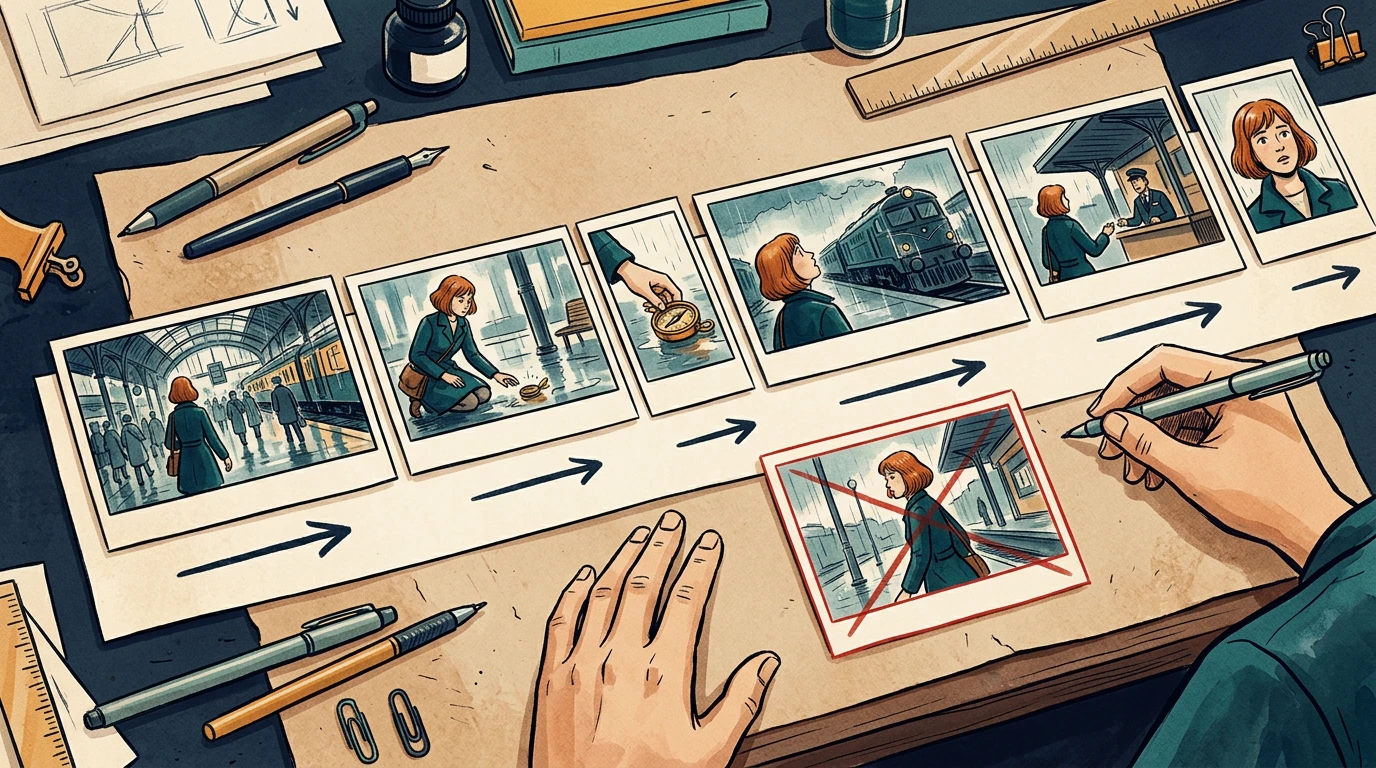
The running example is a 24-second station sequence. Mira enters, sees a compass, picks it up, notices a train, approaches an attendant, and reacts to a new clue. Her copper bob, teal coat, and brass compass remain consistent throughout.

Assign stable shot IDs such as ST01-S010. Keep those IDs when inserting or revising shots. Do not rename every later shot just because one image was added.

Step 2: Specify the timebase and duration

Confirm the delivery aspect ratio, frame dimensions, and frame rate with the editor before production starts. The example below uses 24 fps and six shots totaling 24 seconds. It is a planning example, not a claim about any model's supported clip length.

Related hot tags

स्टोरीबोर्ड

वीडियो प्रोडक्शन

Production Checklist

लोकप्रिय क्रिएटर टूल

प्रेरणा को अपनी अगली कहानी में बदलें

LlamaGen के साथ कॉमिक, स्टोरीबोर्ड और स्टाइलिश फोटो बनाएं।

01

एआई कॉमिक जनरेटर

बस कुछ ही मिनटों में, अपने विचार को सुंदर कॉमिक स्ट्रिप में बदलें।

कॉमिक बनाएं
02

एआई मंगा जनरेटर

जानदार मंगा कला और बहुउपयोगी कहानियाँ बनाएं।

एआई के साथ मंगा बनाएं
03

AI स्टोरीबोर्ड जनरेटर

निर्माण से पहले हर दृश्य का कल्पनात्मक रूप से अवलोकन करें।

एआई के साथ स्टोरीबोर्ड बनाएं
04

फोटो को कॉमिक में बदलें

किसी भी फोटो को कॉमिक-शैली के चित्र में बदलें।

चित्रों से कॉमिक बनाएं
05

एआई कॉमिक स्ट्रिप्स मेकर

निरंतर करैक्टर के साथ साझा करने योग्य स्ट्रिप्स बनाएं।

एआई के साथ कॉमिक स्ट्रिप्स बनाएं

LlamaGen community

checkmark

Get hands-on help with your comics

checkmark

Showcase your comics to fellow LlamaGen creators

checkmark

Participate in special events to win gifts

परिवर्तन लॉग

युवाओं के सपनों को जगाएं
जहाँ लाखों कहानियाँ जीवंत हो उठती हैं

LlamaGen की नवीनतम फीचर रिलीज़, प्रोडक्ट सुधार, डिज़ाइन अपडेट और महत्वपूर्ण बग फिक्स का सारांश।
✦
✧
✦
✧

के लिए एक नया माध्यम कहानी कहने

असीमित कहानियाँ, कॉमिक्स, एनीमेशन, गेम्स और बहुत कुछ—सेकंडों में बनाएं, जो आधुनिक दर्शकों से जुड़ें

ShotStory beatSecondsFrames at 24 fps
S010Mira enters the station372
S020She notices the compass496
S030She picks it up372
S040A train catches her attention5120
S050She approaches the attendant496
S060She recognizes a clue5120
TotalComplete sequence24576

Use one explicit convention in the timing sheet. For example, start frames can be inclusive and end frames exclusive: S010 occupies frames 0 through 71, with an end boundary of 72.

Do not mix that convention with an editor's inclusive In/Out interpretation without converting the numbers first. Adobe's timecode documentation is a useful reference when aligning frame counts and display choices with the receiving editor.

A conceptual six-shot sequence with varied timeline widths and continuity directions

The card widths illustrate pacing. Use the timing sheet, not visual card width, as the numeric source of truth.

Step 3: Describe what moves and what stays fixed

Separate subject motion from camera motion. Phrases like "make it cinematic" leave too many decisions unresolved.

For each shot, write:

Shot: ST01-S030
Start: Mira crouches; compass rests on the wet floor.
Action: her right hand lifts the compass toward her face.
Camera: low medium shot, restrained push-in.
End: compass is held still at chest height.
Preserve: face, copper bob, teal coat, compass shape, station lighting.
Avoid: added people, extra hands, changing train direction.

A clear start and end state helps the next shot connect. If your selected video tool cannot deliver the requested camera behavior, simplify the shot or replace it with an editorial move instead of repeatedly regenerating without a clear diagnosis.

Step 4: Include references and audio decisions

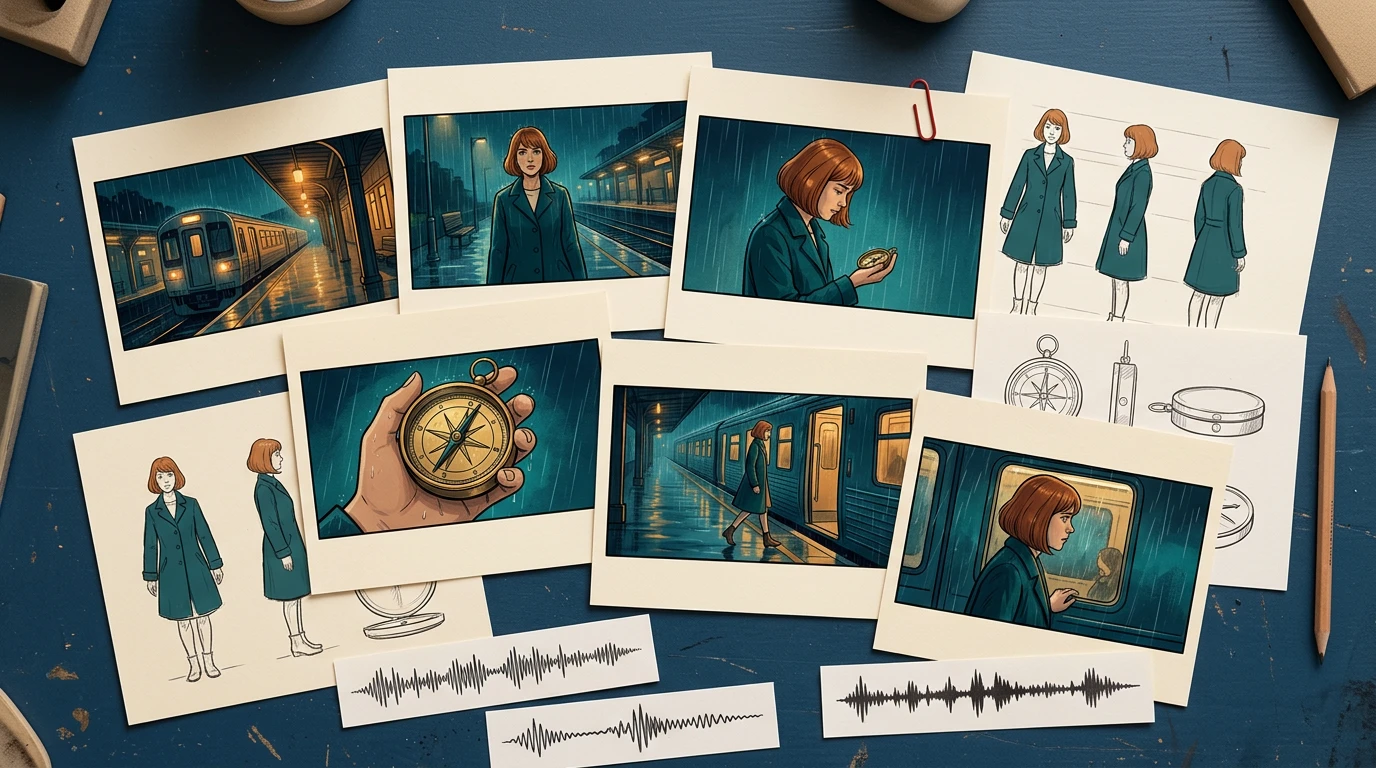
Provide the approved character reference, recurring prop reference, and location reference alongside the frames. Include only the versions the recipient should use.

For audio, distinguish final dialogue, temporary voice, sound effects, ambience, and music. Record cue positions and whether an audio file is approved for publication. Do not let a temporary track become the final soundtrack just because it was attached to the animatic.

A conceptual handoff kit with storyboard cards, character and prop references, and audio cue strips

The package should explain the scene even if the recipient has not watched earlier iterations.

Step 5: Check continuity at the cuts

Review the last useful frame of each shot beside the first useful frame of the next. Watch for changes in hand position, prop scale, screen direction, eyeline, lighting, and background geography.

In the local timing-sheet exercise, an intentionally missing S040 entry creates a 120-frame gap. The corrected sheet restores the six-shot sequence to 576 continuous frames. That validates the schedule structure; it does not validate motion quality or editorial pacing.

For visual continuity, run a separate review. A repaired timing row cannot fix a character suddenly holding the compass in the other hand.

Step 6: Send a package another person can open

A simple handoff structure is easier to inspect than a folder full of filenames containing "final."

station-sequence/
  brief-and-delivery-spec.txt
  shot-list.csv
  frames/
    ST01-S010-v03.png
    ST01-S020-v02.png
  references/
    mira-approved-v02.png
    compass-approved-v01.png
  audio/
  animatic-review-v04.mp4
  revision-log.csv

List every expected file in a manifest, including version and approval state. Use relative paths inside the package when practical. Open it from a clean folder or a second machine to catch missing references.

When exporting XML or another interchange format, test it in the receiving application before promising a seamless transfer. For a small production, a frame sequence plus CSV may be a more predictable fallback.

Step 7: Approve a short motion test before scaling

Choose one difficult representative shot: a face, a hand interacting with the compass, or a camera move across overlapping layers. Review that test before converting every frame into video.

Track preparation time, generation wait, review, revision, and assembly separately. Record the actual credits or cost reported by the selected tool. Static storyboard generation time does not predict a finished video's production budget.

Use a specific rejection reason: hand changed, compass melted, direction reversed, timing too short, or dialogue obscured. Repair the affected shot and recheck its cuts while keeping the other approved material available.

Final handoff checklist

  • Shot IDs and intended order are unambiguous.
  • Every shot points to an approved frame and reference version.
  • Duration, frame rate, aspect ratio, and frame-count convention agree.
  • Subject motion, camera motion, and start/end states are separate.
  • Screen direction, eyelines, hands, and props match across cuts.
  • Dialogue and audio cues are versioned and cleared for their intended use.
  • The animatic and manifest match the same revision.
  • Another person can open the package without missing assets.
  • Outstanding decisions have an owner and approval deadline.

Prepare your next sequence in Storyboard, then use this checklist before motion production. If the sequence still changes substantially during review, return to the storyboard-first workflow before committing more shots.

FAQ

Is an animatic the final video?

No. An animatic mainly tests sequence and timing. The final video may still require motion generation, editing, sound work, and additional quality review.

Should every storyboard frame become one video clip?

No. Match clips to the intended shots and your tool's capabilities. Several storyboard drawings can describe one shot, and one drawing may still need added start and end planning.

What should I do if a generated shot changes the character?

Compare it with the approved references, simplify conflicting motion instructions, and retest that shot. Then recheck its neighboring cuts before accepting the replacement.

Product workflow reviewed November 2, 2026. The timing exercise is a local planning check; this article does not claim that the illustrative sequence was generated as a finished video.

LlamaGen लोगो
  • United States
  • Español
  • Français (France)
  • 日本語
  • 한국어
  • Deutsch
  • 繁體中文 (台灣)
  • 繁體中文 (香港)
  • 简体中文
  • Português
  • Italiano
  • Español (México)
  • العربية
  • Русский
  • Português (Brasil)
  • Tiếng Việt
  • हिन्दी

AI कॉमिक जनरेशन के भविष्य में नेतृत्व कर रहे हैं

  • 24×7 समर्थन
  • साप्ताहिक अपडेट
  • सुरक्षित और नियम-संगत
  • 99.9% अपटाइम

LlamaGen मुफ़्त में डाउनलोड करें

iOSडेस्कटॉप

LlamaGen के बारे में AI से पूछें

उत्पाद

  • नवीनतम लॉन्च
  • विशेषताएँ
  • कॉमिक स्ट्रिप मेकर
  • मंगा स्टूडियोनया
  • चित्र को कॉमिक में बदलें
  • कॉमिक से वीडियो
  • एआई कॉमिक फैक्ट्री
  • कॉमिक एजेंट
  • iOS और Android
  • Mac और Windows
  • डाउनलोड करें
  • कॉमिक जैपनया
  • एआई कॉमिक जनरेटर
  • एआई कार्टून जेनरेटर
  • एआई वेबटून जनरेटर
  • कॉमिक स्ट्रिप मेकर
  • चित्र को कॉमिक में बदलें
  • एआई मंगा जनरेटर
  • मंगा अनुवादक
  • फोटो से एनीमे
  • एनीमे से वास्तविक जीवन
  • मंगा रंग भरें
  • एनीमे पात्र जनरेटर
  • पिक्सेल गेम एसेट टूल्स
  • एआई स्प्राइट शीट जनरेटर
  • सर्वश्रेष्ठ पिक्सल गेम टूल्स 2026
  • फोटो कॉमिक मेकर
  • Comic Life का विकल्प

संबंधित उत्पाद

  • LlamaGen परिवार
  • सिनियोबोर्डनया
  • कॉमिक्स एपीआई

प्लान्स

  • मूल्य निर्धारण
  • स्टार्टर
  • प्रो

समुदाय

  • रचनाकार
  • सहयोगी
  • पार्टनर

AI Models

  • Grok Imagine Image 2.0
  • Wan 3.0
  • Wan 3.0 Prime
  • Seedance 2.5
LinkedInX (Twitter)
  • होम
  • लेख
  • ब्लॉग
  • बनाएं
  • मूल्य निर्धारण
  • एपीआई
  • Affiliate ProgramNEW
  • कॉमिक जैप
  • वेलिका
  • एंटरप्राइज
  • शिक्षा
  • कॉमिक एपीआई
  • सेल्स से संपर्क करें
  • शिक्षा योजनाएँ
  • शिक्षक
  • छात्र
  • शिक्षक और छात्र
  • स्टार्टअप्स
  • शैक्षिक छूट
  • कंपनी

    • हमारे संस्थापक से बात करें
    • परिचय
    • उत्पाद रोडमैप
    • करियर
    • हमें ईमेल करें
    • हमारा मैस्कॉट वर्ल्ड
    • मीडिया किट
    • KOL साझेदारी
    • सामग्री

    मदद

    • सहायता केंद्र
    • विश्वास
    • सुरक्षित एआई
    • प्रोफेशनल सेवाएँ
    • सामान्य प्रश्न
    • सुरक्षा
    • सुलभता
    • वीडियो ट्यूटोरियल
    • हमसे संपर्क करें
    • साइटमैप
    सर्वसम्मति
  • स्नेह दीवार
  • LlamaGen MCPनया
  • LlamaGen डेवलपर
  • संसाधन

    • परिवर्तन लॉग
    • ब्लॉग
    • गाइड्स
    • व्यक्तिगत कॉमिक्स
    • विशेषताएँ
    • विकल्प
    • सर्वश्रेष्ठ एआई ऐप्स
    • GPT-6 मंगा रंगाई गाइड
    • Claude कॉमिक बुक कौशल
    • Gemini एआई कॉमिक गाइड
    • वह कॉमिक
    • शैक्षिक छूट
    • छात्र छूट

    उपकरण

    • एआई लोगो जनरेटर
    • Grokbot-स्टाइल कैरेक्टर जनरेटर
    • पीएनजी से कॉमिक
    • पाठ से कॉमिक
    • पीडीएफ से कॉमिक
    • स्क्रिप्ट से कॉमिक
    • पुस्तक से कॉमिक
    • चित्र को कॉमिक में बदलें
    • एआई पिक्सेल आर्ट जेनरेटर
    • शैक्षिक कॉमिक्स
    • एआई वीडियो जनरेटर
    • Gemini AI वीडियो जनरेटर
    • फ्री फेसलेस AI वीडियो जनरेटर
    • कॉमिक से वीडियो
    • स्टोरीबोर्ड सॉफ़्टवेयर बनाएं
    • AI स्टोरीबोर्ड जनरेटर
    • स्क्रीनराइटिंग सॉफ़्टवेयर
    • स्क्रीनप्ले संपादक
    • कहानी AI
    • एआई स्टोरी जनरेटर
    • स्टोरीबुक जनरेटर
    • एआई इमेज जनरेटर
    • AI लेयर स्प्लिटर
    • एआई कैमरा कोण नियंत्रण
    • एआई पिक्सेल आर्ट जेनरेटर
    • पिक्सेल गेम एसेट टूल्स
    • एआई स्प्राइट शीट जनरेटर
    • स्प्राइट शीट स्लाइसर
    • सर्वश्रेष्ठ पिक्सल गेम टूल्स 2026
    • एनीमेशन एपीआई
    • ChatGPT/Codex प्लगइन
    • ChatGPT इंस्टॉलेशन गाइड
    • Claude Code प्लगइन
    • Claude Code इंस्टॉलेशन गाइड
  • MiniMax H3
  • Nano Banana 2.1
  • Nano Banana 2 Lite
  • Seedream 5.0 Flash
  • Seedream 5.0 Pro
  • Seedance 2.0 Mini
  • Kling 3.0 Turbo
  • Nano Banana 2
  • GPT छवि 2
  • Gemini Omni Flash
  • All AI Models
  • AI उपकरण

    • एआई आउटफिट एक्सट्रैक्टर
    • एआई हेयरस्टाइल चेंजर
    • एआई मंगा हेयरस्टाइल चेंजर
    • एआई विंड इफेक्ट जनरेटर
    • एआई डेप्थ मैप जनरेटर
    • एआई व्हाइट बैकग्राउंड
    • एआई ऑब्जेक्ट रिमूवर
    • एआई वर्चुअल ट्राय-ऑन
    • एआई धुंधली तस्वीरें साफ करें
    • एआई शोर घटाएं
    • एआई फोटो पुनर्स्थापन
    • एआई उत्पाद की छाया
    • AI बैकग्राउंड जनरेटर
    • एआई हेडशॉट जनरेटर
    • एआई इमोजी निर्माता
    • एआई बैकग्राउंड बदलने वाला टूल
    • एआई खुली आंखें
    • एआई सुंदरता
    • एआई उत्पाद फोटोग्राफी
    Instagram
    YouTube
    Facebook ग्रुप
    Reddit
    Discord
    ईमेल सहायता
    गोपनीयताशर्तेंसाइटमैप
    ब्रांड एसेट्स डाउनलोड करें
    © 2026 LlamaGen.Ai सर्वाधिकार सुरक्षितसभी सेवाएँ ऑनलाइन हैं

    पिछले ब्लॉग्स

    Storyboard-to-Video Handoff Checklist: Shots, Timing, Audio, and Continuity

    Storyboard-to-Video Handoff Checklist: Shots, Timing, Audio, and Continuity

    Turn approved storyboard frames into a clear video handoff with stable shot IDs, timing, motion note

    Jay
    Jay
    १ नवंबर, 2026
    How to Localize a Comic Without Redrawing the Artwork

    How to Localize a Comic Without Redrawing the Artwork

    Preserve approved comic art while translating dialogue, rebuilding editable lettering, checking read

    Jay
    Jay
    ३१ अक्टूबर, 2026
    Batch Comic Production Workflow: Draft, Approve, Repair, and Export 40 Pages

    Batch Comic Production Workflow: Draft, Approve, Repair, and Export 40 Pages

    Plan a 40-page AI comic with a pilot, reviewable batches, a page ledger, selective repairs, and expo

    Jay
    Jay
    ३० अक्टूबर, 2026
    From a Flat AI Image to an Editable Comic Page

    From a Flat AI Image to an Editable Comic Page

    Turn a finished comic image into an editable comic page by reviewing an asset sheet, extracting tran

    Jay
    Jay
    २८ अक्टूबर, 2026
    सभी ब्लॉग देखें
    Storyboard-to-Video Handoff Checklist: Shots, Timing, Audio, and Continuity - LlamaGen.AI Blog