



Try Different Manga Styles
Test multiple manga transformation styles and find the perfect look for your photos
How to Turn a Photo into a Manga‑Style Image
Upload a reference, review the request cost, and inspect your manga-style result.
Click to upload
JPG, PNG, WEBP
Step 1: Upload photo to AI manga filter
Pick your favourite photo and upload it to our AI manga filter.

Step 2: Click the 'generate' button
Let our AI do the work and transform your photo into manga style.

Step 3: Download the transformed image
Save your manga‑style artwork and share it with friends.
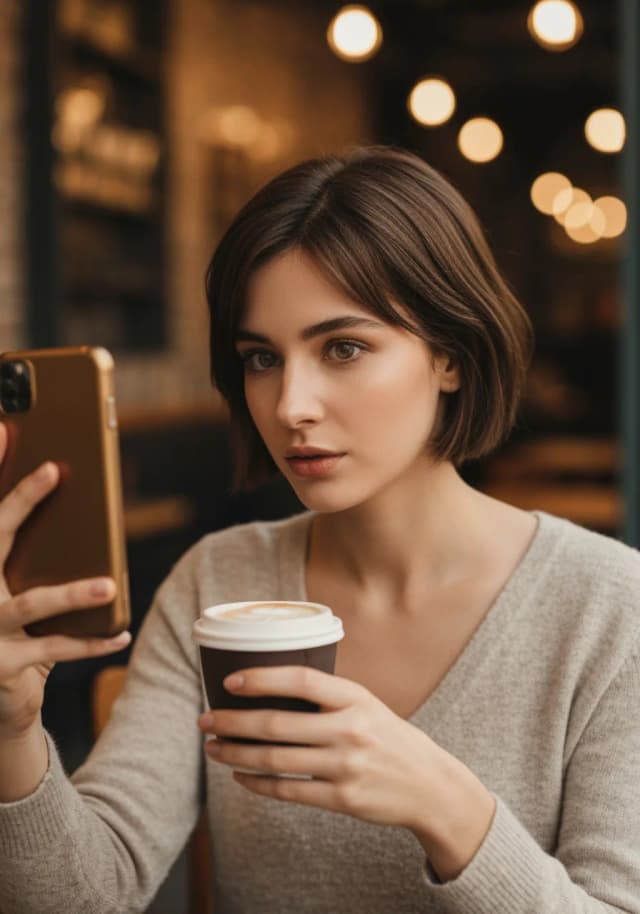
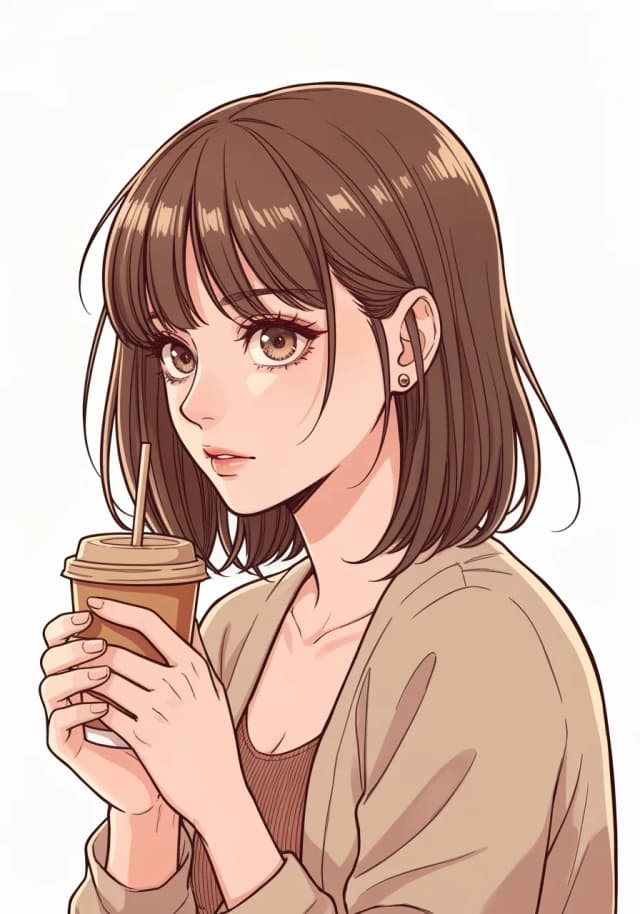
Turn Portraits into Manga‑Style Photos Easily
With our AI Manga Filter, you can effortlessly turn portraits into eye‑catching manga‑style photos in seconds. For example, the sample image shows a woman taking a casual selfie while enjoying coffee—after processing, her photo becomes a vivid manga‑style character with expressive lines, stylised shading, and that familiar anime look.
Whether it’s a simple selfie or a detailed portrait, our AI captures the essence and adds a creative manga twist—ideal for social media, profile pictures, or just having fun with your photos.
Tips for Best Manga Filter Results
Use High‑Quality Photos
Clear, well‑lit photos give the best manga transformations. Try to avoid blurry or low‑resolution images.
Choose Clear Facial Features
Visible facial details and good lighting help create detailed manga characters with expressive eyes.
Experiment with Different Photos
Try portraits, selfies, group photos, and pets—each gives a different manga‑style result.
Avoid Heavy Filters
Start with natural photos. The AI applies its own manga aesthetics for better results.
Try Different Angles
Front‑facing shots work well; side profiles and three‑quarter angles can add drama and character.
Consider Composition
Simple backgrounds and balanced framing usually give cleaner, more appealing manga artwork.
Compare LlamaGen AI Manga Filter with Other Tools
Instant manga results vs manual photo editing
| Feature | LlamaGen.ai | Other Tools |
|---|---|---|
| Instant Processing | ✓ | ✗ |
| Authentic Manga Style | ✓ | ✗ |
| Multiple Art Styles | ✓ | ✗ |
| High Resolution Output | ✓ | ✓ |
| Review download conditions | ✓ | ✗ |
| Account and credits required | ✓ | ✗ |
| No Credit Card Required | ✓ | ✗ |
| Commercial Use Allowed | ✓ | ✗ |
Help Center
AI Manga Filter FAQ
What is an AI Manga Filter?
An AI Manga Filter automatically transforms photos into manga-style artwork using characteristic line art, stylised shading, and expressive features.
Can I use the AI manga filter for free?
Yes. You can try basic generation for free when your account has enough available starter or earned free credits. Sign in and check the cost and model eligibility before generating. Each request uses credits; paid-only models or further generations may require a paid plan or purchased credits. You can also browse the examples for free without signing in.
What image formats are supported?
JPG, JPEG, PNG, and WEBP are supported for uploads and high-resolution downloads.
How long does processing take?
Most photos convert in 5–10 seconds depending on image size and server load.
Can I use the generated manga art commercially?
Yes. You own the outputs. Ensure you have rights to the original photo.
What makes a good photo for manga transformation?
Clear portraits with good lighting and simple backgrounds produce the best results.
LlamaGen AI Manga Filter vs Other Tools
Choose a workflow based on control, review time, and generation costs.
| Feature | AI Manga Filter | Traditional Tools |
|---|---|---|
| Generation conditions | Sign-in and credits required; current cost is shown in the tool | Many apps require payment or show ads/watermarks |
| Conversion Quality | High-quality manga-style conversion with clean lines and shading | Often blurry or cartoon-like rather than real manga |
| AI Model | Custom AI model trained on authentic manga art | Generic filters or presets, not trained for manga |
| Upload & Process | Just upload a photo and get instant manga results online | Manual editing across multiple tools |
| Ease of Use | Beginner-friendly interface | Complex settings, hard for casual users |
| Output Format | High-resolution PNG/JPG instantly | Often low-res images or watermarked exports |
AI Manga Filter FAQs
What is an AI manga filter?
An AI Manga Filter automatically transforms regular photos into manga-style images using AI. It analyses faces, backgrounds, and lighting, then applies comic-style effects like bold outlines and stylised shading—perfect for selfies, pets, and landscapes with one click.
Can I make a manga with AI?
Yes. Try our AI manga generator to create manga from text, or use our online manga maker to customise panels, bubbles, and layouts.
Are the pictures I upload private?
Yes. We process images securely and don’t store them permanently. Your photos are used only for transformation and then deleted.
How does the AI manga filter work?
It detects key elements (faces, edges, scenes), maps them to manga-style features (expressive eyes, line art, cel shading), then renders textures, outlines, and tone for an anime-inspired image—usually in seconds.
Are manga generations unlimited?
Each generation uses credits. Attempts depend on your account balance, plan, and current service limits.