

Disyorkan
Quick Mode
Disyorkan untuk mula. Satu helaian lapisan PNG yang boleh dibaca daripada satu imej.
Muat naik imej yang jelas dan pisahkan kepada latar belakang, latar depan, subjek, teks, objek, watak komik, seni anime, prop, atau grafik produk. Semak helaian lapisan pertama, kemudian ekstrak lapisan PNG lutsinar individu dan eksport ZIP atau PSD permulaan yang boleh diedit.
or drop a file,
paste image or
No image? Try one of these:
Muat naik imej sumber sebenar di halaman ini. Quick Mode menghasilkan helaian lapisan pertama untuk semakan; PRO menambah baik helaian itu apabila sumbernya jelas. Laluan kedua berbayar mengekstrak lapisan PNG lutsinar berasingan yang boleh dimuat turun secara individu, sebagai ZIP, atau sebagai PSD permulaan yang boleh diedit.
Disyorkan untuk mula. Satu helaian lapisan PNG yang boleh dibaca daripada satu imej.
Model lanjutan. Pemisahan dalam helaian aset lebih bersih.
AI Layer Splitter ialah alat imej-ke-lapisan untuk pencipta yang sudah ada imej sumber tetapi memerlukan bahagian produksi praktikal di sebaliknya: latar depan, latar belakang, subjek, watak, rambut, muka, pakaian, anggota badan, teks, objek, prop, butiran produk, dan aksesori.
Dibina untuk artis, pasukan permainan indie, animator, pemasar, pasukan e-dagang, dan pencipta ACG yang perlu menukar satu imej rata kepada aset produksi boleh guna semula tanpa menghabiskan keseluruhan sesi untuk masking.
PNG yang cantik tidak boleh berkelip, parallax, tukar prop, asingkan produk, atau menjadi sprite sehingga bahagian utama dipisahkan.
Alat seleksi, pembersihan tepi, dan penamaan lapisan boleh mengambil masa lebih lama daripada ujian animasi pertama.
Menukar satu sarung tangan, beg, kasut, ekor, helmet, atau reben boleh menjadi repaint penuh apabila setiap bahagian bercantum.
Sebelum
Satu imej watak yang menarik dan nampak lengkap, tetapi masih terkunci sebagai bitmap rata tunggal.
Selepas
Helaian aset yang boleh dibaca dengan latar depan, latar belakang, watak, teks, dan objek dipisahkan supaya artis boleh merancang gerakan, menyunting butiran, dan menyerahkan rujukan produksi.
Cipta laluan pemisahan untuk semakan sebelum membuka aliran kerja masking manual penuh.
Bergerak daripada satu imej watak kepada bahagian untuk animasi, permainan, dan serahan suntingan.
Kajian kes
Maskot jenama boleh bergerak daripada satu ilustrasi statik kepada rujukan kepala, ekor, kasut, beg, pakaian, dan aksesori yang dipisahkan untuk perancangan animasi yang pantas.
Hasil
Artis boleh menyemak bahagian yang boleh digunakan, memutuskan sama ada perlu jalankan semula dengan PRO, dan memulakan pembersihan daripada helaian konkrit dan bukannya sesi masking kosong.
Aliran kerja lapisan LlamaGen
persediaan aset kartun, anime, dan permainan
Gunakan AI Layer Splitter sebagai laluan pertama yang bersih: muat naik satu imej, jana helaian lapisan, kemudian gunakan hasilnya dalam editor anda, aliran kerja animasi, atau saluran aset permainan.
Gunakan seni watak penuh, seni maskot, seni utama anime, konsep permainan, gambar produk, reka bentuk grafik, prop, atau ilustrasi gaya produk dengan tepi yang kelihatan.
Quick Mode mencipta titik semak visual yang pantas supaya pasukan boleh melihat rambut, muka, pakaian, tangan, prop, kasut, latar belakang, teks, objek, dan aksesori dalam konteks.
PRO Mode paling sesuai selepas helaian pertama membuktikan sumber itu mudah dibaca dan projek memerlukan laluan model yang lebih bersih.
Gunakan helaian yang dimuat turun untuk blok gerakan, perancangan rig, rujukan sprite, repaint, atau komposit kreatif.
Matlamatnya ialah titik mula produksi yang boleh disemak, bukan demo AI yang kabur.
Alat pemisah lapisan AI menganalisis karya anda dan mengenal pasti elemen berbeza seperti watak, latar belakang, dan objek, lalu mencipta lapisan berasingan. Ia menggunakan AI untuk memecahkan imej sambil mengekalkan susun atur, hierarki, dan niat reka bentuk, dan berfungsi paling baik dengan reka bentuk grafik, produk ilustrasi, seni watak, dan aset permainan yang bersih.
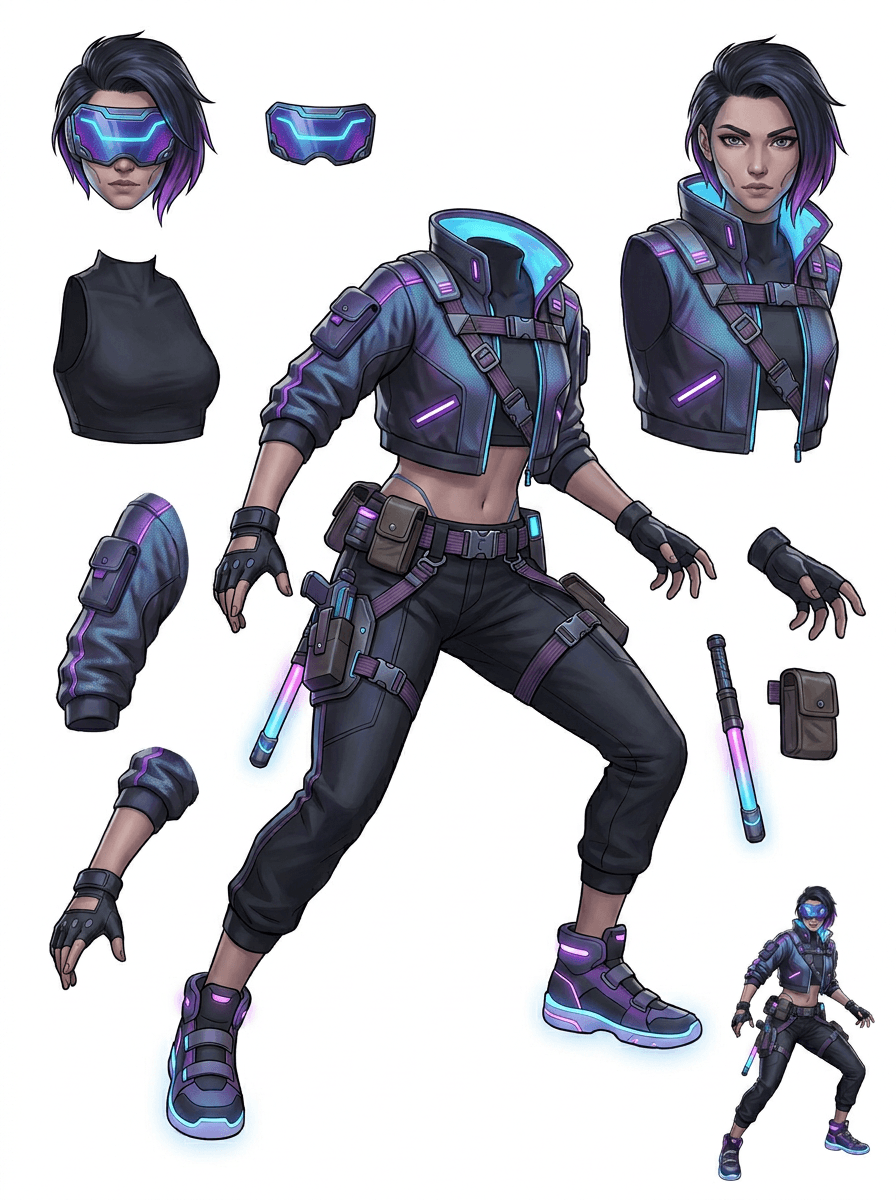
Galeri disusun mengikut senario produksi utama: maskot kartun, watak permainan, watak anime, dan aliran kerja imej-ke-lapisan berasaskan objek. Setiap contoh menggunakan imej sumber AI yang asal dan helaian aset terpisah yang sepadan.
Maskot, watak kanak-kanak, hero gaya pelekat, dan watak motion-comic dengan prop dan aksesori yang ekspresif.
Hero RPG, pelari cyber, NPC santai, lapisan peralatan, senjata, rujukan inventori, dan helaian persediaan sprite.
Seni utama anime moden dengan pemisahan rambut, uniform, reben, helmet, sarung tangan, but, harness, dan azimat.
AI Layer Splitter paling berguna apabila outputnya mempunyai tujuan. Senario ini menerangkan imej sumber yang perlu dimuat naik, bahagian mana yang perlu diperiksa, dan bagaimana helaian bergerak ke dalam animasi, permainan, komik, e-dagang, atau produksi jenama.
Animasi maskot
Gunakan pose maskot yang jelas bila anda perlukan pelekat sosial, iklan pendek, gerakan halaman pendaratan, atau perancangan rig mudah.
Sumber untuk dimuat naik
Maskot penuh badan dengan muka, tangan, kasut, ekor, prop, dan tepi pakaian yang kelihatan.
Lapisan berguna untuk diperiksa
Serahan produksi
Beri artis animasi helaian bahagian untuk semakan sebelum mereka menjiplak, melukis semula, atau melakukan rig gerakan akhir.
Persediaan aset permainan indie
Gunakan seni permainan yang diluluskan apabila pasukan perlukan variasi peralatan, ikon inventori, seni profil, atau penerokaan pose yang pantas.
Sumber untuk dimuat naik
Konsep watak yang mudah dibaca dengan perisai, senjata, beg, jubah, rambut, but, dan siluet yang jelas.
Lapisan berguna untuk diperiksa
Serahan produksi
Gunakan helaian sebagai rujukan permulaan untuk pembersihan sprite, pertukaran peralatan, dan seni berhadapan gameplay.
Suntingan anime dan ACG
Gunakan seni watak gaya anime apabila anda perlukan kawalan pada rambut, muka, uniform, reben, sarung tangan, helmet, atau aksesori.
Sumber untuk dimuat naik
Satu watak anime dengan garis besar kuat, butiran pakaian kelihatan, dan gangguan latar belakang yang minimum.
Lapisan berguna untuk diperiksa
Serahan produksi
Semak helaian sebelum suntingan ekspresi, variasi pakaian, kad watak, atau ujian animatik ringkas.
Komik dan iterasi iklan
Gunakan watak kempen, prop, atau produk ilustrasi apabila revisi saat akhir terus menyentuh bahagian visual kecil.
Sumber untuk dimuat naik
Ilustrasi yang digilap dengan objek di tengah, tepi yang kelihatan, dan sasaran revisi utama tidak tertutup.
Lapisan berguna untuk diperiksa
Serahan produksi
Beri pereka helaian konkrit untuk pertukaran prop, variasi yang selamat untuk copy, dan eksperimen komposit.
Alat ini paling kuat apabila subjeknya bersih, penuh, dan terpisah dengan jelas. Ia bukan jalan pintas untuk setiap foto sesak, helaian lakaran, pose terlindung, atau susun atur padat yang banyak pertindihan antara latar depan, latar belakang, teks, dan objek.
Helaian yang dijana harus dinilai seperti laluan produksi pertama, bukan fail akhir yang ajaib. Gunakan senarai semak untuk tentukan sama ada mahu muat turun, jalankan semula, crop sumber, atau beralih ke PRO selepas pemisah lapisan imej mengenal pasti kawasan latar depan, latar belakang, subjek, objek, dan teks yang boleh digunakan.
Hasil lemah
Bahagian penting bercantum, digandakan secara rawak, atau tersembunyi di bawah kekacauan visual.
Hasil berguna untuk produksi
Helaian memudahkan bahagian utama yang kelihatan dikenal pasti sekilas pandang: kepala, anggota badan, pakaian, prop, aksesori, dan kepingan latar belakang.
Hasil lemah
Watak kelihatan seperti reka bentuk baharu dengan proporsi, warna, kualiti garis, atau personaliti yang berbeza.
Hasil berguna untuk produksi
Bahagian yang dipisahkan masih terasa berkait dengan arahan seni asal, dengan siluet, palet, dan identiti watak yang dikenali.
Hasil lemah
Helaian itu menarik, tetapi pasukan tidak dapat tahu apa yang perlu dijiplak, dilukis semula, di-mask, atau diuji seterusnya.
Hasil berguna untuk produksi
Artis boleh terus memilih bahagian untuk pembersihan, blok rig, rujukan sprite, pertukaran prop, atau ujian komposit.
Hasil lemah
Pemisahan yang buruk tidak memberi petunjuk sama ada masalah datang daripada model atau imej yang dimuat naik.
Hasil berguna untuk produksi
Hasil menunjukkan apa yang perlu diperbaiki seterusnya: crop lebih dekat, buang tanda lakaran, beri margin lebih luas, ringkaskan latar belakang, atau gunakan PRO.
Setiap kad menunjukkan sumber sebenar dan helaian lapisan yang dijana. Label menerangkan hanya bahagian yang kelihatan dalam hasil itu; alat langsung di atas ialah tempat sumber yang sesuai boleh diteruskan kepada lapisan latar depan, latar belakang, subjek, teks, dan objek individu.
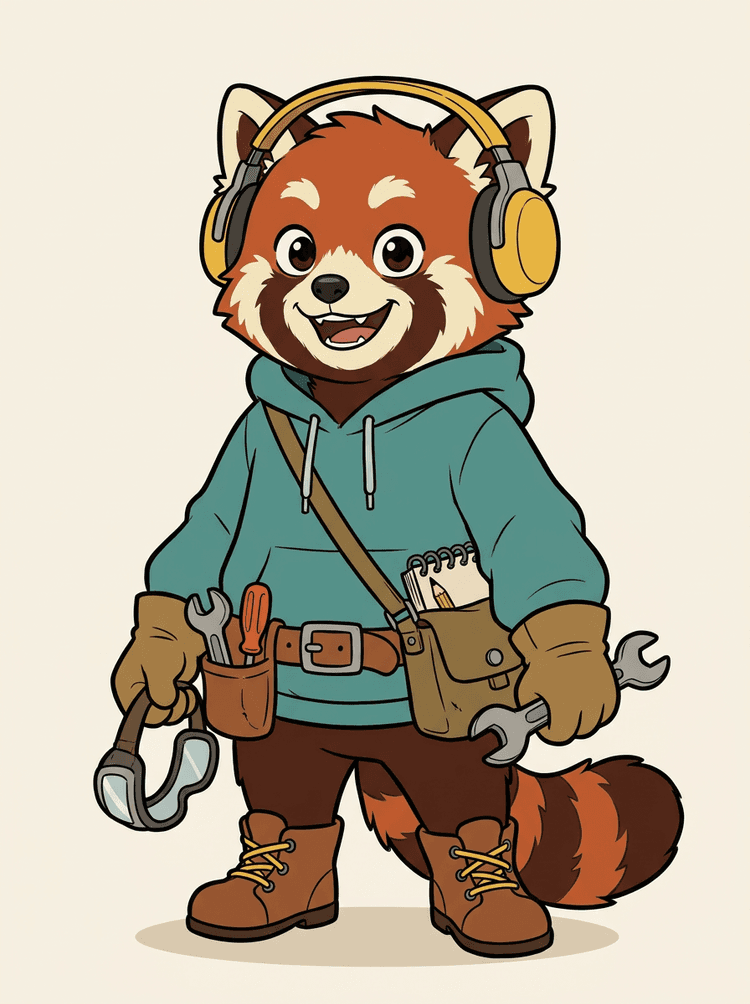
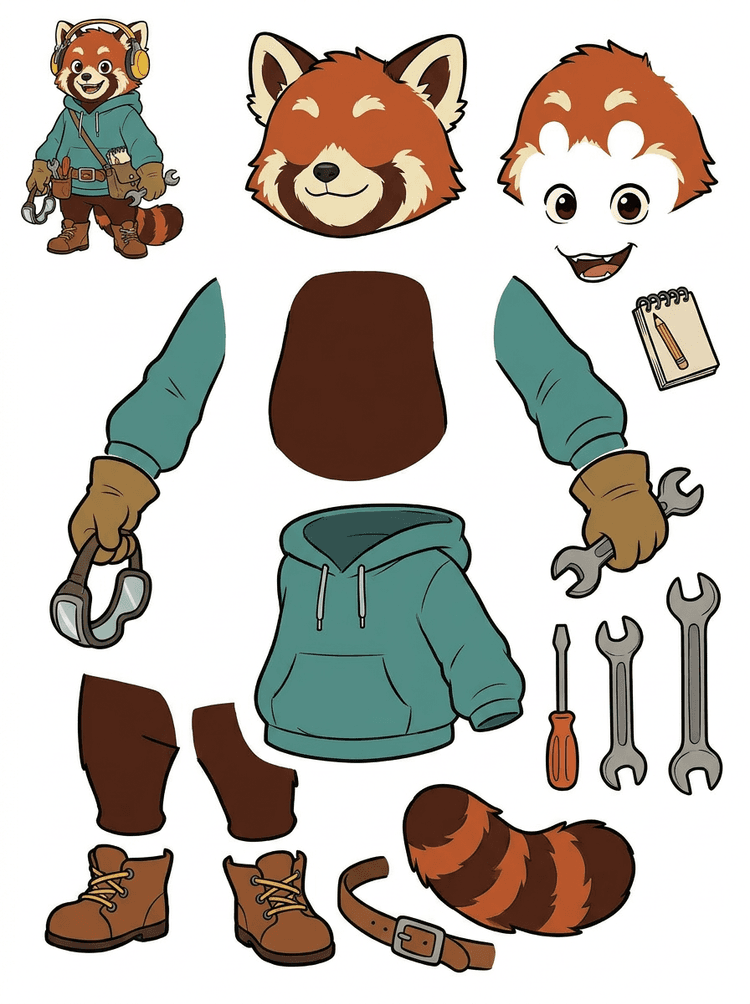
Maskot watak dengan fon kepala, hoodie, beg silang, ekor, kasut, dan alat melukis menjadi helaian praktikal untuk semakan animasi.
Bahagian kelihatan dalam hasil sebenar ini
Serahan produksi
Helaian yang dijana ialah langkah semakan. Teruskan dalam alat langsung untuk mengekstrak kawasan yang kelihatan sesuai sebagai lapisan PNG lutsinar berasingan, kemudian bungkusnya sebagai ZIP atau PSD permulaan yang boleh diedit.

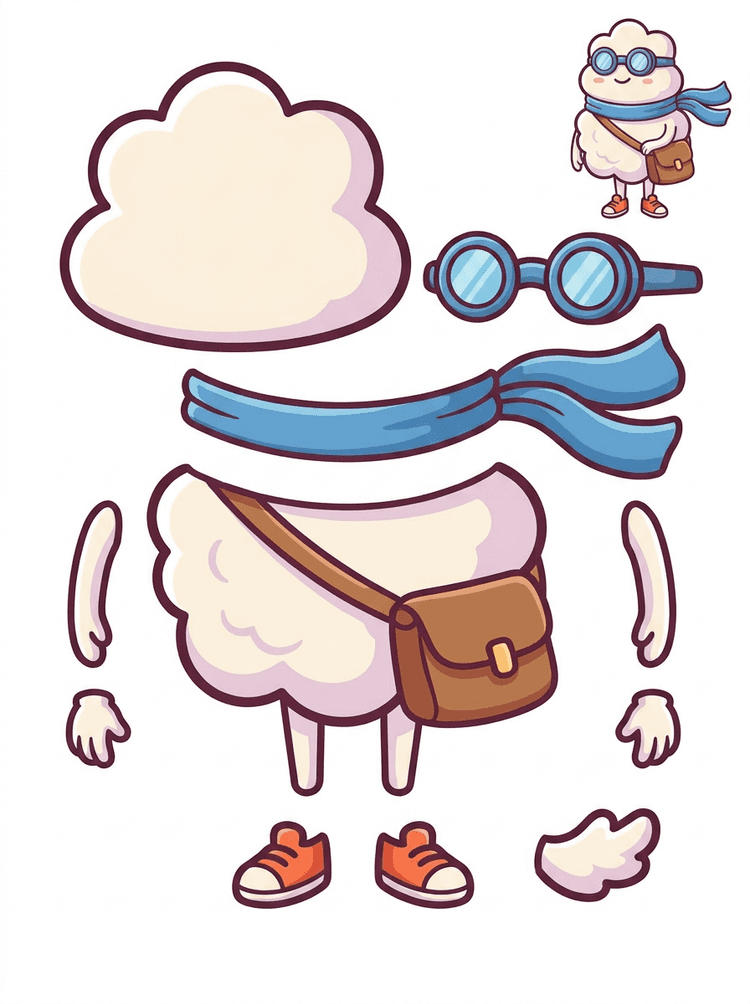
Hero kartun gaya pelekat menjadi helaian bahagian dengan selendang, beg, kasut, gogal, tangan, dan komponen badan bulat.
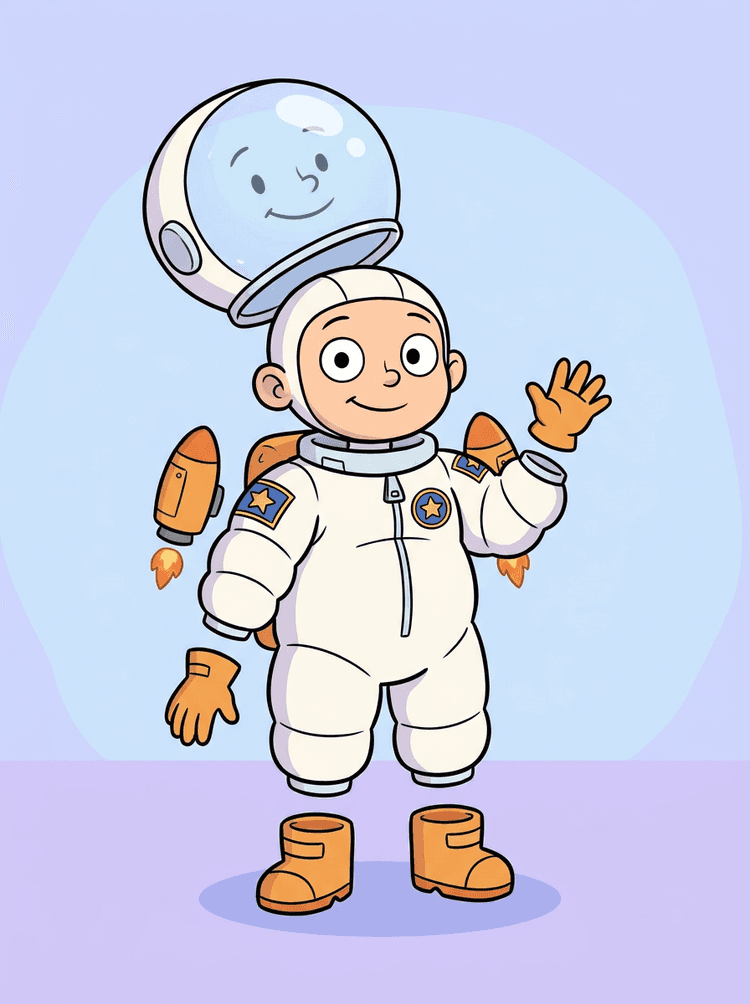
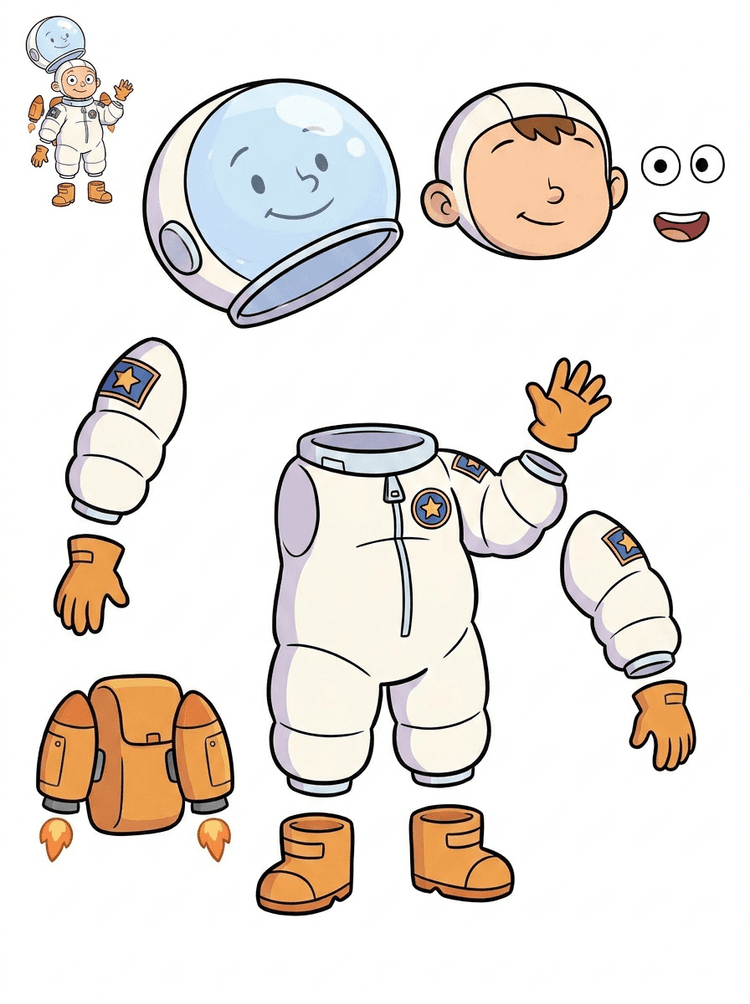
Ilustrasi kanak-kanak angkasawan menjadi helaian untuk helmet, sut, sarung tangan, but, tampalan, beg galas, dan kepingan motion comic.
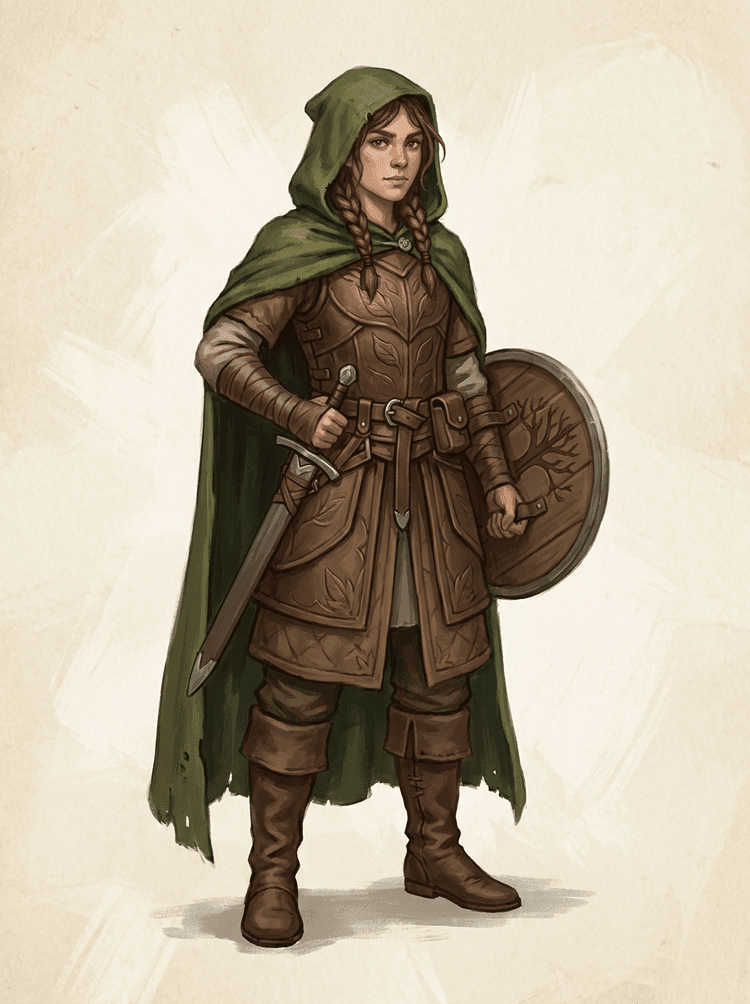
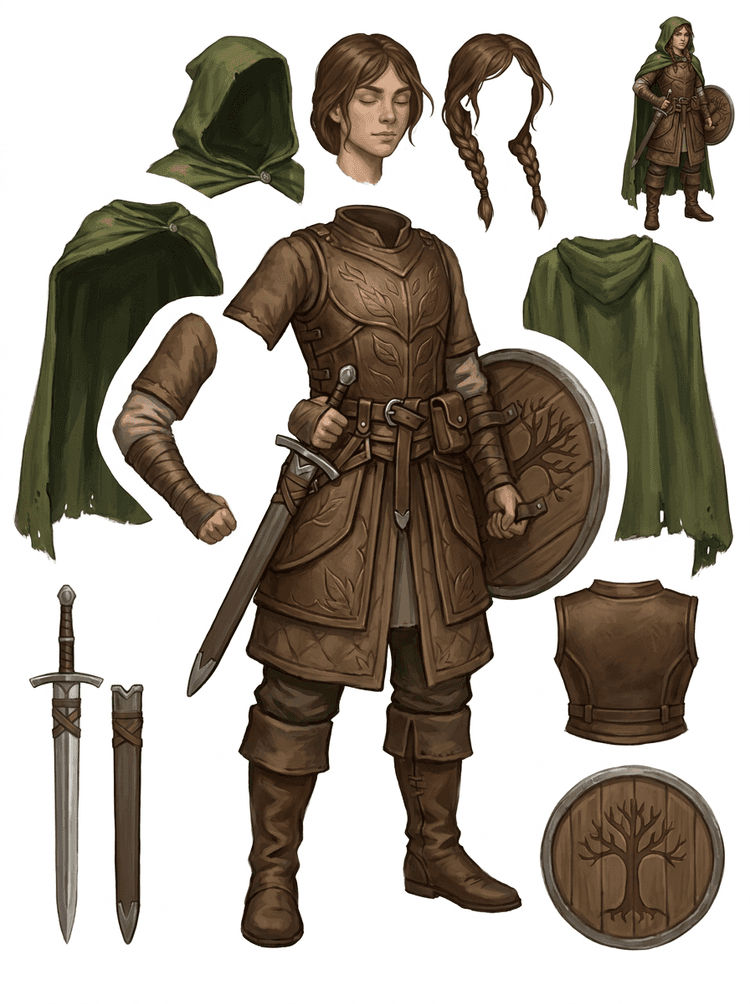
Watak permainan fantasi dipisahkan kepada perisai, jubah, pedang, perisai, kantung, but, anggota badan, dan rujukan sprite yang boleh digunakan semula.
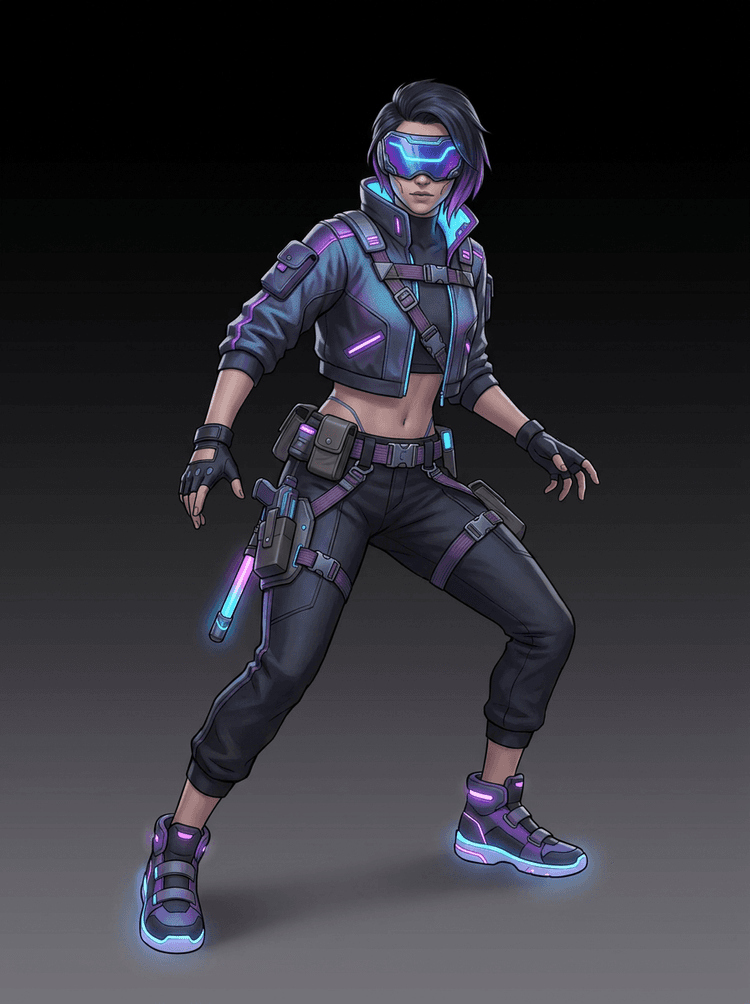
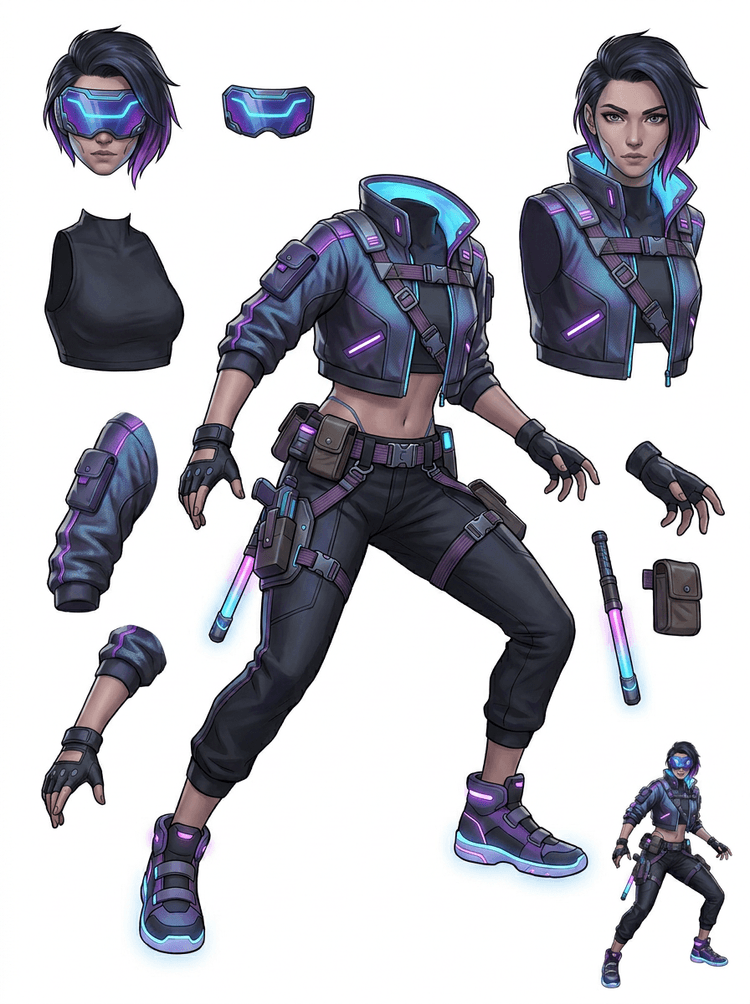
Watak aksi cyberpunk menjadi rujukan bahagian terperinci untuk jaket, visor, sarung tangan, kasut, tali, baton, dan bahagian badan.
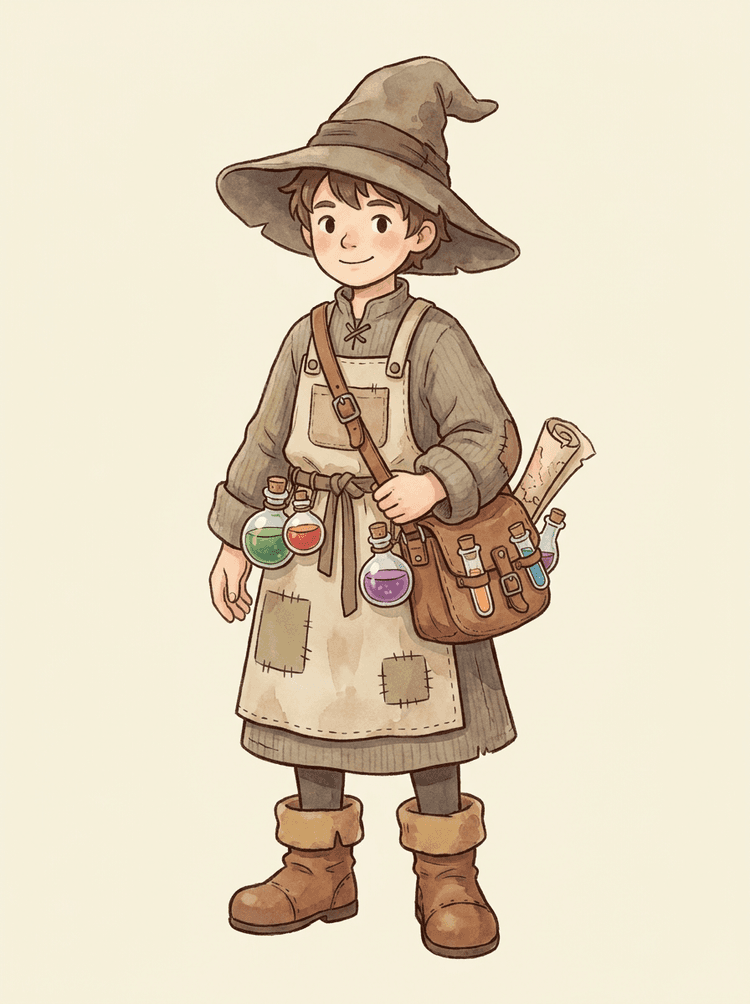
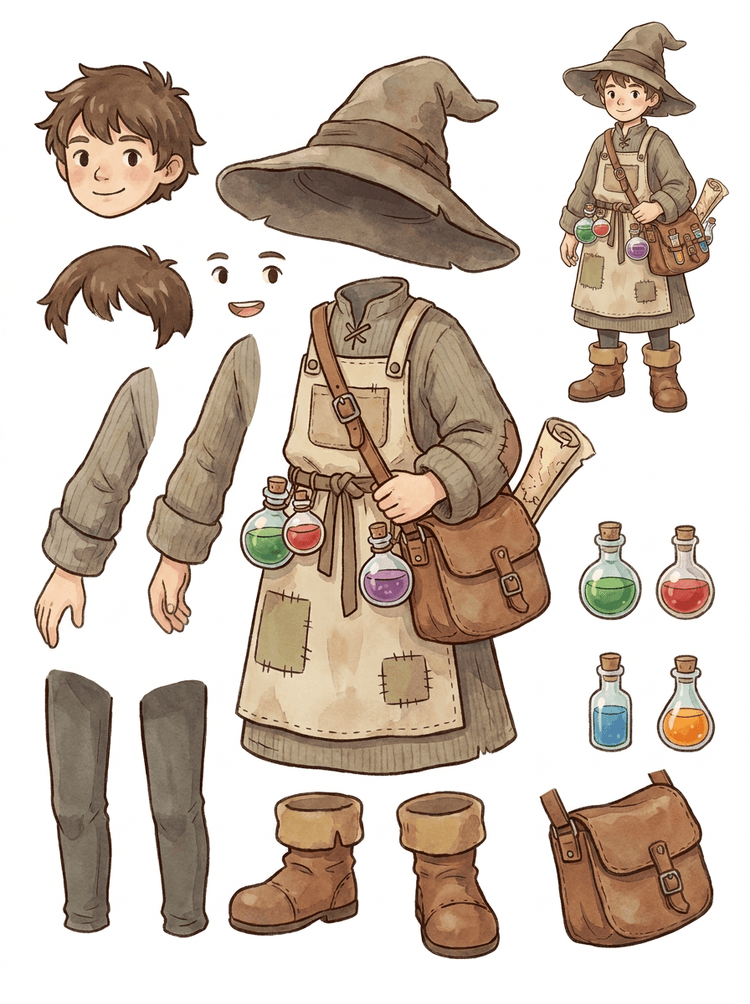
NPC santai dengan topi, apron, beg ramuan, botol, peta, but, dan pakaian hangat menjadi helaian produksi permainan yang boleh digunakan semula.
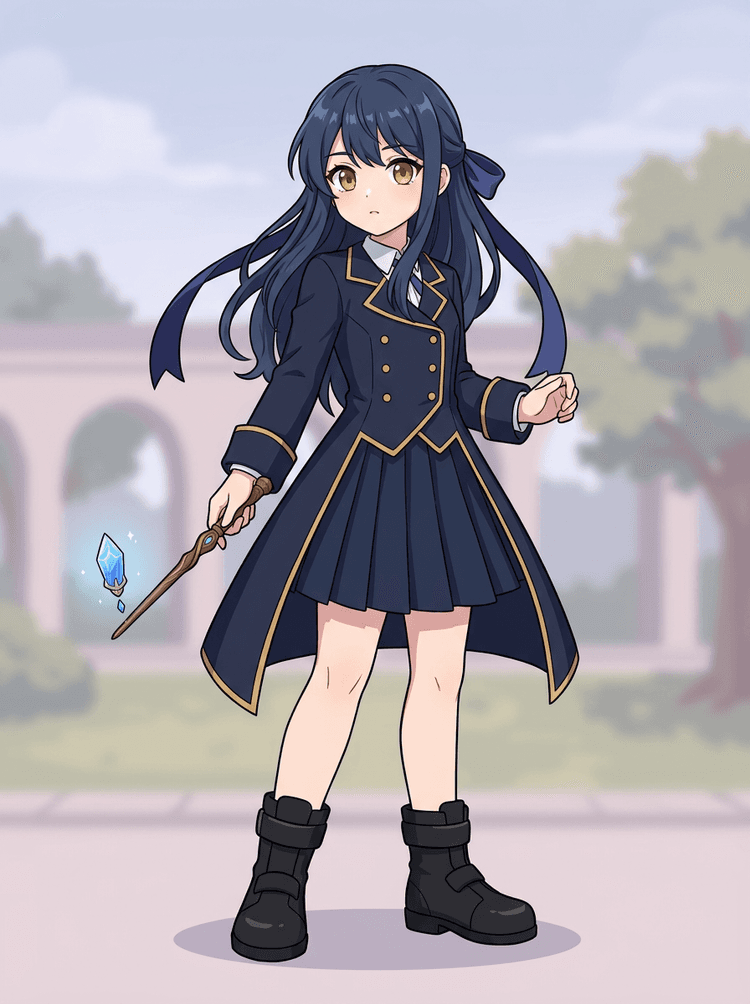
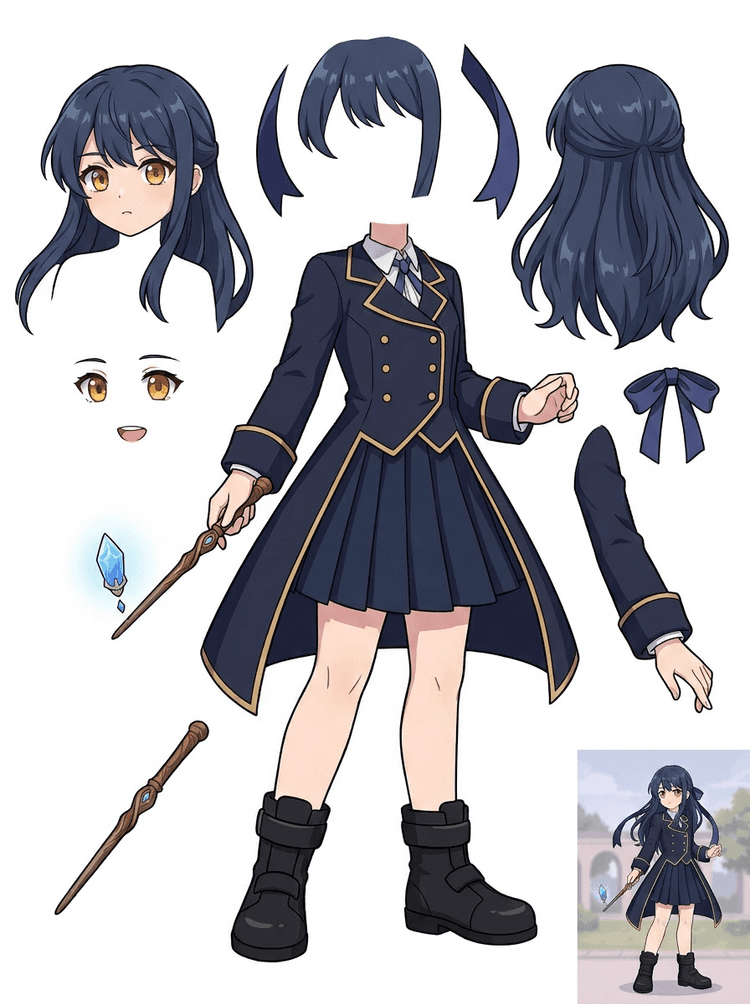
Seni utama anime dengan uniform, reben, tongkat sihir, rambut, azimat, sarung tangan, dan but menjadi helaian bahagian untuk suntingan dan ujian gerakan.
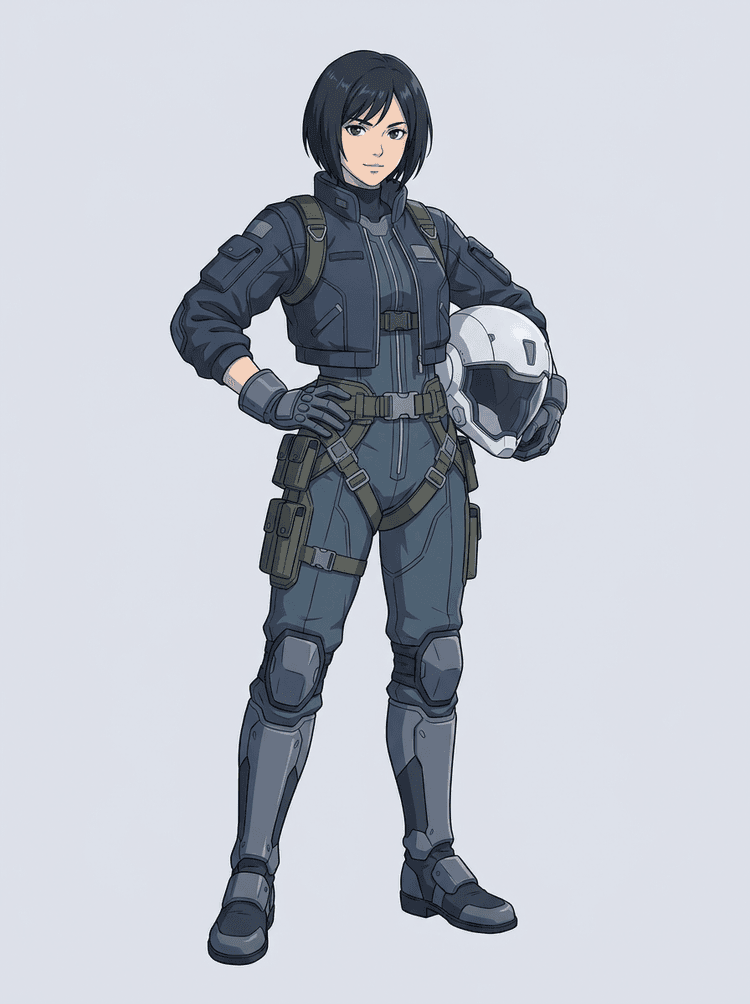
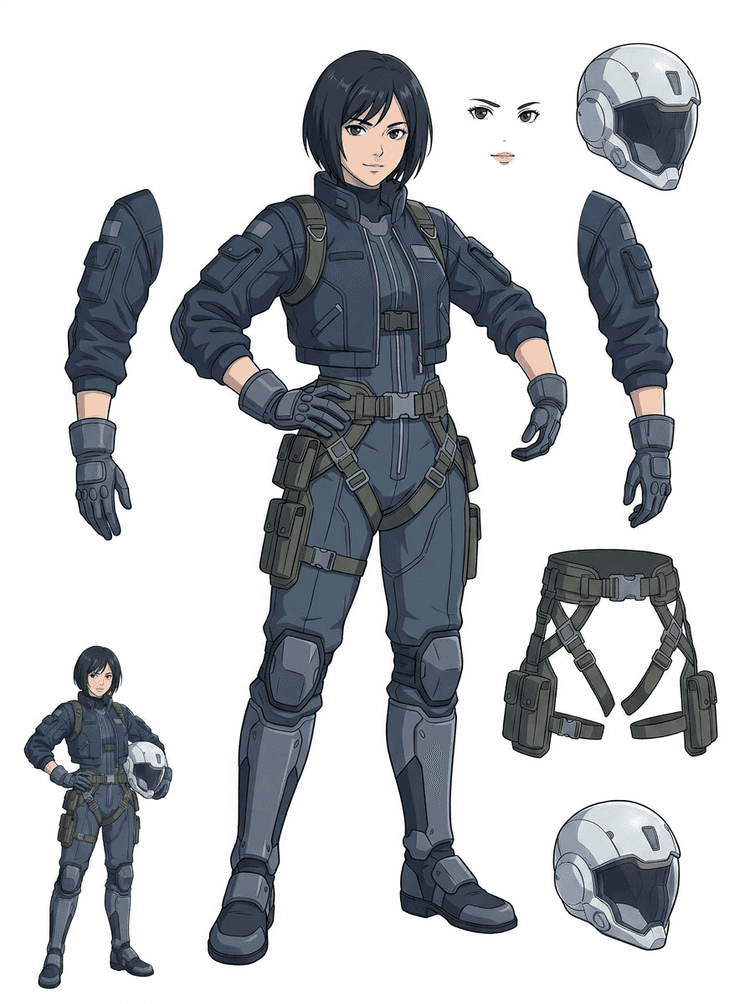
Juruterbang anime sci-fi dipisahkan kepada rambut, muka, jaket, sarung tangan, harness, but, helmet, dan komponen badan.
Tukar satu imej siap kepada bahagian visual berasingan yang lebih mudah disemak, disunting, dianimasikan, atau dibina semula.
Muat naik imej yang jelas dan cipta helaian lapisan PNG yang boleh dibaca dengan latar depan, latar belakang, subjek, objek, teks, pakaian, prop, dan aksesori dalam satu hasil.
Image layer separator membantu pereka, pemasar, animator, dan pasukan permainan mengenal pasti bahagian imej sumber yang boleh menjadi aset boleh diedit. Daripada melukis semula setiap elemen dari awal, pasukan boleh menjana helaian lapisan PNG, membandingkan hasil asal dengan hasil yang dipisahkan, dan memutuskan sama ada sumber perlu dipotong, dibersihkan, guna Quick Mode, atau jalankan PRO.
Cipta helaian yang boleh dimuat turun untuk persediaan sprite, perancangan rig, motion comic, suntingan e-dagang, variasi pelekat, atau serahan watak. Ia paling berkesan apabila satu subjek yang jelas mempunyai tepi yang kelihatan dan pertindihan minimum.
Aliran kerja pemisahan lapisan terbaik mengekalkan konteks. Simpan sumber, helaian yang dijana, dan nota semakan ringkas supaya artis seterusnya tahu apa yang perlu digunakan dan apa yang masih perlu dibersihkan.
Imej asal menerangkan niat apabila animator, artis permainan, atau pereka menyemak helaian yang dipisahkan kemudian.
Helaian pertama jadi lebih bernilai apabila pasukan tahu bahagian mana yang sedia dan mana yang perlu kemasan manual.
Gunakan helaian dan lapisan lutsinar yang dieksport sebagai jambatan praktikal ke animasi, persediaan sprite, suntingan komik, atau komposit. PSD ialah fail permulaan yang boleh diedit, bukan aset produksi akhir yang dijamin.
AI Layer Splitter memberi pasukan laluan pertama yang lebih pantas; aset akhir untuk penghantaran masih mendapat manfaat daripada semakan dan pembersihan manusia.
AI Layer Splitter menukar satu imej rata kepada helaian lapisan PNG yang boleh dibaca dengan latar belakang, subjek, teks, prop, objek, butiran produk, dan bahagian watak yang kelihatan dipisahkan untuk aliran kerja penyuntingan, animasi, seni permainan, motion comic, e-dagang, dan komposit.
Ya. Quick Mode ialah titik mula percuma dalam talian untuk hasil imej-ke-lapisan yang boleh disemak. Gunakannya untuk menguji sama ada imej sumber terpisah dengan baik sebelum menghabiskan masa pada masking manual atau menaik taraf untuk laluan PRO yang lebih bersih.
Ya. AI Layer Splitter berfungsi sebagai pemisah lapisan imej AI berasaskan web: muat naik satu imej, biarkan model mengenal pasti subjek, latar belakang, teks, prop, dan objek, kemudian muat turun helaian imej-ke-lapisan untuk semakan. Ia paling pantas untuk foto yang jelas, reka bentuk grafik, produk ilustrasi, aset permainan, dan seni watak; imej yang kompleks mungkin masih perlu dibersihkan secara manual dalam Photoshop, Figma, atau editor lain.
Muat naik imej yang jelas, jalankan Quick Mode, dan semak helaian imej-ke-lapisan yang dijana. Hasilnya memisahkan latar depan, latar belakang, subjek, teks, prop, dan objek yang kelihatan kepada rujukan praktikal yang boleh anda gunakan untuk penyuntingan, komposit, blok animasi, persediaan sprite, atau pembersihan manual.
Ya. Selepas helaian lapisan pertama dijana, laluan kedua berbayar boleh mengekstrak lapisan PNG lutsinar individu. Anda boleh memuat turun lapisan itu secara berasingan, membungkusnya sebagai ZIP, atau mengeksport PSD permulaan yang boleh diedit. Tepi yang kompleks dan sumber yang padat mungkin masih memerlukan pembersihan manual sebelum penyerahan produksi.
Layer Decomposition ialah keupayaan agen AI yang memisahkan satu imej kepada lapisan visual logik yang boleh diedit seperti latar depan, latar belakang, subjek, teks, dan objek. Ia membantu pasukan bergerak daripada imej rata kepada helaian lapisan yang praktikal untuk semakan, penyuntingan, animasi, dan serahan produksi.
Ya. LlamaGen AI Layer Splitter memisahkan latar belakang, teks, subjek, dan objek yang kelihatan dalam pelayar dan menyediakan helaian aset yang boleh dimuat turun untuk penyuntingan susulan.
Subjek ilustrasi yang bersih paling sesuai: maskot kartun, watak anime, watak permainan, grafik gaya produk, prop, dan reka bentuk penuh badan dengan rambut, pakaian, anggota badan, kasut, senjata, beg, ekor, teks, objek, atau aksesori yang kelihatan.
Ya. Watak kartun dan maskot ialah antara kes penggunaan terkuat kerana garis besar, prop, pakaian, tangan, kasut, dan bahagian muka biasanya cukup jelas untuk menjadi helaian yang berguna.
Ya. AI Layer Splitter untuk aset permainan boleh menukar konsep watak yang bersih kepada titik mula untuk rujukan sprite, variasi pose, ikon inventori, suntingan peralatan, potret UI, dan blok animasi.
Ya. Watak gaya anime boleh dipisahkan kepada rujukan rambut, muka, pakaian, reben, sarung tangan, but, prop, helmet, dan aksesori yang kelihatan apabila imej sumbernya jelas.
Quick Mode mencipta helaian aset yang pantas untuk semakan. PRO Mode menggunakan model dinaik taraf untuk pemisahan lebih bersih apabila imej sumber boleh dibaca dan projek memerlukan laluan berkualiti lebih tinggi.
Tidak. Adegan yang sangat sesak, bahagian badan yang tersembunyi, subjek bertindih, tanda lakaran, bayang tebal, anggota yang terpotong, atau aksesori kecil mungkin masih memerlukan pembersihan sumber atau kemasan manual.
Anda boleh menggunakan output yang dijana mengikut pelan dan terma LlamaGen anda. Pastikan anda juga mempunyai hak ke atas imej sumber yang anda muat naik.
Mulakan dengan sampel pramuat, muat naik watak kartun, anime, atau permainan anda sendiri, dan cipta helaian lapisan untuk semakan dalam beberapa minit. Gunakan hasil pertama untuk tentukan sama ada Quick sudah mencukupi atau laluan PRO berbaloi.